Activity
Mon
Wed
Fri
Sun
Aug
Sep
Oct
Nov
Dec
Jan
Feb
Mar
Apr
May
Jun
What is this?
Less
More
Memberships
E-Ink Tablet Users
1k members • Free
5 contributions to E-Ink Tablet Users

Jan 20 •
🚀 CalSync Update — Version 1.0.19
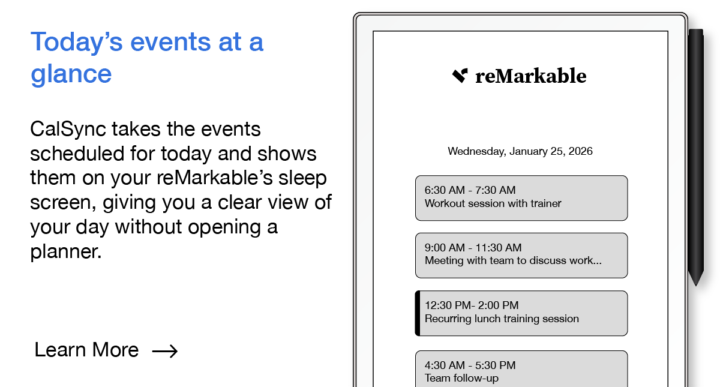
We’ve shipped a new CalSync update focused on reliability, flexibility, and daily usability. Here’s what’s new: What’s new in this release: - More devices per license - New “Today’s Events” Sleep Screen Carousel - Improved connection reliability - License authorization improvements - General bug fixes & stability improvements If you’re already using CalSync, we recommend updating to get the latest improvements. As always, thanks for the feedback — it directly drives updates like this. Tod download: Windows: https://www.einkpads.io/api/calsync/win32/releases/latest MacOs: https://www.einkpads.io/api/calsync/darwin/releases/latest

0 likes • Jan 21
Hi everyone, I have downloaded the new version, which comes, unlike what Patrick said, as a Zip file into my "Downloads" folder. I unzipped it and have now a new folder called "CalSync-win32-x64". In there is a CalSync application file and when I launch it, it opens the version 1.0.19. But this is still in the "Downloads" folder... What shall I do to have it installed properly on the computer? I searched the site, but could not find any "update installation" explanation. It is also not mentionned in the eBook. Thanks for your help.
0 likes • Feb 8
@Jason Smith That's what I did, but I thought there would be an other way of doing the update. In fact, I just need to replace the files in the CalSync folder with the new ones contained in the update zip... Easy!
Feb 6 •
"Why CalSync Might Feel Slow (And Why That’s Actually a Good Thing)"
I’ve seen a few comments about the software feeling a little clunky, and that’s a fair observation from the outside. So I want to explain what’s really happening behind the scenes. The reMarkable tablet is designed to be a distraction-free writing device, not a high-performance computer. Because of that, it runs with: • Very limited RAM and processing power • Storage optimized for battery life and ink stability—not speed • File operations that naturally take longer than what we’re used to on phones or laptops Meanwhile, the CalSync desktop app is running many times faster than the tablet itself. So when it feels like the app is “waiting,” what’s actually happening is this: The app is intentionally pausing so the tablet can safely catch up. Those pauses allow the device to: • Finish writing files correctly • Refresh its internal indexes • Prevent planner corruption or crashes If we pushed everything at full speed, it could break planners, lose data, or freeze the device—and protecting your files always comes first. The easiest way to picture it: It’s like a hungry dog waiting for food. The dog is ready instantly… but it still has to wait for the owner to place the bowl down safely. In this case: Your computer = the fast, hungry dog The reMarkable = the careful owner placing the bowl We know waiting isn’t glamorous, and we’re continuously optimizing every step. But those brief pauses are there for one reason: To keep your planner, your data, and your device safe. And we truly appreciate everyone here who’s been patient, supportive, and part of improving CalSync every day.
1 like • Feb 8
Thank you for the good job, Jason and the team. Keep on doing. I can't wait to see the next evolvment of your application.

Dec '25 •
Not Syncing Calendar
Is cal sync supposed to sync the calendar without connecting and regenerating the calendar?
0 likes • Jan 9
I have the same kind of issue... After struggling for 2 days to get the calendar pushed to the reMarkable, I finaly managed to get it, but completely empty! None of the events appears on the reMarkable while in the App, it is mentionned that a number of events have been imported from one of the synced calendars. I added some events, re-synced the calendars and... no new event was imported and when regenerating and re-syncing with the reMarkabble, still nothing is shown. Has anybody an idea for a solution to get the events shown on the reMarkable? So far I did not try to add events on the reMarkable planner to see if it would sync with my calendars...
Jan 6 •
CalSync installation don't start!
Hi everybody, I bought both EP CalSync and Ep Binder some times ago and am now trying to install both, with no luck so far...😠 I managed to get Ep Binder installed and it seems to work both with WiFi or through USB. But when I launch the Ep CalSync installation, I immediately get an error message: "Application Error An unexpected error occured: listen EADDRINUSE: address already in use :::4200" I don't even get to the moment where I should provide the IP and Pwd... Can anybody please provide help on this matter? Thanks in advance. Win11 - reMarkable2 Yves
1 like • Jan 7
Thank you Michael and Jason. I tried that already after reading on the forum that it would indeed be an issue to have them both running at the same time, but it didn't work. Then, I found out that a new version (1.0.17) was out and I dowloaded it and... manged to get it installed! Don't ask me how, I did nothing different, but this time it worked. I know have both applications installed and working (as far as I can see!). I could create a planner, but can't see it yet on the device... I guess I still have to learn how to ! It will be my mission of the day! ;-)
Nov '25 •
Newcomer
Good afternoon all, My name is Yves, I'm Belgian and novice user of the tablet. I hope to find here the experience that I lack and tips for a better use of this equipment.
1
0
1-5 of 5