Activity
Mon
Wed
Fri
Sun
Aug
Sep
Oct
Nov
Dec
Jan
Feb
Mar
Apr
May
Jun
What is this?
Less
More
Memberships
AI Automation (A-Z)
162.3k members • Free
Chase AI Community
69.9k members • Free
AI Automation Society
417.4k members • Free
AI Money Lab
84.5k members • Free
First Time Founders
530 members • Free
Claude Learning Skool
655 members • Free
Claude Code Architects
1.5k members • Free
AI Creator Profits
27.1k members • Free
Vibe Labs
1.3k members • Free
7 contributions to AI Automation Society

3h •
I used Claude Code to ship my first Chrome extension. No experience. 5 days.
I build WordPress plugins. I had never touched a Chrome extension before this and I'm not going to pretend I understood the stack going in. My browser had gotten bad enough that I had to do something. 300 open tabs, bookmarks I saved and never opened again, tab groups that made sense for a few days and then turned into a pile I stopped trusting. All I wanted was named sections to drop links into and find later. Simple idea. Nothing did it well enough so I built it myself. Claude Code. Five days. Live on the Chrome Web Store. The build wasn't what was hard. My own list of ideas was. I kept wanting to add more every time something worked. I cut probably 70% of what I originally planned and the version that shipped is cleaner because of it. The stuff I cut is sitting in a list I'm calling the roadmap. One thing I'd tell anyone starting out with Claude Code: stop describing what you want it to build and start describing what you want the user to feel. The output is different. Not a little different. A lot different. The extension is called Tabisto. It replaces your new tab with a visual dashboard where you build named sections and drop links in. Separate workspaces, notes, saved tab sessions. Free, no account needed. If you're curious what came out of it. What did your first Claude Code build look like? Did you plan the whole thing upfront or figure it out as you went?
1 like • 3h
@Aadesh Ms Use superpowers, brainstorming, ui ux pro max, etc. Also, you can find all the good skills from here - https://www.skills.sh/
1 like • 2h
@Aadesh Ms I hope you will try Tabisto soon. I am looking forward to your feedback.

💎
⭐
Oct '24 •
Welcome! Introduce yourself + share a career goal you have 🎉
Let's get to know each other! Comment below sharing where you are in the world, a career goal you have, and something you like to do for fun. 😊
1 like • 17h
@Tomi Johnson Welcome to the community bro
2 likes • 17h
@Joseph Banks Welcome to the community bro.

1d •
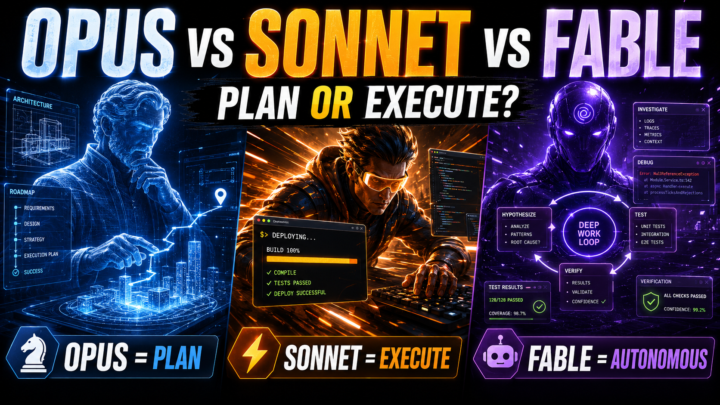
Fable is not really for planning — did you know that, or am I wrong?
Fable is not really for planning — did you know that, or am I wrong? From what I understand, Opus is stronger for planning and architecture, Sonnet is better for executing clear tasks, and Fable is better for long, difficult, or ambiguous execution where the model needs to investigate, test, review, and close the loop. So Fable can plan during execution, but it is not mainly “the planning model.” The confusion is thinking that Fable is the planning model and Sonnet is the execution model. That is not quite right. The practical rule is: Opus is best for planning. Sonnet is best for executing well-defined tasks. Fable is better for difficult, long, or ambiguous work because it tends to investigate, test, review, and close the loop more carefully. Use Opus when you need to design the architecture, write a spec, define phases, or think through the strategy before touching the code. Use Sonnet when the plan is already clear and the task is to implement, edit files, run tests, and fix clear issues. Use Fable when the project is still unclear, has hidden bugs, requires investigation, involves multiple steps, or needs more autonomous execution. There is also an important difference in Claude Code: Using `/model opus` means using Opus for everything: planning, execution, and review. Using `/model opusplan` means using Opus for planning and Sonnet for execution. So, simply telling Opus “I want to plan” does not automatically activate `opusplan`. To use that hybrid flow, you need to explicitly select `/model opusplan`. Final summary: Opus thinks through the plan. Sonnet executes the plan. Fable handles the work when it is difficult, long, or ambiguous. `opusplan` combines Opus for planning with Sonnet for execution. https://platform.claude.com/docs/en/build-with-claude/prompt-engineering/prompting-claude-fable-5
2 likes • 18h
True, we have to plan using Opus and change the model to Fable for the execution.

6d •
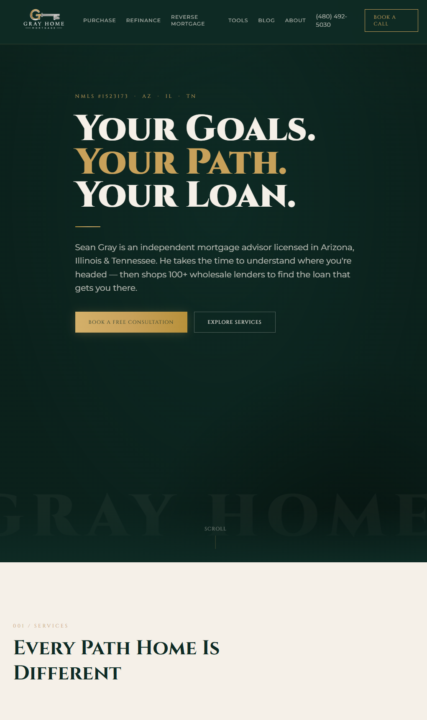
Day 5 Website Completed and LIVE!!
had my own domain, so I used it. Completely rebranded the site and added a few calculators, a opt-in page for my newsletter google reviews, and made it compliant from previous days lessons. grayhomemortgage.com Update: I just created my own CRM as well.
1 like • 18h
Good job bro. I also recently built + launched a Chrome extension Tabisto using Claude Code.

2d •
Who said WordPress is dead because of AI ?
I’ve been running a web agency in Canada since 2014, with a small team of 12 people. We mainly specialize in WordPress. Recently, a client asked me how to create a simple, elegant website on a very tight budget ($600...). He wanted a portfolio website. Usually, I turn down this kind of project for such a meager sum, but this time, I took on the challenge and told myself, “Yes, I can do this with Claude,” so I accepted. #Spoileralert: I succeeded in the challenge! It took me at least 2-3 hours on the screen and 1-2 hours guiding Claude from my phone with /remote-control. I know you want to see the result right now, so here it is : https://synergaiainternational.ca/ In this post, I'll tell you how I did this, if that can help. # HOW I BUILT IT If you’re a web developer or run a web agency, you probably know that when creating a website, you don’t usually jump straight into the development phase. You have to follow specific steps. These steps are as follows: 1) Analyze and document the functional requirements. 2) Consider the user experience (UX design), create a site map, and then create mockups or wireframes 3) At the same time, analyze the brand guidelines provided by the client, or create a set tailored for the web (fonts, colors, usage conventions, icons, etc.) 4) Create concrete design mockups for each page—sometimes for desktop and mobile, sometimes just a single version 5) NEXT, build the website in a development environment 6) Present to the client, make adjustments, and prepare for deployment 7 (bonus): Other elements may be added to this step, such as search engine optimization (SEO), setting up legal notices and a privacy policy, configuring analytics, and training the client on how to use the website (so they don’t break it), 8) Launch the website In short, I couldn’t just tell Claude: “Hey Claude, build me a website for my client. /goal Finish it from start to finish and do it on WordPress. Bye!”
1 like • 18h
Well I am running a WordPress company as well and selling premium WooCommerce plugins on my site but yes due to AI, there is a drop in the sales numbers. You can explore my site from here - https://devdiggers.com/
1-7 of 7

@yash-kapoor-5915
Founder @DevDiggers | Tech & Product Builder
Active 1h ago
Joined Jul 2, 2026
India
Powered by