Activity
Mon
Wed
Fri
Sun
Jul
Aug
Sep
Oct
Nov
Dec
Jan
Feb
Mar
Apr
May
Jun
What is this?
Less
More
Memberships
AndyNoCode - AI Video
88 members • $9/month
IDALL AI
2.5k members • $9/month
AI Video Creators Community
4.5k members • $9/month
Agent Zero
2.7k members • Free
AI Automation Society
406.8k members • Free
IA Masters Academy
1k members • $74/month
AndyNoCode Premium
139 members • $59/month
AI Automations by Jack
3.1k members • $87/month
AI Automation Society Plus
3.8k members • $99/month
48 contributions to AI Automation Society

5h •
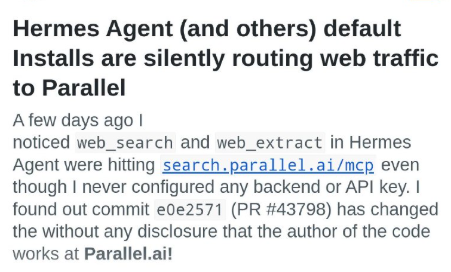
Installed, Trusted, Exposed: The Risk of Using AI Tools Without Verifying Them
Installed, Trusted, Exposed: The Risk of Using AI Tools Without Verifying Them The main lesson from this case is not only about Hermes Agent or Parallel.ai. It is about a common mistake: people install AI tools, plugins, agents, and dependencies without checking what they actually do behind the scenes. What happened is a warning sign. A tool that looks normal may have a default setting that sends searches, URLs, or context to an external service. Many users never notice because they only want the tool to “just work.” That is where the risk starts: convenience replaces validation. The core message is: Do not just use technology. Audit it. Before trusting any AI agent, library, or integration, people should check where the data goes, which external endpoints are called, whether web search or telemetry is enabled by default, whether the documentation is clear, and whether the user gave real consent. The lesson is simple: Free tools, easy integrations, and fast installs do not automatically mean safety. When you do not validate the path your data takes, you may be giving it away without realizing it. In the age of AI agents, trusting without verifying is like opening the door and never asking who walked in. https://www.reddit.com/r/hermesagent/s/7AzvWqEuNe
0 likes • 2h
I created my Jarvis to be lean and optimized. I built an intellect that generates the prompt to create Jarvis, and that’s how I created my OpenPCBot. Every skill or agent always goes through a review process, so I can evaluate what’s inside. Of course, we don’t have any guarantee that everything is clean, but it’s already something. We will be among the few acting as maestros. Most people will remain consumers, as always.
3d •
OpenRouter Fusion
**OpenRouter Fusion** is designed as a way to use **multiple AI models at the same time** and then combine their responses into a better result. The core idea is: **1. Run models in parallel** Instead of asking just one model, Fusion sends the same problem to several models, such as Claude, GPT, Gemini, DeepSeek, Kimi, Qwen, and others. **2. Compare the responses** The system analyzes where the models agree, where they disagree, what each one contributed differently, and which points were poorly covered. **3. Fuse the best parts of each response** A “judge” or synthesizer model takes the best parts and creates a more complete final answer. **4. Improve cost-effectiveness** The commercial promise is that a combination of cheaper models can come close to — or in some tests even outperform — an expensive premium model like “Fable 5,” while spending less. **5. Increase robustness** If one model makes a mistake, another may get it right. If one model misses an important point, another may bring it in. This helps with complex tasks, research, code, strategy, and critical analysis. In summary: **OpenRouter Fusion aims to turn LLMs into a “committee of models”: multiple brains respond, a judge compares them, and the system delivers a final answer that is stronger, cheaper, or more reliable than using a single model.** But the promise depends heavily on the quality of the judge, the models chosen, the cost per task, and factual verification. Fusion is not automatically better for everything; it makes the most sense for important or complex tasks.
3
0

6d •
WON Credits CLAUDE
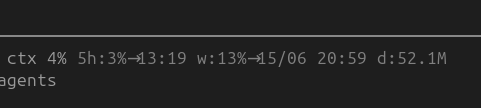
WON Credits CLAUDE I was at 80% of my weekly limits, and Anthropic reset the limits by giving me credits while keeping the week active. It must be what I spent on Fable.
26d •
WhatsApp cambia en JUNIO/2026
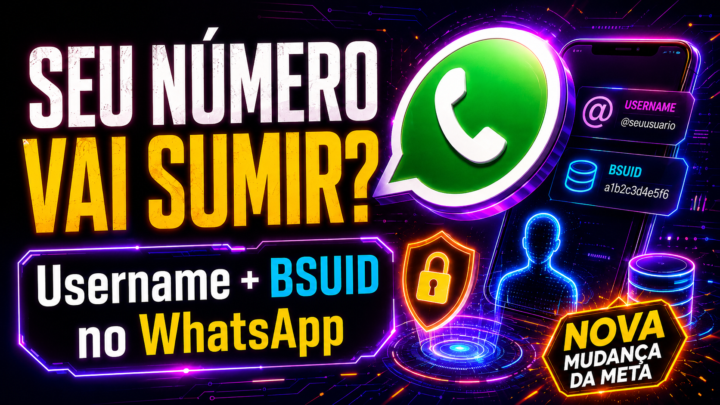
## Qué es este cambio de Meta en WhatsApp Meta está preparando un cambio en WhatsApp que involucra dos nuevos conceptos: **1. WhatsApp Username** Es un nombre de usuario, parecido a Instagram o Telegram. En lugar de que una persona o empresa sea encontrada únicamente por el número de teléfono, podrá existir un identificador como: ```text @neimaldaner @espacoinema @nombredelaempresa ``` Para el usuario común, el objetivo principal es la **privacidad**: conversar con empresas sin necesariamente exponer el número personal. Para las empresas, el username ayuda al **branding**, es decir, a reforzar la marca y facilitar que el cliente encuentre el negocio. **2. BSUID — Business-Scoped User ID** Es un identificador técnico creado automáticamente por Meta. La empresa **no elige** y **no registra** el BSUID manualmente. Se genera cuando un usuario interactúa con una empresa en WhatsApp. Ejemplo: ```text BR.1A2B3C4D5E6F7G8H9 ``` Este ID sirve para que la empresa reconozca al cliente incluso cuando el teléfono no esté visible. ## Qué va a pasar Hoy, muchos sistemas identifican al cliente por el número de WhatsApp. Con este cambio, eso puede dejar de ser suficiente. El nuevo escenario será: ```text Antes: Cliente = número de teléfono Después: Cliente = teléfono + username + BSUID ``` Si el usuario tiene username y elige mayor privacidad, el número podrá quedar oculto en algunas interacciones. En ese caso, la empresa recibirá el BSUID para seguir identificando ese contacto dentro del CRM, chatbot o sistema de atención. El rollout comienza por fases. Según la guía enviada, los BSUID comenzaron a aparecer en webhooks de producción en marzo de 2026, y el rollout de usernames para usuarios finales comienza primero en países piloto, con expansión global progresiva, incluyendo Brasil, en el segundo semestre de 2026. ## Qué cambia para los usuarios comunes Como usuario, podrás tener un username en WhatsApp. Seguirás teniendo un número de teléfono vinculado a la cuenta, pero en algunas situaciones podrás usar el username para preservar tu privacidad.
2
0
26d •
WhatsApp Change in JUNE/2026
## What this Meta/WhatsApp change is Meta is preparing a major WhatsApp change involving two new concepts: **1. WhatsApp Username** This is a public username, similar to Instagram or Telegram. Examples: ```text @johnsmith @yourbrand @espacoinema ``` For regular users, the main purpose is **privacy**: people may be able to talk to businesses without always exposing their personal phone number. For companies, the username helps with **branding and discoverability**, making it easier for customers to find the business. **2. BSUID — Business-Scoped User ID** This is a technical identifier automatically generated by Meta. The company does **not** choose it and does **not** register it manually. It is created when a WhatsApp user interacts with a business. Example: ```text BR.1A2B3C4D5E6F7G8H9 ``` The BSUID allows a business to recognize a customer even when the customer’s phone number is not visible. ## What is going to happen Today, many systems identify WhatsApp contacts only by phone number. With this change, that will no longer be enough. Before: ```text Customer = phone number ``` After: ```text Customer = phone number + username + BSUID ``` If a user activates a WhatsApp username and chooses more privacy, their phone number may be hidden in some interactions. In that case, the business will receive the BSUID to keep identifying that contact inside the CRM, chatbot, or customer service system. According to the guide, BSUIDs started appearing in production webhooks in March 2026, and the username rollout starts first in pilot countries, with global expansion, including Brazil, expected in the second half of 2026. ## What changes for regular users As a regular WhatsApp user, you may be able to create your own username. Your phone number will still exist and remain linked to your WhatsApp account. The difference is that, in some situations, you may use a username instead of exposing your phone number. Simple summary: ```text Phone number = still exists
1
0

1-10 of 48
Active 55m ago
Joined Mar 6, 2025
Powered by