Activity
Mon
Wed
Fri
Sun
Mar
Apr
May
Jun
Jul
Aug
Sep
Oct
Nov
Dec
Jan
Feb
What is this?
Less
More
Memberships
10 contributions to Learn Microsoft Fabric

Jan 5 •
Variable Libraries in Pipelines
Is it just me, or is managing variables in Microsoft Fabric pipelines a bit of a manual task right now? Currently, if we use Environment Variable Libraries, we have to manually "pull in" or define every single variable in the pipeline before we can actually use them. For example, if I am working on a ETL pipeline, I have to manually add: - Finance_DataFlowId - Finance_DestinationWorkspaceId - Finance_LakehouseId - Finance_LakehouseSQLEndpoint Now, imagine doing this for IT, Operations, and HR departments too. If I have 10 variables per department, my pipeline setup becomes very long and repetitive. What I’m thinking is - wouldn’t it be much more efficient if we could pull these dynamically? 💡 Ideally, I should be able to create a string dynamically (e.g., [DeptName]_DataFlowId) and have the pipeline fetch that specific value directly from the library at runtime. No more manual mapping for every single variable. Just one dynamic activity to fetch what we need based on the department or section we are processing. This would make ETL pipelines so much cleaner and easier to scale! What are your thoughts? Are you guys also facing this, or have you found a clever workaround using dynamic expressions?
1 like • 23d
@Sachin Satkalmi Thanks Sachin, I haven't tried notebooks yet. As the current architecture rely heavily on pipeline activities(no code - low code). But surely will try the notebook approach at some point.

Jun '25 •
Materialize View
Is it possible to create a materialized view in a Fabric warehouse? If not, what alternatives are available besides creating aggregated physical tables?
0 likes • Jun '25
@Adolfo Illera Jiménez @Hiren Sanchala That is great! How frequently those materialized view gets updated? Is it with change in backed data or scheduled?
0 likes • Jul '25
@Adolfo Illera Jiménez Thanks! this helps.
Jun '25 •
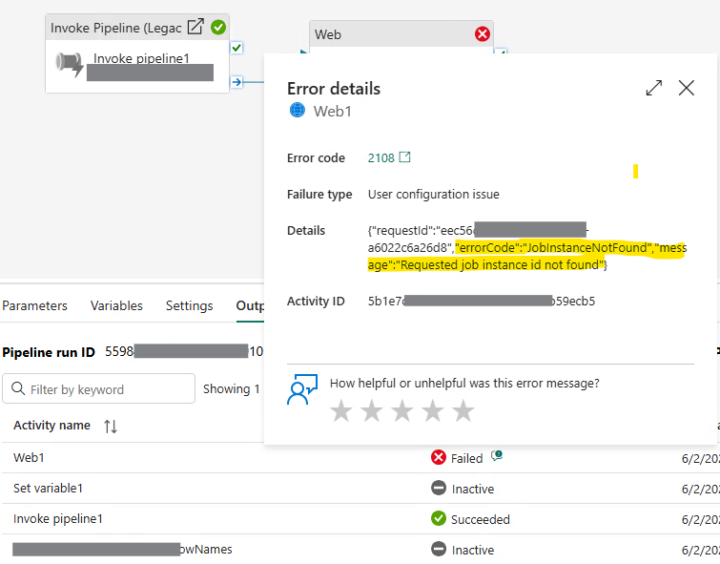
Fabric Data Pipelines: Log Pipeline Run
Hey folks, I am wondering if anyone has implemented a solution where we keep log of pipeline run in warehouse table. (nested pipelines) So far the things I tried: - Invoke pIpeline (preview) activity does return some properties useful to get the details of any child pipeline invoked. - Invoke Pipeline (Legacy) activity don't have any such property so it's sort of difficult to get the child run details. - Tested job scheduler API to get job instance, again this only supports the Pipeline Run Id's when pipeline is invoked manually (using UI) and does not accept the one's triggered using Invoke Pipeline activity (error 404) :( -
0
0
Dec '24 •
Passed DP600
Hi folks, I have cleared DP600 today. Thanks to the community and @Will Needham your videos and notes definitely showed the path to stay on right track throughout the learning process. Major areas I saw, External tools (Tabular Editor & DAX studio) Couple questions on Git integration Then regular DAX, SQL, PySpark code Data pipeline and orchestration.
0 likes • Mar '25
@Ferdinand Fojtlin Thanks!
0 likes • Mar '25
@Duc Bui Hey, We have whole learning path under Skool classroom like Will shared. https://www.skool.com/microsoft-fabric/classroom/6e52cd48?md=94aa5a1989dc4225867333d2b0d374f5 For additional material you can find it on Microsoft learn https://learn.microsoft.com/en-us/training/courses/dp-600t00
Feb '25 •
Best Tool to Design Architecture
Hey everyone, I'm looking for the simplest yet most effective tool for creating architectural block diagrams with Fabric and Azure elements. I usually use Draw.io, but it has limitations when it comes to Fabric icons. Any recommendations?
0 likes • Feb '25
@Mark Lang Thanks for sharing!
0 likes • Feb '25
@Antony Catella Thanks for sharing!
1-10 of 10