Activity
Mon
Wed
Fri
Sun
Mar
Apr
May
Jun
Jul
Aug
Sep
Oct
Nov
Dec
Jan
Feb
What is this?
Less
More
Memberships
Freedom For Founders
213 members • Free
The Founders Union
42 members • Free
The Founders Club
61.7k members • Free
Nomad founders
46 members • Free
Founders Academy
339 members • Free
AI GENERALIST MASTERMIND
181 members • Free
🇹🇭 Skool IRL: Bangkok
167 members • Free
🇮🇩 Skool IRL: Bali
151 members • Free
🇸🇬 Skool IRL: Singapore
72 members • Free
7 contributions to AI n8n Automation Collective

12d •
He Built His SaaS for $500 Instead of $23K
So I grabbed coffee with my buddy Rohan last week, and his story is kind of wild. He's been sitting on this enterprise SaaS idea in the HRTech space for months. Good idea too - validated with potential customers. But he can't code much. So he started getting quotes. The developer route? > Senior devs wanted $120K-150K a year plus equity. Even juniors were $80K+. But it's not just the salary - it's the commitment. What if it doesn't work? He was worried about bleeding cash every month on payroll while trying to figure out if anyone will pay for his product. Dev agencies? > Cheapest quote: $23,000. Most expensive: $47K. Timeline? 3-4 months. And any changes after delivery? Extra. Always extra. Then he found this AI coding thing. He took a $500 course on Agentic spec coding - basically using specialized AI agents to build software without being a developer. A month later, he had a working MVP. Not a prototype. An actual product he's testing with real users. The math: - Devs: $120K+ per year - Agency: $23K, months of waiting - His way: $500, one month What surprised him most: The speed, flexibility, and scalability. With an agency, every change takes days or weeks of negotiation. Now he iterates in hours. Idea in the morning, tested and fixed by dinner. This isn't magic. Rohan had frustrating nights because of the lack of experience with spec coding. Things broke. You still need to understand what you're building - the AI doesn't think for you. But if you're scrappy? This is viable. Three years ago, non-technical founders had to learn to code for years or raise money. Now there's another path. Not replacing developers for complex stuff, but for getting an MVP out there? Completely different game. Rohan's product isn't perfect. But it exists. People are using it. Built for the cost of a used iPhone and a month of late nights. What would you build if you didn't need to raise $500K first?
0
0
Oct '25 •
Find Customers through your Competitors on LinkedIn in 7 Steps: n8n Automation
Do you follow your competitors on LinkedIn to know what's happening in the market and who is working with your competitors? While it can give you a lot of insights, it is nearly impossible to track your competitors' activity manually on LinkedIn. That's when you use this n8n automation workflow to find customers through your competitors on LinkedIn: Step 1 - Define your competitors - Node: Manual Trigger or Form. - Input: list of LinkedIn company pages or personal profiles representing direct competitors. - Store them as workflow variables for later use. --------------------------- Step 2 - Identify competitors active 5+ days per week - Node: HTTP Request (PhantomBuster / LinkedIn API partner). - Pull each competitor’s activity log from the past 7 days: posts, likes, comments, shares. - Count active days. - Filter for those with engagement on 5 or more distinct days. - Output: “Active Competitors” list for further tracking. --------------------------- Step 3 - Fetch interaction network of active competitors - Node: HTTP Request (same tool). - For each competitor: - - Gather all profiles they’ve interacted with — those they’ve liked, commented on, or shared posts from. - - Also capture users who’ve engaged (liked/commented) on the competitor’s own posts. - Store: name, LinkedIn URL, interaction type, company name, and engagement date. --------------------------- Step 4 - Filter potential customers based on ICP - Node: Function / Gemini. - Input: all interaction profiles + your ICP. - Ask Gemini to filter and retain only those who match the ICP (e.g., “Operations Managers in manufacturing companies with 100–1000 employees in the US”). - Output: refined list of potential customers likely relevant to your offerings. Suggested Gemini instruction:“From this list of LinkedIn profiles, keep only those who fit the Ideal Customer Profile: [ICP details]. Return their names, companies, and roles.” ---------------------------
0
0
Sep '25 •
Generate Leads from Reddit using n8n Automation
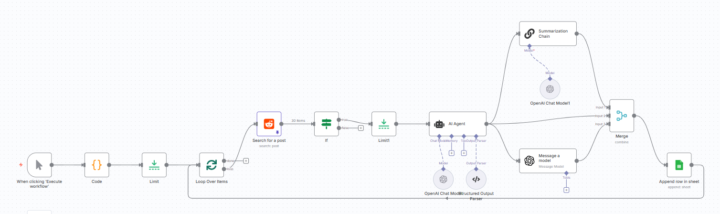
Reddit is a goldmine of leads for several businesses. However, the problem is scalability. We wanted to help businesses achieve two things: 1. Scale 2. Good quality content By achieving the above two things, we ensured that marketing goals were being achieved and the leads could flow in. Here's how we did it and you can do it too: Step 1. Scrape Reddit based on certain keywords and Subreddits (Subs) Step 2. Filter through the posts based on the date of the post Step 3. Classify the intent of the post into 4 categories - question_help, complaint_vent, recommendation_request, discussion_opinion Step 4. The information gathered for each post is fed into an agent that drafts a comment which is highly informative, adds value and subtly talks about your offering. At the same time, another agent summarizes and stores the summary, comment as well as other details of the post in a Google Sheet. Step 5. You can hire an intern to simply copy the comments from the Google Sheet and add the comments on the posts for which the URLs have already been gathered in the beginning. Voila! Your engagement wheels are in motion. Wait for responses and inbound leads. Check the image for the workflow diagram. Please share your questions and feedback in the comments.
3
0
Sep '25 •
Learn to Transform Raw Product Images into Studio Quality Marketing Assets
Hey! We are hosting a webinar tomorrow in which we'll show how to build an AI automation workflow and the prompt engineering going into it for a very popular use-case: transforming raw product images into studio quality marketing assets. Time: 2:30 PM IST / 5:00 PM SGT / 10:00 AM BST You can register here: https://www.eventbrite.com/e/1629432730159
0
0

Sep '25 •
GenAI-Enabled Outreach: How to Enrich Prospect Data in Odoo CRM?
Today we're going to be talking about enriching prospect data in your CRM for highly effective outbound marketing campaigns. Some of the biggest companies in the world (including Anthropic and others) have used similar workflows for GTM. Outbound marketing has completely changed after LLMs became mainstream. It is all about data, precision, and research. Earlier, getting details about every prospect used to take several days - which has now been reduced to a few minutes! We've created a simple guide on how you can enrich data about prospects in your CRM (taking Odoo CRM as an example in this workflow) to make your outbound campaigns highly rewarding. _____________________________________________________________________________________ Step 1: Connect Odoo CRM to Enrichment Tools Use Zapier, Make, or n8n to link Odoo with external APIs. Step 2: Enrich Current Designation & Company Use Clearbit, ZoomInfo or Apollo to fetch up-to-date job titles and company info. Step 3: Track LinkedIn Content Engagement Use PhantomBuster or Apify actors for LinkedIn to scrape posts/content interacted with by saved prospects. Step 4: Collect Job Posts from prospect companies for hiring signals. Use LinkedIn Job Scraper (PhantomBuster) or Indeed API to pull job ads. Step 5: Collect intent data from prospect companies. Use Cura8.ai to find intent signals from all over the internet. Step 6: Push Enriched Data Back into Odoo Automate updates into Odoo CRM fields via Zapier/Make webhooks or Odoo API _____________________________________________________________________________________ If you have any questions or need help, please drop a comment.
1
0
1-7 of 7

@varun-p-7555
I talk about all things automation and spec coding. Let's connect if you need help with spec coding: [email protected]
Check https://sam.navan.ai
Active 4h ago
Joined Aug 29, 2025
India