Activity
Mon
Wed
Fri
Sun
Aug
Sep
Oct
Nov
Dec
Jan
Feb
Mar
Apr
May
Jun
What is this?
Less
More
Memberships
CNC Startup Community
1.1k members • Free
1 contribution to CNC Startup Community

11d •
CIC Mirrored Acrylic
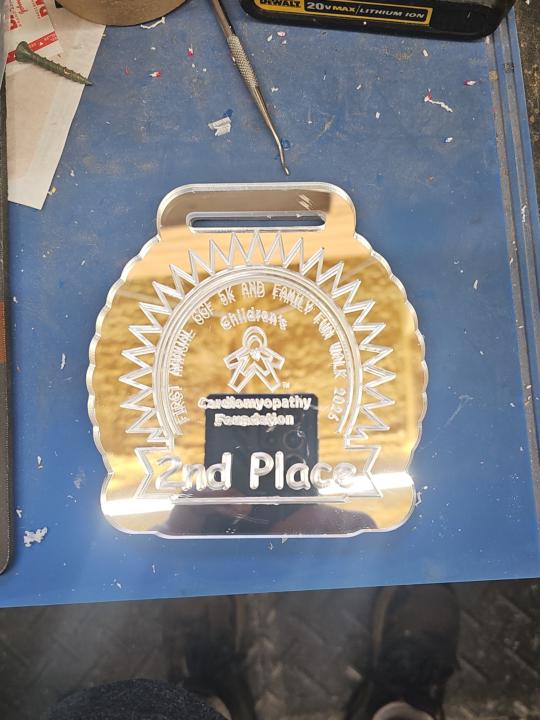
My niece needs some acrylic medals carved out. Yesterday, I was practicing with a piece of 1/4" acrylic she got me from Michael's that was on sale for 50% off. There wasn't anything on it that said whether it was cast acrylic or not. While using that, there was no issue with the bit. I did smell the plastic melting smell a little, so I sped up the Feed and lowered the RPM, which it improved. However, when I went to the CIC Workshop mirrored acrylic, and after practicing one medal with no issues, I set up the tool path for three of them at a time. It did the first one ok, but then the other two, it was a mess-which I thought was due to my leaving the protective film on it, until it finished and I removed the Raptor dust boot and saw the wad of acrylic melted to the bit. After seeing that I started babysitting with the air compressor to blow away the acrylic chips. I was using the CIC Workshop 60V bit. After that, I tried their 30V and it wadded up almost immediately after starting, so I changed to the IDC 90V (I don't have the CIC 90V) I have and it worked a lot better. I did see the plastic almost start to stick a couple of times, but was able to blow it away, resulting in being able to do that one okay. At this point, the non-mirrored look better when I thought the mirrored would look better. Do y'all have any suggestions on the best v bit to use so I don't have to babysit when I start to make 50 of them?

0 likes • 9d
You can get better detail (and no melting) with a diamond drag bit. You will be etching the acrylic so the spindle should be off.
1 like • 6d
@Tim Lawrence Hey Tim. There's really not much of a learning curve. The bit is spring loaded. You will set Z-zero where the bit is touching the material (like any other bit). The spindle should be off when using this bit. In Vcarve, I used the Quick Engraving Toolpath. The depth/pressure setting is similar to depth of cut. The Z-axis will go down that distance, but it won't really etch that deep since its spring loaded. You then select if you want to do an 'Outline' or a 'Fill'. For the Fill selection, you have a couple of options for the fill pattern and density. You will have to play around with this (a lot) until you find the results you like. With clear material, most people like to etch from the back so will create a mirrored image for the toolpath. I think you're gonna enjoy using this bit!
1-1 of 1
Active 6d ago
Joined Dec 24, 2024
Powered by