Activity
Mon
Wed
Fri
Sun
Oct
Nov
Dec
Jan
Feb
Mar
Apr
May
Jun
Jul
Aug
What is this?
Less
More
InvestCEO Boardroom
604 members • Free
InvestCEO with Kyle Henris
45.1k members • Free
238 contributions to InvestCEO with Kyle Henris



0 likes • Jul 21
what was the criteria for this entry?
0 likes • Jul 21
i guess i was just wondering what model it was.

Jul 17 •
If your chart background looks like this and your "canvas" settings don't fix it.
Right click on the chart. Click settings. Click on "Symbol". Click on "electronic trading hours background". Set it back to white/opacity at 0%. Apply to all. Sometimes it updates itself to have the gradient automatically. Weird and annoying.

1 like • Jul 17
@Russ Emley helps me as well, It was a little TOO dark so i went in and its a lot more faded now, can see the overnight, but its just a super mild tint.

3 likes • Jul 17
Haven't used others, but this one had a good interface. Free Trial https://echotrader.io/?source=investceo

Jul 9 •
Need some help
When I pull up trading view, I don’t have a “trading panel” button. How do I get that?
0 likes • Jul 9
Is the trade button in the top right corner? if so, should be able to select that which will open the broker menu. select yours, log in and it should open the trading panel at the bottom.
0 likes • Jul 9
I haven't had that for a while. Do you have the trade button in the top right corner? if you click on that and log in to your broker, it will open the trading menu at the bottom. Maybe someone else can help if the trading panel you are looking for is different then the one at the bottom that looks like this picture:

Jul 8 •
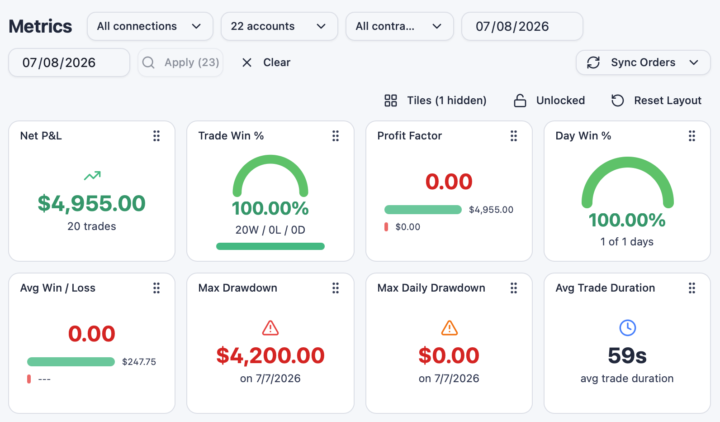
The power and protection of scaling with low risk
Why invest in a few accounts to add to the algo each month? Because tiny risk can achieve this in one trade when it's multiplied by many accounts.
0 likes • Jul 9
Awesome! Is that $250+ risk?
0 likes • Jul 9
@Tana Whicker thats what i thought you did. was thrown by the max drawdown. Congratulations.
1-10 of 238
@tim-morton-8323
Have a bachelor's in accounting, love numbers and statistics so seeing if I can turn this into something I can help catch up my retirement.
Active 5h ago
Joined Aug 4, 2024
INFJ
Michigan
Powered by