Activity
Mon
Wed
Fri
Sun
Jun
Jul
Aug
Sep
Oct
Nov
Dec
Jan
Feb
Mar
Apr
What is this?
Less
More
Owned by Susanne
KI im Retail ist die Community für zukunftsfähigen Handel: echte Use-Cases, smarte Tools und Austausch auf Augenhöhe – verständlich & umsetzbar.
Diese Community dient zum Austausch der Teilnehmer der Testphase für den Visticle Content Generator
Memberships
Einfach Neukunden FREE
959 members • Free
KI Meetups DACH
184 members • Free
VERTIX OS
13 members • $12/month
2 contributions to Skool Extensions 🧩

🔥
14d •
Translate Button
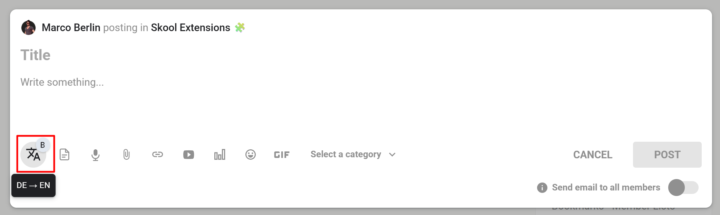
𝗧𝗿𝗮𝗻𝘀𝗹𝗮𝘁𝗲 𝗕𝘂𝘁𝘁𝗼𝗻 — 𝗢𝗻𝗲-𝗖𝗹𝗶𝗰𝗸 𝗧𝗿𝗮𝗻𝘀𝗹𝗮𝘁𝗶𝗼𝗻 𝗥𝗶𝗴𝗵𝘁 𝗶𝗻 𝘁𝗵𝗲 𝗘𝗱𝗶𝘁𝗼𝗿 Writing in a multilingual community usually means jumping to a translation tab, pasting your text, copying the result back, and losing your flow. The Translate Button puts translation directly inside every Skool editor — no context switch, no lost selection, no copy-paste dance. The translate icon lives on the Bold Button as a small badge: click the badge to toggle the main button between bold formatting and translation mode. Once you're in translate mode, select any text in the editor and click the button — the selection is instantly replaced with its translation. Your cursor stays in the same spot, so you can keep typing. The translation direction follows your interface language: if your UI is set to German, Spanish, or French, text translates to English; if your UI is English, text translates to German. The button shows up in every Skool editor that already supports the Bold Button — feed post composer, comment reply fields, reply-to-reply editors — and also in the native DM and Group Chat input. While a translation is running, the button dims briefly so you know it's working; failures stay silent to avoid interrupting your writing. Because the badge toggle is persistent, you can set the button to translate mode once and use it as a pure translation tool throughout your session, or flip back to bold formatting whenever you need it. --- Ü𝗯𝗲𝗿𝘀𝗲𝘁𝘇𝗲𝗻-𝗕𝘂𝘁𝘁𝗼𝗻 — 𝗘𝗶𝗻-𝗞𝗹𝗶𝗰𝗸-Ü𝗯𝗲𝗿𝘀𝗲𝘁𝘇𝘂𝗻𝗴 𝗱𝗶𝗿𝗲𝗸𝘁 𝗶𝗺 𝗘𝗱𝗶𝘁𝗼𝗿 Schreiben in einer mehrsprachigen Community bedeutet meistens: Tab mit Übersetzer öffnen, Text einfügen, Ergebnis zurückkopieren — und dabei den Schreibfluss verlieren. Der Übersetzen-Button bringt die Übersetzung direkt in jeden Skool-Editor: kein Kontextwechsel, keine verlorene Markierung, kein Copy-Paste-Tanz. Das Übersetzen-Symbol sitzt als kleines Badge am Bold-Button: Ein Klick auf das Badge schaltet den Haupt-Button zwischen Fettschrift-Modus und Übersetzungs-Modus um. Im Übersetzungs-Modus markierst du beliebigen Text im Editor und klickst den Button — die Markierung wird sofort durch die Übersetzung ersetzt. Dein Cursor bleibt an derselben Stelle, sodass du einfach weitertippen kannst. Die Übersetzungsrichtung richtet sich nach deiner Oberflächensprache: Bei deutscher, spanischer oder französischer UI wird nach Englisch übersetzt, bei englischer UI nach Deutsch.

🔥
3 likes • 14d
Sehr cool! Danke
🔥
18d •
Video Download in Postings (Premium Feature 👑)
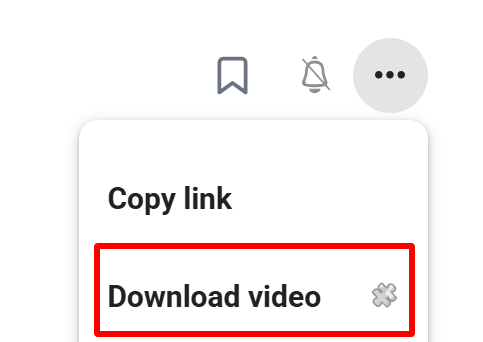
𝗩𝗶𝗱𝗲𝗼 𝗗𝗼𝘄𝗻𝗹𝗼𝗮𝗱 — 𝗦𝗮𝘃𝗲 𝗔𝗻𝘆 𝗦𝗸𝗼𝗼𝗹 𝗩𝗶𝗱𝗲𝗼 𝗮𝘀 𝗠𝗣𝟰 Skool posts often contain valuable video content — tutorials, walkthroughs, live replays — but there's no built-in way to save them for offline viewing. Video Download adds a "Download video" entry directly to the 3-dot menu of any post that contains a video. One click and the full-quality MP4 lands in your downloads folder. Under the hood the extension detects the video in the post, extracts the HLS stream URL, and sends it to a secure server-side ffmpeg transmuxer. The stream is remuxed to a valid MP4 container without re-encoding — lossless, fast, and ready to play in QuickTime, Windows Media Player, VLC, or any other standard player. A toast shows the download progress and confirms when the file is ready. Perfect for archiving course content, watching on the go, or keeping a backup of your own community's material. --- 𝗩𝗶𝗱𝗲𝗼 𝗗𝗼𝘄𝗻𝗹𝗼𝗮𝗱 — 𝗝𝗲𝗱𝗲𝘀 𝗦𝗸𝗼𝗼𝗹-𝗩𝗶𝗱𝗲𝗼 𝗮𝗹𝘀 𝗠𝗣𝟰 𝘀𝗽𝗲𝗶𝗰𝗵𝗲𝗿𝗻 Skool-Posts enthalten oft wertvolle Video-Inhalte — Tutorials, Walkthroughs, Live-Aufzeichnungen — aber es gibt keine eingebaute Möglichkeit, sie für die Offline-Nutzung zu speichern. Video Download fügt einen "Video laden"-Eintrag direkt ins 3-Punkte-Menü jedes Posts mit Video ein. Ein Klick, und die MP4 in voller Qualität landet im Downloads-Ordner. Im Hintergrund erkennt die Extension das Video im Post, extrahiert die HLS-Stream-URL und schickt sie an einen sicheren server-seitigen ffmpeg-Transmuxer. Der Stream wird ohne Neukodierung in einen gültigen MP4-Container remuxt — verlustfrei, schnell und sofort abspielbar in QuickTime, Windows Media Player, VLC oder jedem anderen Standard-Player. Ein Toast zeigt den Download-Fortschritt und bestätigt, wenn die Datei fertig ist. Perfekt zum Archivieren von Kursinhalten, zum Anschauen unterwegs oder als Backup für das Material deiner eigenen Community.
🔥
1 like • 18d
I like 🙂
1-2 of 2

🔥
@susanne-deiss-2357
Special Purpose Consultant
Give me your problem I´ll solve it.
Online now
Joined Mar 26, 2026
Powered by