Activity
Mon
Wed
Fri
Sun
Aug
Sep
Oct
Nov
Dec
Jan
Feb
Mar
Apr
May
Jun
What is this?
Less
More
Memberships
E-Ink Tablet Users
1k members • Free
6 contributions to E-Ink Tablet Users

May 2 •
Planner Error
Does anyone know what this error means? Planner Error Request failed with status code 500

0 likes • May 11
I am having the same problem. How did you fix it?

May 7 •
A proud Dad
Yesterday was one of those moments in life that reminds you what really matters. My son graduated, and I honestly couldn’t be more proud as a father. For as long as I can remember, he has talked about becoming a doctor and helping people. It was never just a passing idea for him — he stayed focused on it year after year, even when things got difficult, exhausting, or uncertain. Watching him walk across that stage yesterday hit me hard because I’ve seen the work behind the scenes that nobody else sees. What stood out to me most is that success rarely happens all at once. It comes from visualizing where you want to go, staying connected to that vision, and then taking small meaningful steps every single day — even when progress feels slow. Over time, those small steps become something massive. That lesson applies to all of us:business,relationships,health,dreams,purpose. You do not have to have everything figured out overnight. You just have to keep moving toward the life you see in your mind. As a father, seeing my son turn his vision into reality is one of the proudest moments of my life.

1 like • May 7
Congratulations, Jason to both of you!
Mar 31 •
🚀 CalSync 1.0.34 is Now Live
We’ve just released CalSync version 1.0.34, and this is a big one. This update is heavily focused on sync reliability, calendar accuracy, and overall stability — all based directly on your feedback. 🔧 What’s been fixed & improved: - Auto Sync Stability - Duplicate All-Day Events - Duplicate Devices - Auto Sync Not Pushing Planners - Connection Stability - Timezone Accuracy - Tablet Security Improvements - General Fixes & UI Improvements 📥 Download the Update You can grab the latest version here: 👉 https://www.skool.com/einkpads/classroom 💬 We need your feedback Let us know in the comments: - Did this fix the issues you were experiencing? - What OS are you using (Mac / Windows / Linux)? Your feedback helps us validate fixes quickly and keep improving CalSync for everyone.
1 like • Apr 1
My license issues have been resolved and I was able to access my calendar. Thanks!
Mar 19 •
Issue with license manager continues
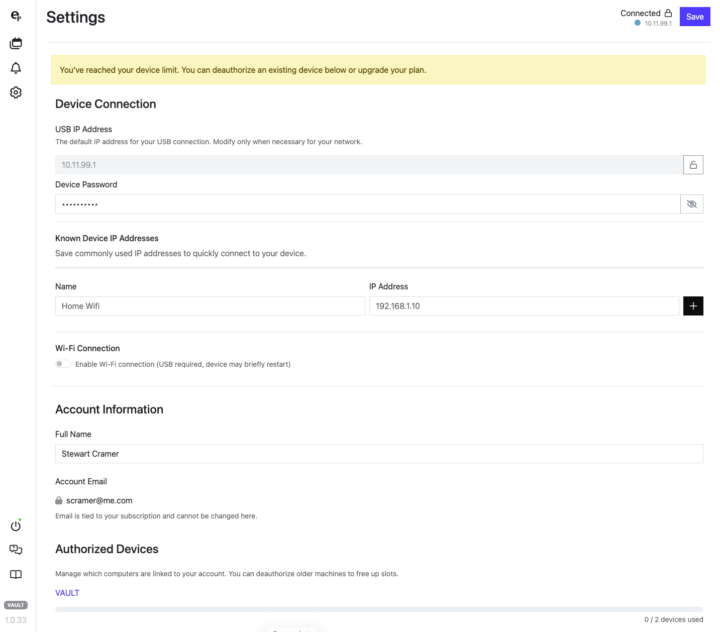
I am still having trouble accessing my calendars. I see a banner at the top of my screen telling me I have reached my device limit. You can see at the lower left that 0 of 2 devices have been used. I then authorize my computer. Note that it still says 0 of 2 devices used. I then go back to access my calendars. When I click on the calendar, I go back to the same screen I captured first. I am running a Mac Studio running Tahoe 26.3.1. Stewart Cramer
0
0
Mar 13 •
I am unable to access my planners
I have just updated to V 1.0.31. I can sync my planner but I cannot access the planner to modify it. Every time I try I get the Upgrade License screen. It shows I have a lifetime access license to Vault. I also see that my computer is authorized. Stewart Cramer
1 like • Mar 14
I am still having issues with activating. Here is what I am seeing. It says I am out of devices, but no devices are authorized.
0 likes • Mar 14
The changes to my planner still synced to my Remarkable.
1-6 of 6

Active 11h ago
Joined Jan 22, 2026
Powered by