Activity
Mon
Wed
Fri
Sun
Aug
Sep
Oct
Nov
Dec
Jan
Feb
Mar
Apr
May
Jun
What is this?
Less
More
Memberships
AI Automation Society
417k members • Free
6 contributions to AI Automation Society

2h •
Points Engagement
Joined this community for the content. Planned to grab what I wanted and lurk. The points system got me instead. I know exactly what it's doing—leveling, tiers, the little dopamine ping of unlocking the next thing. Recognized the mechanic immediately. Still show up more than I ever did when I was just here for the downloads. Now I'm building one for my own thing. I co-own a woodshop and I've wanted a membership progression system for a while. This is what finally got me off the fence. The catch: it doesn't port cleanly. Here the reward is content—digital, infinite, free to give away. In a shop the rewards are bench time, tool access, class seats. All finite. And people are there to actually build things, so I don't want anyone grinding points instead of making a table. Figuring out how to make the system push toward the craft instead of away from it. Building it with AI. I'll post progress. Anyone gamified a physical space with real constraints instead of a digital one? Curious where it breaks.

1d •
Who said WordPress is dead because of AI ?
I’ve been running a web agency in Canada since 2014, with a small team of 12 people. We mainly specialize in WordPress. Recently, a client asked me how to create a simple, elegant website on a very tight budget ($600...). He wanted a portfolio website. Usually, I turn down this kind of project for such a meager sum, but this time, I took on the challenge and told myself, “Yes, I can do this with Claude,” so I accepted. #Spoileralert: I succeeded in the challenge! It took me at least 2-3 hours on the screen and 1-2 hours guiding Claude from my phone with /remote-control. I know you want to see the result right now, so here it is : https://synergaiainternational.ca/ In this post, I'll tell you how I did this, if that can help. # HOW I BUILT IT If you’re a web developer or run a web agency, you probably know that when creating a website, you don’t usually jump straight into the development phase. You have to follow specific steps. These steps are as follows: 1) Analyze and document the functional requirements. 2) Consider the user experience (UX design), create a site map, and then create mockups or wireframes 3) At the same time, analyze the brand guidelines provided by the client, or create a set tailored for the web (fonts, colors, usage conventions, icons, etc.) 4) Create concrete design mockups for each page—sometimes for desktop and mobile, sometimes just a single version 5) NEXT, build the website in a development environment 6) Present to the client, make adjustments, and prepare for deployment 7 (bonus): Other elements may be added to this step, such as search engine optimization (SEO), setting up legal notices and a privacy policy, configuring analytics, and training the client on how to use the website (so they don’t break it), 8) Launch the website In short, I couldn’t just tell Claude: “Hey Claude, build me a website for my client. /goal Finish it from start to finish and do it on WordPress. Bye!”
2 likes • 23h
Claude Code and Wordpress has really elevated my company. Before I was on a very closed system and paid a lot of fees to a membership web Service. I recently moved away from that dedicated service to use WordPress with Memberpress and Woo Commerce. Claude Code using the Wordpress MCP made it possible and I was able to customize it specifically for our purposes. Just last night, I needed to great a gift certificate process that was not standard to WooCommerce and Claude made it happen. I could not be happier with what we are able to do with that system now.
1 like • 3h
@Jason Elam Totally agree, I knew where I wanted to go and what done looks like, I could have maybe struggled to get there, but claude helped me get there quicker and, I think, better than the solution I would have come up with. Yes, I could have hired MemberPress, Stripe, and Event Ticket to do the work, but I'm a small business and could not afford it. They all still get money from me through fees, so I see it as a win, win.

🔥
1d •
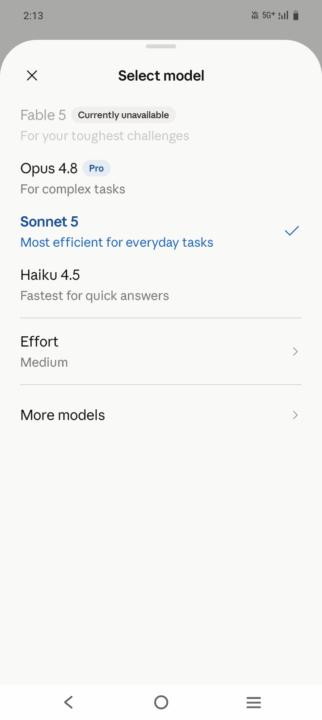
Claude fable/ sonnet
Anthropic just had the busiest 48 hours of its year. Yesterday: Claude Sonnet 5 dropped. Near-Opus performance, way cheaper, now the default model for free/Pro users. Today: Fable 5 comes back online after being pulled by a government export order weeks ago. One company, two "new model" stories in the same week — for very different reasons. Which one are you more curious about? 👇
Poll
43 members have voted
1 like • 22h
I tried Sonnet 5 and it was much faster than Opus 4.8, but I did not like the responses as much. Opus was still much more reasoned and obtained or at least reflected more information. I have not tried Fable, but maybe I will in the next day or so.
1d •
I'm a woodworker who builds his own software tools now
I run a woodworking studio and do product development at my day job. I am not a software developer. Over the past year I've shipped a handful of working tools anyway — shop signage that runs on a wall display, a tool-maintenance tracker, a cut-list optimizer — by treating AI as a build partner instead of a search engine. Here's what nobody tells you: the hard part was never the code. It was knowing what I actually wanted and being able to describe it clearly. Forty years of building furniture turns out to be decent training for that. You learn to think in specs whether the material is white oak or Swift. What surprised me most is that these tools solve problems too small to ever justify hiring someone. Nobody was ever going to build them for me. Now I just build them over a weekend, in conversation. If you're learning this stuff, start with the annoying problem — the dumb little thing you've worked around for years. That's the one worth automating, and it's the one that teaches you the most.
0 likes • 1d
@James Tech Hi and thanks for the welcome

2d •
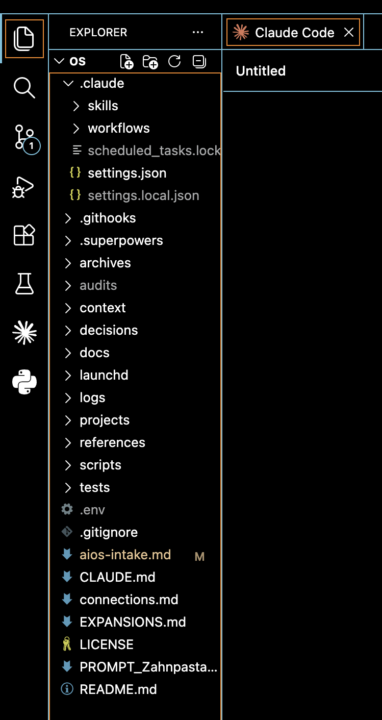
Done. AIOS set-up and growing
#AISOS up and running. easier than expected. now growing it continously. focused on skills and routines to automate my day to day. Thanks for giving us access to this, @Nate Herk
1 like • 1d
Awesome, I can't wait to get started.
1 like • 1d
@Julius Waggoner What does the GDS skill do?
1-6 of 6