Activity
Mon
Wed
Fri
Sun
Jul
Aug
Sep
Oct
Nov
Dec
Jan
Feb
Mar
Apr
May
Jun
What is this?
Less
More
Memberships
AI Automation Society
409.2k members • Free
ZeroOne Systems
10.1k members • Free
1 contribution to ZeroOne Systems

24d •
Experiences installing Claude Code
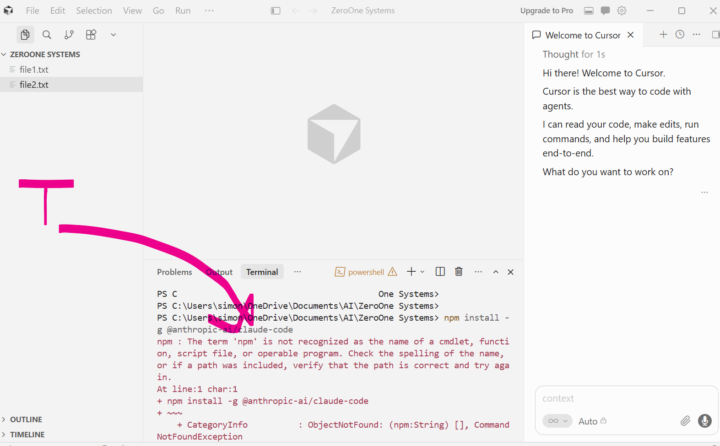
I hit problems installing some base software like npm and claude code - here's what I learned, I hope it helps! BTW I am running this in Windows so if you're running under a different OS it won't work! This is my experience - it might help, but it might not. If you are on the classroom course orientation section "Start here" and you've been through the lesson steps, at the end is a section called "What to do today". In it is some technical instructions about installing Claude Code and it says to open your terminal and execute this line npm install -g @anthropic-ai/claude-code BTW, if you don't know what it means by "terminal", it is referring to the IDE terminal - e.g. Cursor which you should have installed in a previous lesson - screenshot attached When I did run it I got the following error: npm : The term 'npm' is not recognized as the name of a cmdlet, function, script file, or operable program. Check the spelling of the name, or if a path was included, verify that the path is correct and try again. The course says if npm isn't installed install node.js. This was the case for me (because I received the error above), as instructed I navigated to https://nodejs.org and downloaded the LTS version. When it has installed, close the Cursor program and restart it. I re-executed the npm install command in my terminal, the error message I had previously got had changed to npm : File C:\Program Files\nodejs\npm.ps1 cannot be loaded because running scripts is disabled on this system. For more information, see about_Execution_Policies at https:/go.microsoft.com/fwlink/?LinkID=135170. What this means is that node.js is installed but the terminal doesn't have permission to run the script (npm.ps1). To confirm this run the following command in the terminal Get-ExecutionPolicy -List this will list the execution policies I got this Scope ExecutionPolicy ----- --------------- MachinePolicy Undefined

0 likes • 22d
I had the same permission issue. followed your steps and finally got cursor to at least run claude --version inside cursor
1-1 of 1