Activity
Mon
Wed
Fri
Sun
Oct
Nov
Dec
Jan
Feb
Mar
Apr
May
Jun
Jul
Aug
Sep
What is this?
Less
More
Learn
472 members • Free
BookSkool
93 members • Free
E-Ink Tablet Users
1.4k members • Free
Uncharted
12 members • Free
31 contributions to E-Ink Tablet Users

May 30 •
🎉 reMarkable Pro - Giveaway Winner Announcement 🎉
First, thank you to everyone who participated, invited friends, shared the community, and helped make this group what it is today. After reviewing participation and community involvement, I’m excited to announce that the winner of the reMarkable giveaway is… 🏆 Scott Kirstein 🏆 Scott has been incredibly active in the community, consistently contributing to discussions, helping others, and referring several of his colleagues to join us. The spirit of this giveaway was always to reward someone who is genuinely engaged and helping grow this community, and Scott embodies exactly that. Congratulations, Scott! Please send me a direct message with your shipping address so I can get your prize on its way. One small favor: when it arrives, I’d love for you to record a short video of yourself receiving and opening it so we can share the excitement with the rest of the community. I also want to give a special thank you to all of our runners-up and everyone who participated. There were several community members who made this a very difficult decision, and your support, engagement, and contributions have not gone unnoticed. The good news is that this is just the beginning. We plan to do giveaways like this much more often as our community continues to grow. Thank you all for being here and for helping make this one of the best e-ink communities anywhere. Congratulations again, Scott! 🎉 @Scott Kirstein

1 like • May 31
Congrats scott

May 28 •
Where is the password on New Paper Pro
I have a new Paper Pro and I can't find the password. When I click copyright and licenses there is nothing that says password.
0 likes • May 28
you have to enable the developer mode (Menu > Settings > General > Software (click on the version) > Advanced > Enable Developer mode). You will have to factory reset your device, but when you link it to the connect (cloud) again, it syncs back all your data. Once you go through the setup process again, you will locate it in the standard place (Menu > Settings > General > About > Copyright and licenses > General information
0 likes • May 28
Yes, enabling Developer Mode will reveal both password and IP. Exiting Developer Mode requires a software recovery via your computer, which will completely wipe the device and delete your custom sleep screen. To keep the screen, you must stay in Developer Mode. It does not void your hardware warranty. Changing a screen image won't damage the device, and any software glitches can be fixed with a factory recovery. Yes. Every official software update will overwrite your custom image with the factory default, forcing you to SSH in and re-upload it If you are comfortable with the idea that your tablet will show a warning screen every time it boots up, that you'll have to re-apply your custom screen after updates, and that you'll need a computer to restore it if it glitches, go for it If that sounds like too much babysitting just for a custom image it might be safer to leave it as is

May 25 •
Cannot link eP Binder with reMarkable2
Hi, I'm attempting to link my Binder application via laptop (v2.3.1) with my reMarkable2 (v3.27.1.0). When I go to General Settings>Storage I can see the button for enabling USB interface, but it will not let me activate it. Have attempted with Pen, finger, using the force, etc. with no luck. What am I missing? Thanks for the help!
0 likes • May 26
It only activates when the USB-C cable is already plugged in. Connect the cable first, then try it
0 likes • May 28
Leave the tablet plugged into the laptop and force a restart (hold power for 15 seconds to shut down, then turn back on). This might force the device to re-detect the connection on boot. Or the USB cable could be the problem try swapping it for another one I hope this helps..

May 17 •
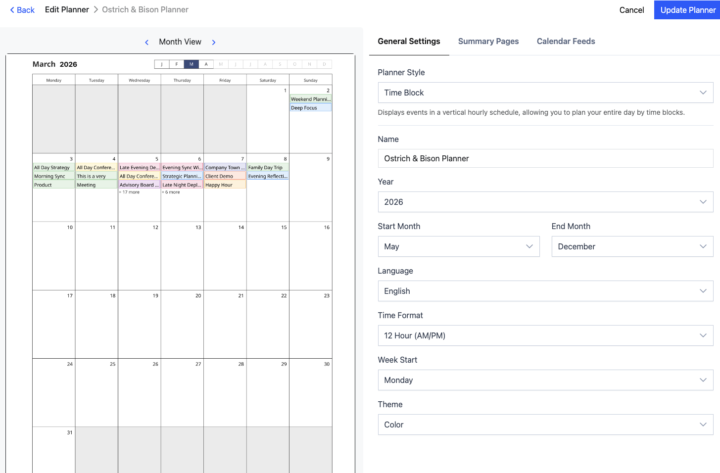
Color Planner on Remarkable Paper Pro
I have created my planner with color turned on, but it is not displayed in color on my Remarkable Paper Pro. What do I need to do to fix this?
0 likes • May 18
Open your planner PDF on the reMarkable, tap the Document Settings icon (sliders/toggles) in the side toolbar, and lower or turn off the automatic contrast boost. (make sure your device is updated)
0 likes • May 23
@Pascal Gruisen well ...it looks like my previous suggestion doesn't apply to layout in version 1.1.3 on mac I hope you and Taj get it sorted out soon!

May 18 •
CalSync-Not able to update password
I switched my RM Pro from Dev to normal mode and then back to Dev. Unable to update with new password, it keeps reverting back to original password.
0 likes • May 19
On your RM Pro, go to Settings > General > Help > About > Copyrights and licenses (under GPLv3 Compliance). Close CalSync, unplug the USB, restart your RM Pro, plug it back in, and enter the new password manually. (If it still fails, SSH into the device and run mount -o remount,rw / and umount -R /etc to unlock the file system, then ensure your CalSync app is updated to the latest version).
0 likes • May 20
Great 👍
1-10 of 31