Activity
Mon
Wed
Fri
Sun
Jun
Jul
Aug
Sep
Oct
Nov
Dec
Jan
Feb
Mar
Apr
What is this?
Less
More
Owned by Silla
För dig mitt i livet som vill hitta din riktning, stärka ditt mindset och ta trygga steg mot något som känns mer som du.
Svensk community för dig som bygger eller vill bygga Skool community– på svenska eller engelska.
Memberships
Pretty & Paid Playground
2.1k members • Free
The Directory On Skool
582 members • Free
BYOB: Bring Your Own Business™
1.1k members • Free
Aligned AF Community
232 members • $100,000/month
The AI-Driven Business Summit
7.6k members • Free
Girlfriends in Business
3 members • Free
Skool Scale Camp
4.9k members • Free
Rewired & Regulated
1.8k members • Free
YouTube Income Vault 🔐
304 members • $7/month
32 contributions to AI Solopreneur Club

21h •
Tools used for recording
Good morning all, I’m planning to create training videos for my students using screen recording (without appearing on camera).Could you suggest: - Tools for screen recording - Options for adding voiceover without video - Tools to reduce background noise and improve audio quality Thanks in advance!

🔥
2 likes • 19h
@Rakesh Ram I also use Descript and find it very userfriendly has good functions

9d •
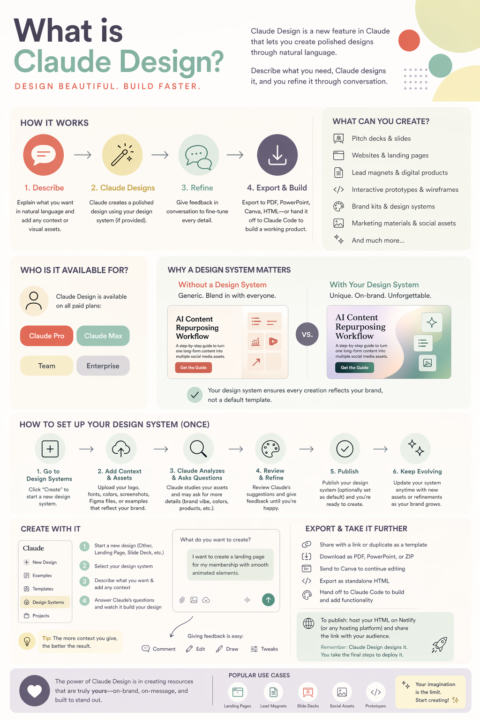
💥Open AI Image Generation 2.0 is here - its officially #1💥
OpenAI rolled out ChatGPT Images 2.0 yesterday (April 21) and it's live for all of us today. Short rundown of what it is and where it fits into our work. What changed: - Text inside images actually works now - image/text, posters, thumbnails, infographics all render cleanly. - Two modes: Instant (fast) and Thinking (reasons before it draws, keeps characters and objects consistent across frames). - Up to 8 images from one prompt with continuity - carousels, storyboards, and series hold together. - 2K output, native 4K on paid plans, wide aspect ratio support, improved non-Latin text (Japanese, Korean, Hindi, Bengali, Chinese). - Paid plans include a full commercial license. First reactions from the AI community: The common take is that this is the moment AI image gen moves from "fun toy" to "asset production." Text rendering and character consistency are the two things people keep pointing to as the real unlocks. There's also pushback - some designers are calling it a "slop renaissance" and flagging concerns about visual sameness across the web (I both agree and disagree, but also hugely emphasize with designers). Where I see this opening things up for us: - Content creation - infographics, carousels, post designs, Reel covers, thumbnails, data visuals, illustrations, custom graphics, mockups, product photography. Basically every visual asset in your content stack. - Personal brand & storytelling - this is the layer I'm most excited about. How do you use it to tell your story, showcase your work, and make abstract ideas visual for the visual learners in your audience? Quote cards, announcement visuals, behind-the-scenes illustrations, concept explainers etc. - Educational content & services - workbooks, lesson slides, diagrams, process illustrations, course visuals. If you teach, this collapses a huge chunk of the "make it visual" work. - Print-on-demand & merch - huge! Designs, mockups, full merch drops, poster art. Paid plans include a commercial license so you can actually sell it. - Digital products - also huge. SVGs, stock images, digital artwork, illustration packs, bundles. - Client work - storyboards, mood boards, concept visuals, campaign mockups. A much faster way to pitch and deliver creative work. - Ad-creatives - creating multiple ad creatives based on your product, offer or content.
🔥
5 likes • 9d
I made this infographic yesterday as an introduction of myself in a community, with one prompt and an image. I was pretty happy with it. Looking forward to your Claude tutorial ☺️
🔥
3 likes • 8d
@Kiara Murtagh it was very simple. Create an infographic that describes me as you know me answering these questions; Who I am What I do for a living — not a full pitch, just context What I personally love, value, or geek out on What lights me up about being in the communiy I want them to get to know me — the human behind the work. Then I uploaded a picture of me I wanted to use.
14d •
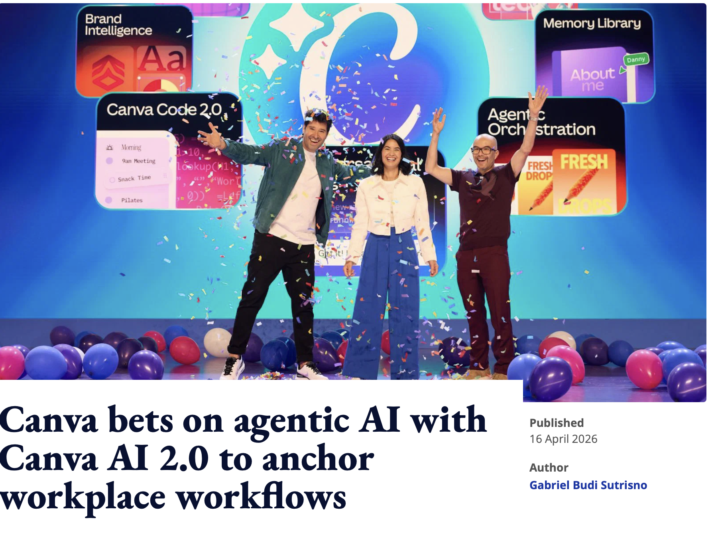
Canva AI 2.0 is HERE + a secret code for extra AI usage!
Canva just released some MASSIVE upgrades and is rolling out Canva AI 2.0! As someone not really impressed with Canva's AI so far, checkin it out right now and I can tell you I am now paying very close attention! ✨SECRET CODE: Type "Activate superpowers" in the design search bar - and you will get a week of extra AI credits to test it out! ✨ What is Canva 2.0 AI? Canva is repositioning from a design tool to an "agentic system for work." Basically instead of you picking a template and dragging stuff around, you talk to it and it builds the thing - including pulling data from your other tools. This is their biggest release ever! The main new capabilities: 1. Conversational Design - you type a prompt in natural language and it generates a full editable design. No templates, no manual layout. 2. Agentic Orchestration - an orchestration layer reads your intent, picks the right Canva tools, and runs multi-step workflows (like "build me a multi-channel campaign for X launch") end to end. 3. Connectors - Canva now plugs into Slack, Notion, Zoom, Gmail, Google Drive, Google Calendar, and HubSpot. So it can pull from your meeting transcripts, emails, and docs to generate newsletters, sales pitches, briefing docs, meeting summaries. This is great, but I wanted to take it further and create a Notion template via Canva - it could not do that. 4. Persistent Memory - it learns how you work, remembers your brand, and auto-updates designs when brand assets change. This is HUGE! 5. Object-Based Intelligence - if you say "swap this image" or "change the headline," only that element changes. The rest stays locked. 6. Brand Intelligence - automatic brand application across everything. 7. Scheduling - you can set tasks to run on a cadence in the background (so your weekly social template can just… rebuild itself). 8. Web Research - it can pull live structured info from the web directly into designs. 9. Sheets AI - structured spreadsheet generation inside Canva. Doubt that it's better than in Claude, but I haven't tested it yet. 10. Canva Code 2.0 — now supports HTML import. Excited to try generating code in Claude and importing it into canva for the design! 11. Under the hood Three proprietary models: Canva Proteus (style transfer), Canva Lucid Origin (image gen), Canva I2V (image-to-video). Canva claims they're 7x faster and 30x cheaper than frontier alternatives. 12. Rollout Research preview right now. First 1 million users get access via the Canva homepage, with broader rollout in the coming weeks.
🔥
1 like • 14d
Wow....I need to check this out as well. I would love to have a video on this🥰
18d •
20 Ways to Stop Burning Through Your Claude Credits
Grateful to @Nils Davis for starting a separate thread on that - I want to create a consolidated version here based on some research, best practice and trial and error on how to optimize your Claude usage so you don't run out of tokens. So if you've been hitting your usage limits, here are some tips to try out and to keep in mind. Quick context: a token is roughly one word. Every time you send a message, Claude re-reads your entire conversation from the top. So message 1 is cheap. For message 30 Claude is re-reading 29 previous exchanges before it even looks at your new question. That's why your credits disappear. 1. Convert files to markdown before you upload them. A single PDF page costs 1,500 to 3,000 tokens. Screenshots can be 1,300 tokens each. If you upload the same 15-page PDF to 4 different chats, that's 180,000+ tokens gone on one document. Open a Google Doc, paste the text you need, download as .md. Markdown is the love language of LLMs. 2. Use Sonnet for everyday work. Save Opus for the heavy stuff. Opus burns tokens 5x faster than Sonnet. Grammar checks, brainstorming, reformatting, short answers. Sonnet handles all of it at a fraction of the cost. If the task takes Claude less than 30 seconds to answer, it doesn't need Opus. Switch before you start. It takes 2 clicks. 3. Turn off extended thinking when you don't need it. Extended thinking burns through your allowance way faster than you'd expect. It's extra steps, extra outputs, extra compute. If you're not working on something genuinely complex, turn it off. 4. New task = new chat. Every message in a thread carries the full conversation history. A 20-message session burns roughly 105,000 tokens. A 30-message session? 232,000. If you went from writing a LinkedIn post to drafting a client proposal in the same chat, Claude is still re-reading the LinkedIn stuff every time it thinks about your proposal. 5. Be specific from your very first message. "Summarize this document" followed by "actually just the financial risks in section 3" is two expensive messages when it could've been one. Tell Claude exactly where to look and what to do. The more specific you are, the fewer tokens you burn.
🔥
2 likes • 15d
This one is being Saved. Thank you🙏
15d •
🎉We are 200 members!!!
We just hit 200 members!!! When I started building my one-person business with AI as my side kick, I didn't know a lot of people on similar journeys and it sucked. I needed a space like this and now 200 of us are here and it's honestly THE BEST THING!!😍🥹 Grateful to have all of you here!

🔥
2 likes • 15d
So happy I am here.
1-10 of 32

🔥
@silla-jonsdottir-8673
Midlife coach & NLP practitioner supporting midlife women in transition.
Inner clarity to outer creativity through NLP, EFT & nervous system work.
Active 18h ago
Joined Dec 3, 2025
Sweden
Powered by