Activity
Mon
Wed
Fri
Sun
Dec
Jan
Feb
Mar
Apr
May
Jun
Jul
Aug
Sep
Oct
Nov
What is this?
Less
More
E-Ink Tablet Users
1.6k
Free
8 contributions to E-Ink Tablet Users

2d •
Cannot Add Google Tasks
I've been trying to add Google tasks, but every time I do it reverts back to select a task platform after I update. Here's the before and after screenshots. What else can I do to get this done? Anyone?

1 like • 10h
@Jason Smith thx

11h •
CalSync 2.0 is here: your pen now runs your task list
Hi everyone, CalSync 2.0 is out today, and it is the biggest update we have shipped. eP Tasks: CalSync's own task list You no longer need a separate task app. Keep your tasks in CalSync, and they print on your planner at every sync. Turn it on in Settings, under "Your todo lists". eP Tasks is part of Pro and Business. Your pen does more than check things off (image 1) On eP Tasks rows, one mark changes the task: A check completes it An arrow moves it a day forward or back A dash carries it over An X deletes it A dot, a circle or a line marks it in progress, delegated or blocked You can also write a new task by hand on an empty task line, and it becomes a real task after two syncs. Pen marks and handwriting work on reMarkable Paper Pro today. Your tasks on the web (image 2) Add, edit and complete tasks from the Tasks page on einkpads.io. Search by name and filter by date and by status. Task Insights (image 3) See how many tasks you finish, how much of that you did with your pen, how your week is going and your strongest month. Also in 2.0 Review ticks now says what each mark will do before you confirm it A mark CalSync cannot read is held and Activity tells you. It is never treated as a check If you cancel a subscription and you own Vault, your account goes back to Vault How to get it 2.0.0 is a full update, so download and install it from einkpads.io. Your planners and settings carry over. Try the pen marks and tell us which one you use most. If anything looks off, reply here and we will look at it. Jason

1 like • 11h
Looks interesting!😊
11d •
CalSync 1.7.13 is out: pen check-off, rebuilt
Hey everyone, 1.7.13 is live, and it is the biggest pen check-off update so far. I went back through how CalSync reads your pen marks from start to finish and rebuilt the parts that were letting checks slip through. This one was tested with a real pen on both a Paper Pro and a Paper Pro Move before release. What changes for you: • More checks count. Two-stroke checks, flatter checks, the first check on a new task page and checks on a brand-new planner now complete the task. • Activity tells you what happened. Every sync shows a Pen check-off line, like “2 tasks checked off”. • Nothing gets stuck silently. If CalSync is not sure a check was meant for a task, you get a Review ticks link and confirm it in one step. No more erase, sync, redraw, sync. • Calibration stays saved, per tablet. • Your handwriting stays on its page when task pages come and go. • Paper Pro Move: you can now pick which list goes to Top Three. Get 1.7.13 CalSync will offer the update when you open it. Or download it directly: • Mac (Apple Silicon): https://www.einkpads.io/api/calsync/darwin/arm64/releases/latest • Mac (Intel): https://www.einkpads.io/api/calsync/darwin/x64/releases/latest • Windows: https://www.einkpads.io/api/calsync/win32/releases/latest • Linux: https://www.einkpads.io/api/calsync/linux/x64/releases/latest If your checks haven’t been registering: update to 1.7.13, sync once, then check a task off and sync again. If anything still doesn’t complete, tell me what the Pen check-off line in Activity says. That line is what pinpoints it. Thanks for the detailed reports and the patience. They shaped this release.
0 likes • 20h
https://www.skool.com/einkpads/cannot-add-google-tasks?p=ac3a95eb See my note. Any thoughts on what I can do?
Jul 11 •
🚀 CalSync 1.4.10 is here
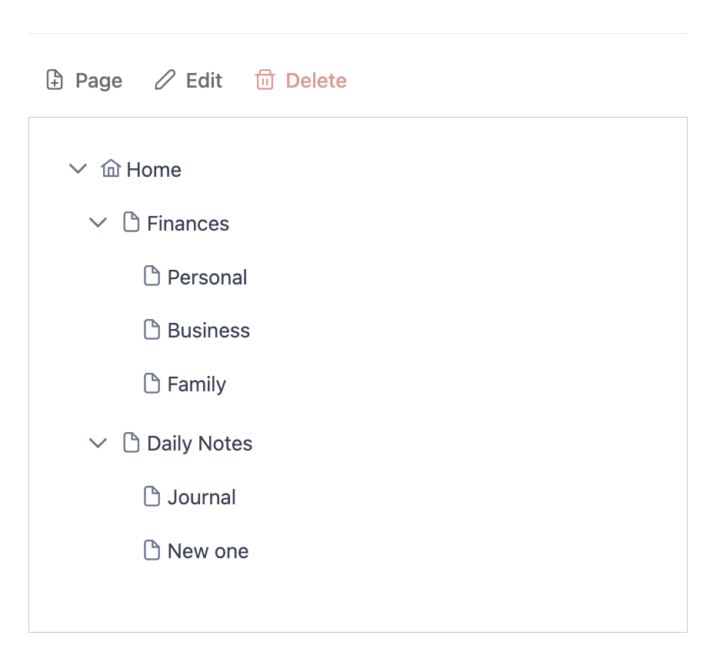
This update makes navigating your planner much easier and improves manual syncing for Supernote users. ✨ What’s new 📖 A brand-new Home page for Summary Pages If you use Summary Pages, you’ll now see a Home index that automatically lists everything you’ve added. - Jump to any page with a single tap - Expand sections to reveal the pages inside - Tap breadcrumbs to quickly move back through your planner - New folder and page icons make navigation clearer - If you only have one Summary Page, the 📖 icon takes you straight there No more hunting through long lists to find what you need. 📤 Supernote manual push is smarter Deleted a planner from your Supernote and want it back? Now, whenever you manually Push to Supernote, CalSync will always send the planner again—even if nothing has changed. Automatic syncs still only upload when changes are detected, so you won’t end up with duplicate planners during normal syncing. 🛠️ Fixes & improvements - Summary Pages now scroll properly inside the Edit Planner window. - Additional reliability improvements and general polish throughout the app. - Download the latest version Windows https://www.einkpads.io/api/calsync/win32/releases/latest macOS (Apple Silicon) https://www.einkpads.io/api/calsync/darwin/arm64/releases/latest macOS (Intel) https://www.einkpads.io/api/calsync/darwin/x64/releases/latest As always, thank you for all the feedback and feature requests—they continue to shape every release! 🚀 📖 Summary Pages Attached to this post are three screenshots from the Summary Pages tab in Edit Planner. This is where you build the navigation and page structure for your planner. Summary Pages can be linked to your Day, Week, Month, and Year views, giving you quick access to the information that matters most.
0 likes • Jul 13
I still have not been able to get cloud sync working. How do I diagnose at this point?
Jun 11 •
Week View on Event Stack
I cannot seem to navigate to the weak view when I generate a calendar, using the event stack planner style. Can someone show me how to navigate to this view?
1 like • Jun 22
Got this one taken care of. Thx
1-8 of 8