Activity
Mon
Wed
Fri
Sun
May
Jun
Jul
Aug
Sep
Oct
Nov
Dec
Jan
Feb
Mar
Apr
What is this?
Less
More
Owned by Rose
Start, grow, and monetize your Skool community. Practical systems that work. Skool Homeroom is where EVERY great Skool community begins. 🎓
Memberships
Skool Launch Lab
338 members • Free
Skool 100 Member Challenge
22 members • Free
Write, Publish, Influence
177 members • Free
𝙂𝙊𝙊𝙎𝙄𝙁𝙔 🍓🐛🦋🌈⭐️🩷
12.3k members • Free
Skoolers
194.5k members • Free
The Grown Girls’ Table
69 members • Free
Granny Wisdom, Hippie Vibes
287 members • Free
Publishing Creators Academy
128 members • $7/month
High Vibe Tribe
80.3k members • Free
7 contributions to PWS Writers Room

10h •
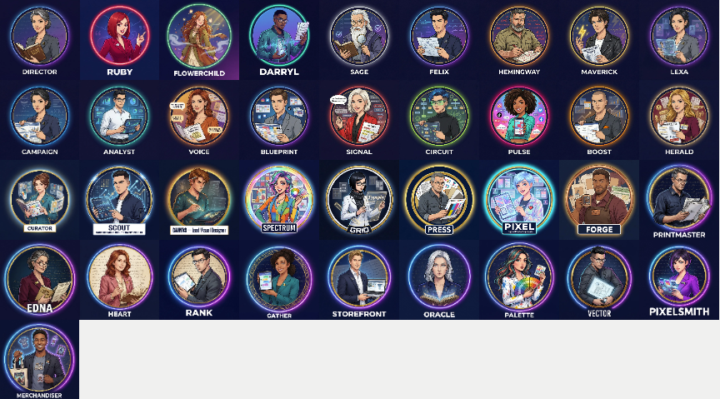
The Whole TEAM!
Just for funsies, before I get back to work here is the whole Professional Writing System Team! # Professional Writing System — Complete Team Roster --- ## Story Development Room *Your expert story planning and concept development team* | Persona | Role | |---------|------| | **DIRECTOR** | Strategic Coordinator — session leader and decision facilitator | | **FELIX** | Plot Architecture Lead — story structure and narrative design | | **RUBY** | Character & Relationship Expert — authentic dialogue and character dynamics | | **SAGE** | Logic & Consistency Guardian — plot holes and timeline errors | | **FLOWERCHILD** | Atmospheric World-Building Specialist — sensory detail and immersion | | **DARRYL** | Narrative Momentum Specialist — reader engagement and pacing | | **EDNA** | Market & Pacing Strategist — genre conventions and commercial viability | | **MAVERICK** | Creative Challenger — questioning assumptions and subverting tropes | | **LEXA** | The Nomenclator — character naming and world-building terminology | --- ## Character Creation Room *Your specialist team for deep character development* | Persona | Role | |---------|------| | **DIRECTOR** | Profile Coordinator — alignment with story requirements | | **RUBY** | Character & Voice Expert (Lead) — emotional authenticity and psychological depth | | **SAGE** | Logic & Backstory Guardian — timeline verification and consistency | | **MAVERICK** | Creative Challenger — subverts archetypes and adds unexpected traits | | **LEXA** | The Nomenclator — character naming using the LEXA naming system | --- ## Writers Room *Your collaborative prose-writing team* | Persona | Role | |---------|------| | **DIRECTOR** | Execution Coordinator — Story Bible guardian and session leader | | **FELIX** | Structure & Causality Keeper — plot architecture and scene logic | | **RUBY** | Voice & Dialogue Specialist — character voice and emotional truth | | **SAGE** | Consistency & Logic Guardian — continuity and internal rules |

🔥
1 like • 4h
I love your AI team!!
🔥
1 like • 3h
@Michael Culp I created AI pictures of the characters in my book. I needed to actually see who I was writing about. This one is my favorite.. his name is Dravok... he's part Gargoyle, I just need to fix his second picture because he's not married LOL
4h •
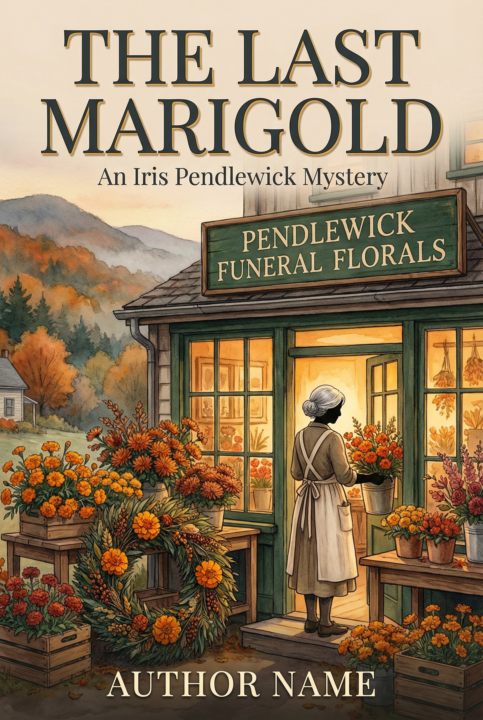
Sample Covers - The Last MariGold
@Rose Colbourne made a comment in her skool group to me about not knowing how to get covers designed, so I thought I'd do a quick teaser. The two samples here came from the /Book-Merch Team in the PWS. These are what I call "cold" because there was no discussion, I just asked for two sample covers and copied the entire sample prompt from one of the Thursday Throwaways post this week with no constraints. I love how it will "fill in the blanks" if you do not give it enough information. I have asked the team for full dust jackets before and gotten fake reviews, an authors picture, name and bio on the back of the book. I do think Eleanor Hemlock would be a great pen name for a cosy mystery author though. The full text of what the /Book-Merch-Team replied is below. You do not have to read through it all but it is interesting. These samples were made with nano-banana in manus' canvas. I have been told Google Gemini works the same way and need to test this on the free tier to see if its the same. You can ask for styles, give sample images you like. It works best with discussion and will use the color pallette and ideas for an entire line of merch products you can order or DIY yourself. To edit you can use your favorite photo editor or just "talk" to the image. If I select the second cover image and say "change the author name to Michael Culp in the same font and color" it will do just that. I also need to re-iterate (constantly) a human artist is golden. Even if you choose to pay a human which i do highly encourage as they need to eat to. The Covers created here can be used as is or you can use them to show an artist what you want and let them know what changes you need. It's a good start. Again the formatting issue so I've attached a PDf file of the output below. Let me know if you have any issues access it https://drive.google.com/file/d/10emeUWdAsX4_hoogYEFFcWajYBHKnu-y/view?usp=sharing
🔥
0 likes • 4h
What!!??? These are AI??? Are you f*ing serious??? I love Eleanor Hemlock as a pen name... that's really cool! I spent so much time waiting to finally get my name (I just recently changed my last name to Colbourne) and I hadn't really thought about using a pen name... name sure if I would. But anyway... I love these... they're sooooo amazing. Michael, I have work to be doing on Skool... you are making it very hard for me to not get lost in book mode again!!!
1d •
I need to share my pain....
Part of what I want to do with this Skool is to share process's with each other, learn new one's iterate and create better. We all work differently and some methods may help others come up with better processes which they can share with the class and we all get better. I am not the smartest in the room (that's usually my lovely wife) but I am willing to share and learn. And I do have a lot of experience in many things. So I'm writing...and creating a Skool...and trying to promote the system I use to others...starting a publishing company...updating the Skills...creating the copy... creating the images...resizing the images...whoops that won't fit...resize them again...post to skool...post to gumroad...post to website. Rinse and repeat... My biggest hang-up right now is that after creating a slew of graphics I'll be sharing (with the help of the Marketing Team Skill) they are the wrong size. I intentionally made them square and too large to be multi functional 2048x2048. Skool Banners are 1460x752. Cool. Whip out my handu Affinity App and do a batch resize on everything to 752x752 thinking I can just upload them and they'll sit squarely (pun intended) in the middle. Nope! Skool conveniently resizes to the width and you can only zoom UP!. I'm sure there is a way to create a new macro to increase just the canvas size but i do not want to take the time today to figure this out when I can open, resize, and upload just the ones I need faster, but then I have to write the copy. So the general process I used for this: Manus.ai will also use claude skills and can call claude to write with directly. It works more like Claude Code than a Chat system. One of the very cool things it does (and I only *just* found out Google's antigravity app does much te same) when I run the Merch or Marketing Teams skills in manus, instead of just giving the prompts for the graphics they create, Manus opens a canvas window and uses nano-banana to start creating them one by one. You can then click on one of them so its icon appears in the chat window and make changes to that particular image or choose multiple images if you need the same changes.

🔥
1 like • 4h
I love your goal of helping us get our stories out and I'm really excited to be here!!
6d •
Okay folks Show and Tell Saturday!
Just like our Fiction writing should be Show not tell let's share a short of what we are working on and a pain point that is keeping us from moving forward. I'll start. Trying to get this Skool fleshed out and adding things to it daily, stopped by time, the day job, and new ideas. I'm ADHD and constantly being distracted by learning something new! In testing the latest version of the PWS System i started writing a new story that was supposed to be a throw-away but is becoming a full book, 4 chapters into a scifi story the Working title is "Stars & Surrender". I'll add a couple snippets below.
🔥
1 like • 3d
Here's a bit about my book: It's a supernatural mystery with a slow-burn romance set in an old mansion, with a heroine who's awakening to her true magical heritage while danger closes in. There's witches, shifters, Fae, brownies, dwarves, and all sorts of other magickal beings and you just never know who might be your friend and who's not! I actually have over 20k words written plus I have bits and pieces and parts of it scattered through multiple notes on my computer and I have bit and pieces of a prequel, a sequel, and a pre prequel written
🔥
1 like • 3d
@Michael Culp that sounds really interesting. I did start getting it all plotted out in Plott'r. But it's been a couple of months so I have to go back and look at things again
3d •
Monday Musings
What's the daily fuel that keeps you going? My addication is diet coke. I'm currently on Can #2 of my daily 4-8. What's yours? Years ago I would get stuck in interdepartmental IT meetings with all of the different University departments. Generally there would be 50-60 of us and I started making a log of what I could see in front of everybody around the room. I drew a Coffee Cup, Soda Can, and water glass and would mark with hashes how many of each was in evidence at every meeting. I was there for almost 12 years and accumulated a lot of data on this and developed a theory: IT people that really know their stuff and do the labor generally drink soda. Management generally drinks coffee and women drink wtare & tea far more than men. There are outliers of course in every dataset. The biggest one here is if a person was in the military they could go either way. So if you see an IT person that really knows their stuff but drinks coffee ask them if they were in the military.
Poll
5 members have voted

🔥
1 like • 3d
Pepsi... that's my kryptonite. But I've wrangled it down to a can a day and then supplement with tea and water for the rest of the day. Oh, and chocolate... it's a bad addiction! 🤣
🔥
1 like • 3d
@Michael Culp
1-7 of 7
🔥
@rose-colbourne
Build. Grow. Monetize. Skool Homeroom... Where EVERY great Skool community begins 🍎
Rose Colbourne 🙋♀️
Midlife cat wrangler 😹
Fantasy author 🧙♂️
Online now
Joined Mar 30, 2026
ISTP
Gulfport, Mississippi
Powered by