Activity
Mon
Wed
Fri
Sun
Nov
Dec
Jan
Feb
Mar
Apr
May
Jun
Jul
Aug
Sep
What is this?
Less
More
1 contribution to Mobile Camera Field Notes
Jan 1 •
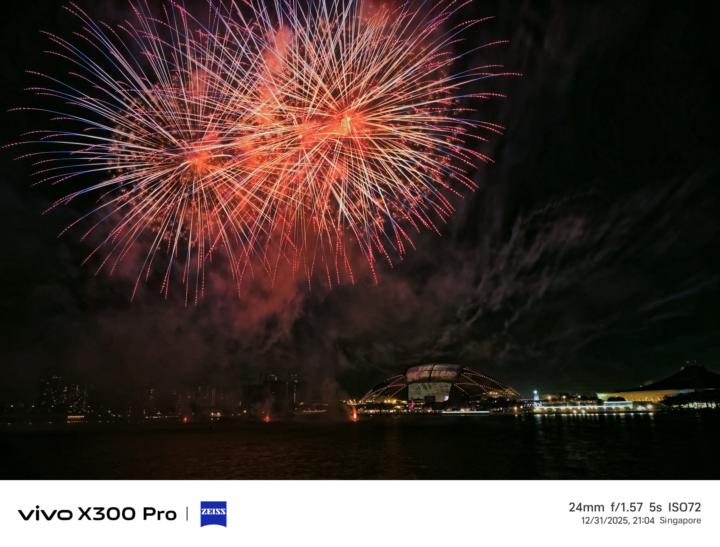
Fireworks With Smartphones?
Yes… but it’s not as straightforward as it looks. The main challenge is that smartphones don’t have a physical aperture you can stop down. That makes it hard to control the amount of light coming in, especially during fireworks shows where bursts overlap each other—something that happens a lot during the grand finale. The result? Blown highlights, flare, or a scene that just looks too bright. One of the more effective ways to manage this is by using an ND (neutral density) filter. Think of it as sunglasses for your phone. The darker the filter, the longer you can drag the shutter without overexposing the image. A 3–4 stop ND filter (ND8 or ND16) is usually a good starting point. Next, switch your phone to Pro or Manual mode. On iPhones, you’ll need a third-party camera app that allows full manual control. Aim for a shutter speed of around 3 seconds or longer to properly capture the trails and bursts of fireworks. Finally, don’t forget to shoot in RAW (DNG). Fireworks scenes are high-contrast, with bright explosions against dark skies, and RAW files give you much more flexibility to recover highlights and tweak shadows during editing. With a bit of prep and the right settings, smartphones can absolutely deliver impressive fireworks shots. Welcome to ask questions below.

1 like • Jan 2
Yet to try the hp filter.
0 likes • Jan 3
@Wilson Wong Bought, but haven't try. 😬
1-1 of 1

Active 52d ago
Joined Dec 30, 2025