
Write something

Jan 15 •
Shooting Better Portraits
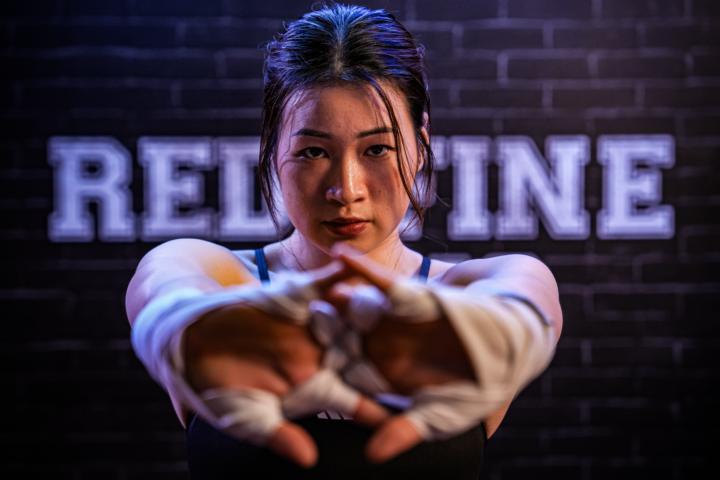
Portraits can seem daunting especially when you first starting out. I will not speak about street photography, or street portrait as it can be two types - the ninja style where you do the deed without the subject knowing and the other where you chat up the subject and ask for a picture. These shots are done with instructions from the photographer and you do not need a camera to get trust from the subject. Directing subject is one of the key ingredients when shooting portraits. And to know how to direct the subject, you must have an idea on how a good portrait should look like. In this example during Sony's product launch of their new Sony Alpha 7 Mark 5 camera, Sony has set up a nice 'gym' in the middle of the mall with continuous lighting of blue and warm colours. When I start to shoot, I try to remember the gym shots I have seen online and in magazines. High contrast, low key portraits pops to mind. Next is to see what the model/subject is capable of. If he/she can follow instructions just give an example of what you want them to do and they will mirror the pose. After which I will micro adjust where the look, where they put their hands etc in relation to the key light (main light on their faces). For those with no modelling experience, you might have to adjust them yourself. Just make sure you ask for permission before you do so. After took a few shots, show the subject what you have taken so they have a better idea what you are trying to achieve and they will adjust accordingly. See if you can see which is shot with an old smartphone (Honor Magic 6 Pro).
2
0
Jan 9 •
Shooting Videos Without Stress
Did a relatively long video covering all the car launches at the Singapore Motor Show 2026. Video creation can feel daunting at first, but like anything else, progress comes from taking small, consistent steps. For this video, instead of focusing on individual cars, I documented the launch moments and captured all the unveils. This approach gives viewers a quick overview of what’s on display without dragging the video out with long takes. One key tip: capture your videos and photos in a logical sequence. It makes fast edits much easier and helps you stay organised during post-production.
3
0
Jan 1 •
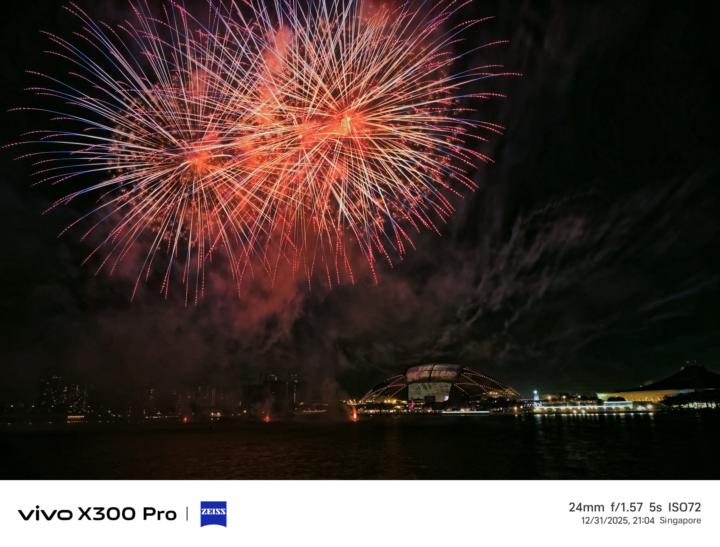
Fireworks With Smartphones?
Yes… but it’s not as straightforward as it looks. The main challenge is that smartphones don’t have a physical aperture you can stop down. That makes it hard to control the amount of light coming in, especially during fireworks shows where bursts overlap each other—something that happens a lot during the grand finale. The result? Blown highlights, flare, or a scene that just looks too bright. One of the more effective ways to manage this is by using an ND (neutral density) filter. Think of it as sunglasses for your phone. The darker the filter, the longer you can drag the shutter without overexposing the image. A 3–4 stop ND filter (ND8 or ND16) is usually a good starting point. Next, switch your phone to Pro or Manual mode. On iPhones, you’ll need a third-party camera app that allows full manual control. Aim for a shutter speed of around 3 seconds or longer to properly capture the trails and bursts of fireworks. Finally, don’t forget to shoot in RAW (DNG). Fireworks scenes are high-contrast, with bright explosions against dark skies, and RAW files give you much more flexibility to recover highlights and tweak shadows during editing. With a bit of prep and the right settings, smartphones can absolutely deliver impressive fireworks shots. Welcome to ask questions below.
Dec '25 •
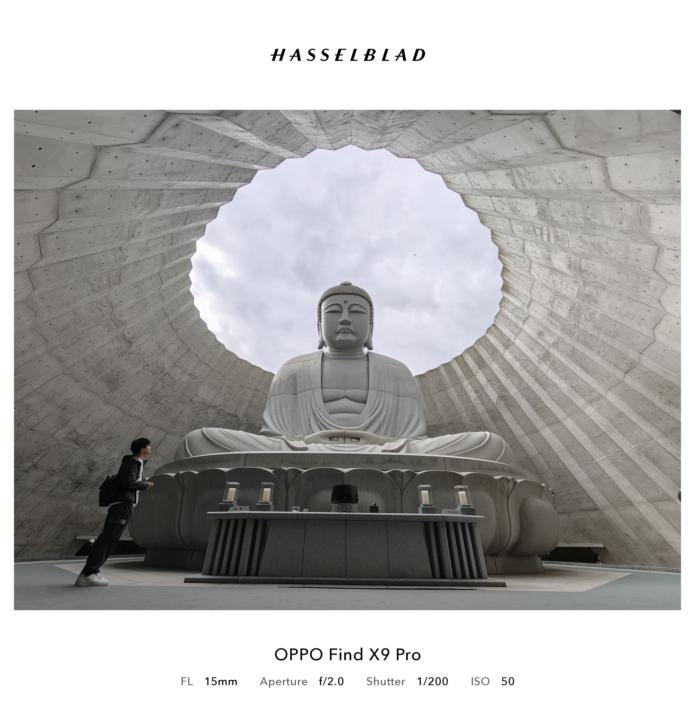
Hokkaido Big Buddha x Oppo Find X9 Pro
What: Big Buddha Where: Hokkaido When: October 2025, late morning Camera: Oppo Find X9 Pro Why (The Story): Hokkaido is really more about the surrounding nature, trails, and road trips, and the Buddha statue is one of the unplanned road-trip destinations. Quite a lot of people at this destination, but thankfully, it's not that crowded, and one has to wait until visitors clear out some areas. How: Considering the statue's size and proximity, one really has to do this in ultrawide (0.5x in your camera or at least a 12mm lens for the camera) and use night mode to capture as many details of the skies and the internal cone that partially covers the Buddha statue. Edit consideration: Leaving one visitor felt there was a story of being in awe and gave a sense of space. Removing him from the picture using the phone's AI erase was pretty simple, and the result is quite natural, too. Cutting down the highlights to get even more details of the clouds might work, but it can be a bit too much contrast if not careful. The key thing about editing is not to make the skies too heavy. Did general sharpening before posting. Welcome to ask questions below.
1-4 of 4
powered by

skool.com/smartphone-imaging-learners-9400
Travel-led smartphone imaging for learners and experts who shoot with intent, learn in real locations, and tell stronger stories beyond presets.
Suggested communities
Powered by