Activity
Mon
Wed
Fri
Sun
Mar
Apr
May
Jun
Jul
Aug
Sep
Oct
Nov
Dec
Jan
Feb
What is this?
Less
More
Memberships
Fabric Dojo 织物
349 members • $67/month
Azure Innovation Station
767 members • Free
Learn Microsoft Fabric
15.3k members • Free
106 contributions to Learn Microsoft Fabric

2d •
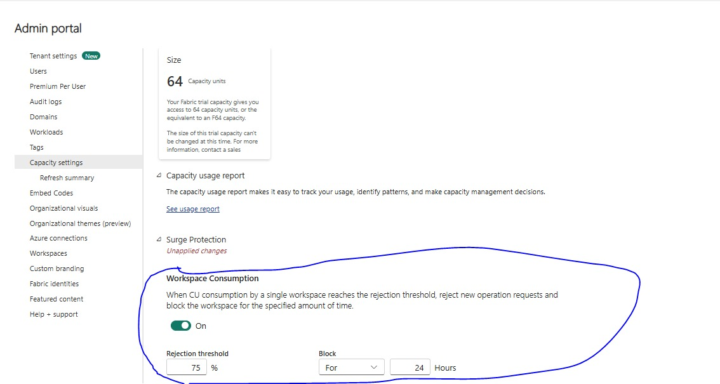
Workspace CU Consumption for Surge Protection - Rolled Out!
Excited to share that the Workspace Capacity Unit (CU) Consumption controls for Surge Protection have now been rolled out! With this update, admins can: - Set rejection thresholds for CU usage by individual workspaces. - Automatically block new operations once the threshold is reached. - Define block duration (e.g., 24 hours) to ensure fair usage and protect overall capacity health. This feature helps maintain stability during heavy workloads and prevents any single workspace from consuming disproportionate resources.
1
0
6d •
Fabric Identities limit for your tenant (Generally Available)
Fabric tenant admins can: - Scale beyond previous constraint — the default limit for number of Fabric identities in an organization increases from 1,000 to 10,000 identities. Please refer the following link. https://blog.fabric.microsoft.com/en-us/blog/take-control-of-fabric-identities-limit-for-your-tenant-generally-available/
2
0
8d •
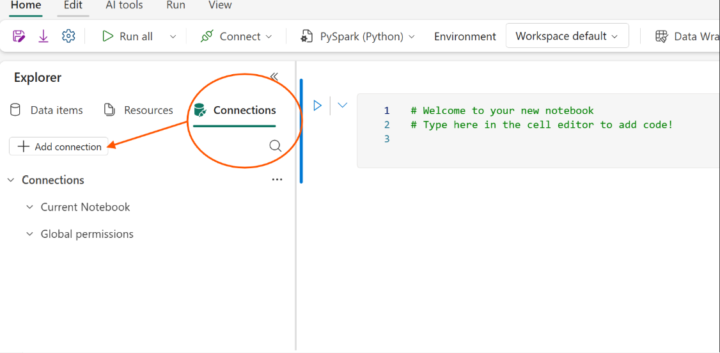
Create Connections Directly Within Notebooks
Observed an exciting enhancement you can now create connections directly within Notebooks to pull data from multiple sources seamlessly. This makes data exploration and analysis much smoother for developers and analysts working inside Fabric. Direct Connectivity: Establish connections from your Notebook without switching contexts. Multiple Data Sources: Access and query data from supported sources right inside Fabric. Streamlined Workflow: Simplifies the process of bringing external data into your analytics environment.
4
0
9d •
Key Announcement: Workspace-Level Surge Protection Controls (Preview)
Surge protection in Microsoft Fabric has been a key feature for managing capacity usage and preventing overload. Today, it helps you: - Limit background compute consumption at the capacity level, setting thresholds for when background operations are rejected and when they recover. - Reduce deep throttling states with longer recover time by engaging throttling earlier to enable admins to take preventive action and reducing recovery times. Until now, surge protection applied only at the capacity level—meaning all workspaces shared the same rules. What’s new: workspace-level surge protection We’re taking surge protection to the next level with workspace-level controls. This update gives you more granular management of compute usage across your organization. Key enhancements - Per-workspace CU % limits: Define a compute unit (CU) consumption threshold that applies to all workspaces, as a percentage of overall capacity utilization. These are set over a rolling 24-hour period. - Automatic blocking: When a workspace exceeds its threshold, it can be automatically placed in a blocked state, rejecting new operations until usage drops or the block expires. - Mission critical mode: Designate high-priority workspaces as mission critical—exempting them from surge protection rules—effectively prioritizing them over other workspaces. This mode can also be used to remove an active blocked state. Note: I have not yet tested. Here is the link for more info: https://blog.fabric.microsoft.com/en-us/blog/surge-protection-gets-smarter-introducing-workspace-level-controls-preview?ft=All
2
0
Dec '25 •
Fabric Runtime 2.0 is in Experimental Public Preview!
Microsoft has just announced the release of Fabric Runtime 2.0 (EPP), a next-generation runtime designed for large-scale data computations and advanced analytics workloads within the Microsoft Fabric ecosystem. Fabric Runtime 2.0 is purpose-built to handle enterprise-scale analytics with consistency, security, and performance. For developers and data engineers, this means: - Faster experimentation with Spark 4.0 features. - Simplified CI/CD workflows with environment-aware configuration. - A stronger foundation for AI-driven workloads and real-time analytics. Read the official announcement here. https://blog.fabric.microsoft.com/en-us/blog/fabric-runtime-2-0-experimental-public-preview?ft=All
4
0
1-10 of 106

@pavan-kumar-1816
With over 12 years of experience as a Data Engineer and Analyst, I’ve built a strong foundation in designing and optimizing data solutions.
Active 3h ago
Joined Sep 16, 2024
INDIA
Powered by