Activity
Mon
Wed
Fri
Sun
Dec
Jan
Feb
Mar
Apr
May
Jun
Jul
Aug
Sep
Oct
Nov
What is this?
Less
More
ANALISTA DE REDES DO FUTURO
217
Free
Day Job Destroyer
231
$99/m
Day Job Killer
70.1k
Free
English Achievers
2.1k
5.0
$37/m
Deep Dive English
170
Free
Confident Speaking Circle
540
5.0
Free
Teachers for Peace Global
282
Free
Fat-bike Lab
136
Free
WFH Remote Room
1.3k
Free
5 contributions to EngineeringTech

Jul 2 •
Welcome - read this first
This is a space for anyone interested in programming, Linux, self-hosting, networking, and IT in general. Whether you're just starting out or already experienced, you're very welcome here. The idea is simple: learn together, share what you know, help others, and show what you're building along the way. Feel free to ask questions at any level. If you're working on something—home lab setups, ESPHome, Node-RED, Proxmox, scripts, or anything else—don’t hesitate to share it. Even small projects or experiments are worth posting. I’ll also be sharing my own learning journey, especially around Proxmox, networking, and IoT. Expect real setups, things that worked, and things that didn’t. Introduce yourself To get started, say hello in the comments: - What are you learning right now? - What are you building or experimenting with? - What would you like to improve or achieve next? Looking forward to seeing what you’re working on.


1 like • 19d
I am a software and AI engineer with demonstrated experiences in several chances. I urge you to pool your wisdom and capabilities to achieve results befitting the AI era. I am confident that by combining our respective strengths, we will undoubtedly achieve meaningful outcomes. I wish you the best of luck in all your future endeavors
3 likes • 14d
Welcome, Abdul! 😊 Your Examination Management Portal sounds like a great hands-on project. Building real applications is one of the best ways to strengthen your understanding of databases and backend development. With my background in AI and full-stack engineering, I’m always interested in seeing how developers turn technical knowledge into practical solutions. Keep building and learning—you’re on the right path! 🚀
May 17 •
I have to admit you something
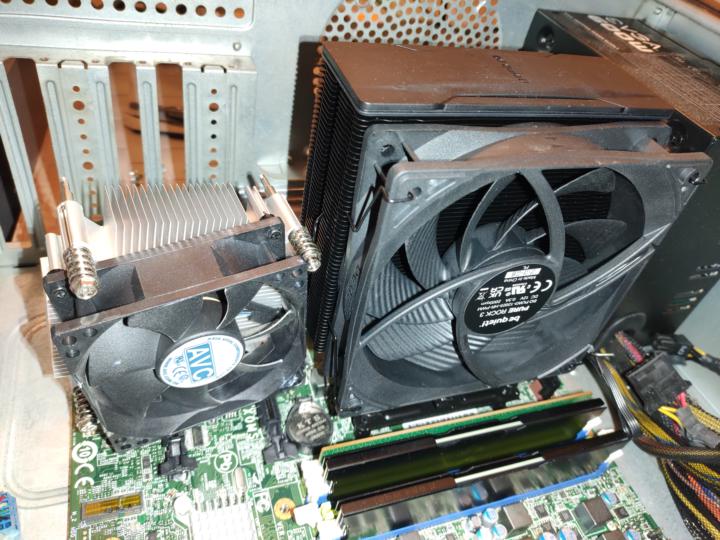
For a while, one small thing was driving me crazy every time I powered on my Proxmox machine. Not the CPU. Not the storage. Not the software. The fan. It was loud. Constantly loud. Full speed from the moment the machine started. And once I noticed it, I couldn’t ignore it anymore. That’s the annoying part about hardware problems like this — they don’t stay in the background. They slowly take over your attention until fixing them becomes the only thing you can think about. So I started digging. I checked the socket type. I removed the motherboard. I measured the mounting holes. I confirmed what I needed. Only then did the search begin. The setup itself was nothing exotic: an Intel Core i5-6500 sitting on a Lenovo ThinkCentre M900 motherboard, model IQ1X0MS (30BC), with an LGA1151 socket. A budget CPU on a budget OEM board — simple on paper, but not so simple when the fan refuses to behave. At that point, the goal was clear. I didn’t need the biggest cooler. I needed the quietest practical solution. So I compared a few options: Noctua NH-D15 - extremely powerful, but probably more cooler than this CPU really needed. be quiet! Dark Rock Pro 5 - premium, silent, and also a bit overkill here. Endorfy Fortis 5 - a strong, balanced option with good value. Endorfy Fera 5 - compact, affordable, and practical. be quiet! Pure Rock 3 - quiet, sensible, and enough for a 65 W processor. And after thinking it through, the choice became obvious. I went with the be quiet! Pure Rock 3. It was reasonably priced was more than enough for the i5-6500.And it solved the problem without turning the build into something unnecessarily expensive or oversized. But the cooler alone was not the whole story. No more background irritation. No more fighting the machine every time I wanted to use it. Just a simple fix that made the whole setup feel right again. And honestly, sometimes that’s the best kind of upgrade - not the flashy one, but the one that quietly removes a problem you were tired of living with.
1 like • 19d
I am a software and AI engineer with demonstrated experiences in several chances. I urge you to pool your wisdom and capabilities to achieve results befitting the AI era. I am confident that by combining our respective strengths, we will undoubtedly achieve meaningful outcomes. I wish you the best of luck in all your future endeavors
Jul 7 •
How I added QEMU/KVM netowrk Bridge on Omarchy Linux
I recently switched my Omarchy Linux setup to give QEMU/KVM VMs direct LAN access using a native bridge (br0) and systemd-networkd. Here is the exact config I used to get it running without sudo. I dropped three files into /etc/systemd/network/ to define the bridge and attach my interface (eno1). - /etc/systemd/network/10-br0.netdev [NetDev] Name=br0 Kind=bridge - 20-eno1.network [Match] Name=eno1 [Network] Bridge=br0 - /etc/systemd/network/20-br0.network [Match] Name=eno1 [Network] Bridge=br0 - /etc/systemd/network/20-br0.network [Match] Name=br0 [Network] DHCP=yes Then I just ran sudo systemctl restart systemd-networkd.service To let my VMs use this bridge without root, I updated two config files. - /etc/qemu/bridge.conf allow br0 - /etc/libvirt/qemu-bridge-helper.conf allow br0 After a sudo systemctl restart libvirtd, my VMs connect directly to the network via br0 instantly. Clean, native, and no sudo needed for launch.
1 like • 19d
I am a software and AI engineer with demonstrated experiences in several chances. I urge you to pool your wisdom and capabilities to achieve results befitting the AI era. I am confident that by combining our respective strengths, we will undoubtedly achieve meaningful outcomes. I wish you the best of luck in all your future endeavors

Mar 28 •
Hi everyone! Let's share your works
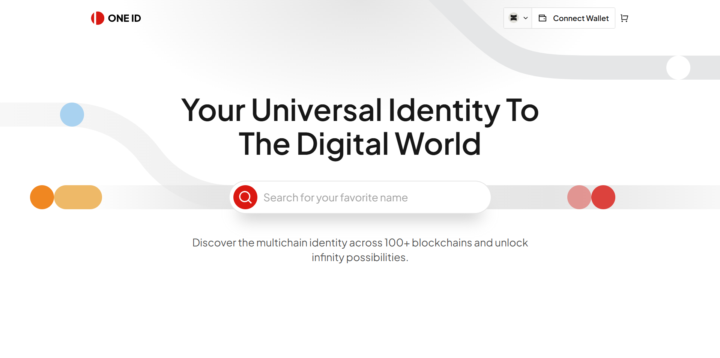
Hello devs, Welcome to this communiy and my post. I am a senior Full Stack and AI Engineer, currently I am gonna post my previous works. There are quite a few full-stack, AI, and software engineers in this community. I would be very grateful if you could leave comments sharing screenshots, GitHub links, or links to project websites of the projects you have previously developed. This will be beneficial for mutual cooperation, fostering opportunities, securing jobs, and the development of the community. I am presenting my work first.
1 like • 19d
I am a software and AI engineer with demonstrated experiences in several chances. I urge you to pool your wisdom and capabilities to achieve results befitting the AI era. I am confident that by combining our respective strengths, we will undoubtedly achieve meaningful outcomes. I wish you the best of luck in all your future endeavors
Aug 19 •
How do I sync files privately?
Are you tired of relying on big tech clouds for your personal data? In my latest video, I walk you through a complete, self-hosted solution for file synchronization that keeps your data private and under your control. This tutorial is designed for beginners but covers everything you need to know to sync files across Ubuntu, Windows, and Android devices seamlessly. 🎥 What You’ll Learn in This Video We break down the entire setup process into clear, manageable steps: - Getting Started: How to download and prepare a bootable Ubuntu flash drive. - Ubuntu Setup: A step-by-step guide to installing Ubuntu and configuring Syncthing for file syncing. - Windows Integration: Installing and setting up Syncthing on Windows to sync with your Linux machine. - Mobile Sync: An overview of mobile Syncthing clients and a specific configuration guide for Android. - Network Security: How to use Netbird to securely connect your Ubuntu and Android devices over the internet without exposing them publicly. - Live Testing: Real-time folder sharing and synchronization tests to prove it all works. 🛠️ The Tech Stack - OS: Ubuntu & Windows - Sync Tool: Syncthing (Open-source, decentralized) - Network Tool: Netbird (For secure, private connections) Whether you want to replace Google Drive, back up your Android photos to your PC, or simply learn how to manage your own data infrastructure, this video has you covered. You can find the video in the classroom section. Have fun ;)
1 like • Aug 19
This looks really useful! I’ve been interested in self-hosted solutions too, especially for keeping files private and having access across multiple devices. Thanks for sharing this—I'll definitely check it out when I get some time. 👍
1-5 of 5

@omi-gento-2571
"I like the dreams of the future better than the history of the past."
----
“The secret of getting ahead is getting started.”(Mark Twain)
Active 29m ago
Joined Jul 16, 2026