Activity
Mon
Wed
Fri
Sun
Sep
Oct
Nov
Dec
Jan
Feb
Mar
Apr
May
Jun
Jul
Aug
What is this?
Less
More
Memberships
AI Automation Skool
2.5k members • Free
AI Bits and Pieces
832 members • Free
AI Society: Make Money with AI
299 members • $7/month
AI Automation Society Plus
3.9k members • $129/month
Useful AI • AI For Business
28.6k members • Free
AI Marketing Hub
4.9k members • Free
AI Automation Society
434k members • Free
AI Automation (A-Z)
164.9k members • $7/month
Agent Empire
1.5k members • Free
4 contributions to AI Bits and Pieces

🔥
7d •
ChatGPT Work v. Claude Cowork: Which Should You Choose?
In Part 1 and Part 2, we used 🐠 Dory and 🖖Spock to explain the difference between Chat and (Co)work. That leads to the next logical question: 🤔 Okay, but which Spock do I use—ChatGPT’s Work or Claude’s Cowork? Personally, I use and like both. The honest answer is that ChatGPT Work and Claude Cowork are built around the same core idea: Give the AI a goal, provide the right context, and let it complete the work. Both can research information, analyze files, create documents, build spreadsheets and presentations, use connected tools, and work through assignments involving several steps. The meaningful difference is where each one feels most at home. Claude Cowork: Best When Your Work Lives in Files and Folders Claude Cowork is especially comfortable when your work lives in files and folders. You can connect a folder on your computer and ask Claude to: - Read and compare several files - Edit or create documents - Rename and reorganize files - Build spreadsheets and presentations - Research missing information - Deliver the finished materials for your review It can work directly with the material inside that folder rather than requiring you to open each file, copy the information into a conversation, and direct every step. Claude Cowork is no longer limited to the desktop. Cowork sessions can also run remotely and be accessed through web and mobile as availability rolls out (more on that later). However, its ability to work with selected local folders remains one of its most recognizable strengths. Claude can also use connectors and plugins: A Claude plugin can package skills, connectors, and sub-agents into a reusable workflow. When a direct connector or tool is not available, Claude can use your computer by navigating applications, clicking, and typing. ⚠️ Note: Claude Cowork requires a Pro level subscription. ChatGPT Work: Best When Your Work Lives Across Connected Apps ChatGPT Work is especially comfortable when your work is spread across connected business tools.


1 like • 5d
Great post @Michael Wacht 💥
🔥
12d •
Frontier Models Part 1 of 3: Chat, (Co)Work, or Code(x) Explained
As AI models continue to evolve, they are beginning to give us different products for different kinds of use cases. The three products I find most useful are: - Chat - Work - Code There are also specialized products for things such as design, research, and working with source material—including tools like Claude Design, Gemini Notebook. But for today, let’s stick with the three horsemen: Chat, Work, and Code. Each AI company is known for its models. The large, well-known models—ChatGPT, Claude, and Gemini—are commonly referred to as frontier models and are generally associated with closed, cloud-based systems rather than open-source models running locally. Please refer to the "Frontier AI Ecosystem Matrix" to see what OpenAI, Anthropic, Google, Microsoft, xAI, and Perplexity call their respective models and products. For this series, I will use the follow product naming convention: - Chat - (Co)Work - Code(x) The parentheses are simply my shorthand to cover the names used by ChatGPT and Claude. Please note that these are not official industry terms. They simply save me from repeatedly writing “Work or Cowork” and “Code or Codex.” LOL! Here is the easiest way I have found to explain the difference between the products: Chat: What question can I answer for you, right now? (Co)Work: What can I take off your plate? Code(x): What can I build for you? The goal is not to create a perfect technical definition. It is to give you a simple way to recognize which type of AI product may be the best fit for the task in front of you. In Part 2, we will look more closely at Chat, (Co)Work, and Code(x) product features, how each product is actually used and where the lines between products overlap. In Part 3, we will work through a few practice exercises to help solidify the use cases for each product. If you have any questions, please ask in the comments below. Make it a great AI day!

3 likes • 7d
Great framework to explain the various AI producst to a client and Love the Matrix chart @Michael Wacht @Everett Michaud thx for the tip on Opencode!
🔥
30d •
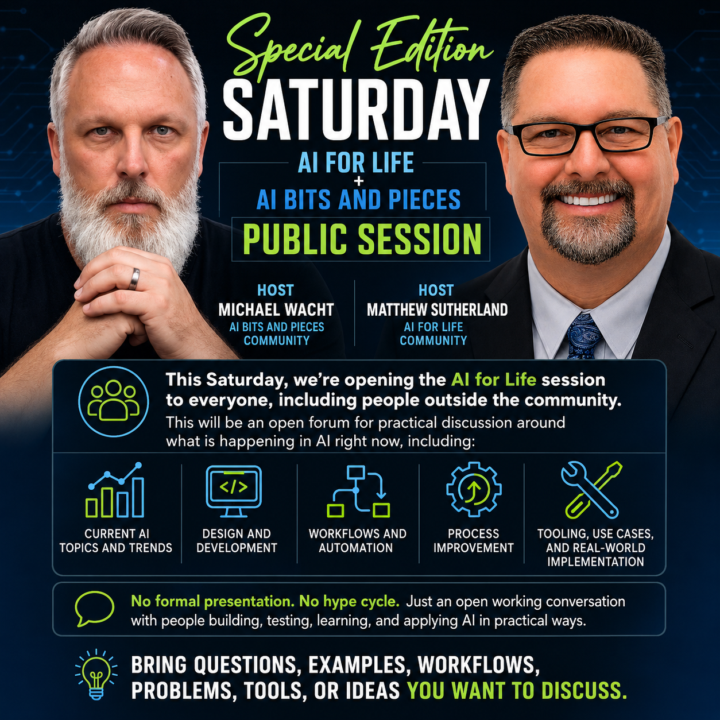
(Done) Special Edition Saturday, July 11th Live Zoom Meeting Ai For Life + AI Bits and Pieces
Join us on Zoom Saturday, July 11, 2026 12:30 ET - 13:30 ET we’re opening the AI for Life + AI Bits and Pieces session to everyone, including people outside the community. Join instructions https://us06web.zoom.us/meetings/81545596982/invitations?signature=NQBPitO7KYhO4f7NHMddMYVn476zmP8rjoEmkdhIvzY Meeting ID: 815 4559 6982 Passcode: 050131 Hosts: - 𝗠𝗶𝗰𝗵𝗮𝗲𝗹 𝗪𝗮𝗰𝗵𝘁 from 𝗔𝗜 𝗕𝗶𝘁𝘀 𝗮𝗻𝗱 𝗣𝗶𝗲𝗰𝗲𝘀 𝗰𝗼𝗺𝗺𝘂𝗻𝗶𝘁𝘆. - 𝗠𝗮𝘁𝘁𝗵𝗲𝘄 𝗦𝘂𝘁𝗵𝗲𝗿𝗹𝗮𝗻𝗱 from 𝗔𝗶 𝗳𝗼𝗿 𝗟𝗶𝗳𝗲 𝗰𝗼𝗺𝗺𝘂𝗻𝗶𝘁𝘆. This will be guided questions plus an open forum for practical discussion around what is happening in AI right now, including: - The explosion of AIOS aka Second Brain - AI hot topics and trends - Design and development - Workflows and automation - Process improvement - Tooling, use cases, and real-world implementation Join us for an open working conversation with people who have been building, testing, learning, and applying AI and automations in practical ways. 𝗦𝘂𝗯𝗺𝗶𝘁 𝗾𝘂𝗲𝘀𝘁𝗶𝗼𝗻𝘀 𝗽𝗿𝗶𝗼𝗿 𝘁𝗼 𝘁𝗵𝗲 𝗲𝘃𝗲𝗻𝘁 𝗳𝗼𝗿 𝗰𝗼𝗻𝘀𝗶𝗱𝗲𝗿𝗮𝘁𝗶𝗼𝗻. We’ll kick things off with pre-submitted questions. Simply submit your question(s) in the comments below, or direct message me in Skool. ✨ Claude will pick the question order. And of course bring questions, examples, workflows, problems, tools, or ideas you want to discuss during the open forum. Hope to see our friends there: @Ron Nedd @Frank Priboy @Gina Wang @Debbie Ai @Pedro Gomez @Usman Mohammed @Nick Mohler @Mike AI Consultant @Diane McCracken @R S @Collin Thomas @Jacob Brodsky @Bradley Kerman @Md. Abdullah Al Mafi @Michele Wacht @Mark Zayec @John Romano @Josh Frison
3 likes • 16d
@Michael Gorski is a link to the recording available? thx
1 like • 7d
@Michael Wacht Thx I appreciate it!

2 likes • 15d
i’ve been using it but recently started experimenting with it using Andrej Karpathy’s LLM wiki framework🔥
4 likes • 14d
@Michael Wacht I like it. It’s definitely a mindset shift and new way of organizing things. I’m still trying to wrap my head around it. For anyone who would like to learn more about it, Karpathy created a repo on github: https://gist.github.com/karpathy/442a6bf555914893e9891c11519de94f
1-4 of 4

@noah-otalvaro-5544
AI automations for entrepreneurs seeking FLOW🧘🏽
Real estate investor | Miami off-market |
80/20 Frameworks + AI = Buy Back Your Time
✌️SubTo member
Active 11h ago
Joined Jul 15, 2026
Miami, Florida
Powered by