Activity
Mon
Wed
Fri
Sun
Nov
Dec
Jan
Feb
Mar
Apr
May
Jun
Jul
Aug
Sep
Oct
What is this?
Less
More
AI Without The Hype
69
Free
11 contributions to AI Without The Hype

Aug 17 •
☕ AI Monday Brief | Monday 17 August
Hello! 👋 🕵️ AI-written text may soon carry an invisible watermark, as per the the recent news from Anthropic, who are introducing invisible watermarks into text generated by Claude. You won’t see them. 👀 The writing will look exactly the same but there will be subtle patterns in the words Claude chooses that can make the text detectable as AI-generated. The technology is based on Google DeepMind’s SynthID system and is introduced secondary to new transparency requirements under the EU AI Act. Pretty sure that other major AI companies are working on similar approaches. 💡 Why this matters Well, we’ve spent the last few years asking: “Can you tell if this was written by AI?” That question may eventually become easier to answer and less subjective. Instead of teachers, employers or publishers trying to guess from someone’s writing style, AI-generated content could potentially carry its own invisible provenance. The key question to answer relates to accountability and ownership: if AI becomes embedded in Word, email, search, research and everyday work… when does something actually become “AI-generated”? If AI wrote the whole report? Easy. But what if it rewrote one paragraph? What if it suggested three sentences? What if you wrote it, AI edited it, and you rewrote the edit? 🤯 We may be getting much better at identifying where AI has been used at exactly the same time that the boundary between human work and AI work is disappearing. 👀 Should you care? yes… As AI becomes normal the question will shift from: ❌ “Did you use AI?” To: 🎯 “What responsibility do you still own for the finished work?” AI provenance can tell us something about how something was produced but it doesn’t answer whether that something is accurate, thoughtful, original or good. 💭 Question for you: If you wrote something, AI improved it, and you approved every word… who wrote it? 👇

1 like • Aug 17
Interesting and not unexpected given how much it is being used around us. You pose an interesting question tho….., I would still consider that I wrote it. There’s been a lot of talk about AI augmenting practice in healthcare, but im not sure it would be perceived that way if things were watermarked as AI generated……
1 like • Aug 18
@Rachel Dbeis Clinical decision making must always remain with the human, the governance of this is the challenge….. how will the AI watermark differentiate between new information and editing functionality?
Jul 20 •
☕ AI Monday Brief | Monday 20 July
Good morning! 👋 Welcome to this week’s AI Monday Brief! Here’s an AI story that’s worth your attention. 🏛️ The biggest AI companies are now asking governments to regulate AI. For years, the AI industry has been racing to build bigger and more powerful models as quickly as possible. But over the past few weeks, leaders from OpenAI, Google DeepMind and Anthropic have all publicly backed the idea of stronger regulation for the most powerful AI systems. (Axios) 💡 Why this matters This feels like a turning point. The conversation is moving from: “How quickly can we build better AI?” To: “How do we build AI safely and responsibly?” The very companies leading the AI race are calling for clearer rules. Is it a sign that AI is moving from an exciting new technology into something governments, healthcare systems and businesses will increasingly need to govern?? 🤷🏽♀️ 👀 Should you care? ✅ Yes. Especially if you work in healthcare, education, finance or the public sector. Over the next few years, understanding AI governance may become just as important as understanding AI itself. 💬 Question of the week If AI starts influencing more decisions in our workplaces…What would you want humans to always remain responsible for? 👇 I’d love to hear your thoughts.

1 like • Jul 20
Introducing the concept, understanding the full capabilities and testing these on real world situations that’s part of our human curiosity and we shouldn’t lose that. The next natural step is to review what we have learned, what is the data telling us and what have we learned so far? ……perhaps the unintended consequences? ……..such as hallucinations and inaccuracies which can cause harm. So we must make things safer and we do this by ensuring we set governance in a robust purposeful way. In the way that clinical reasoning, empathy and oversight should remain core humans traits and we should always remain responsible for….
Jul 16 •
🧠 Thursday AI Fact
ChatGPT became the fastest-growing consumer application in history.🧠 It reached 100 million monthly users in around two months after launch (2022). Let’s compare it to other applications: 🎵 Spotify took years. 📸 Instagram took over two years. 🎬 Netflix took more than ten years to reach similar scale. 💡 Whether you love AI or hate it, its adoption has been one of the fastest technology shifts we’ve ever seen. The interesting question now is ❓“How will we choose to use it?”
1 like • Jul 16
…..well ok, one for the road!!
1 like • Jul 16
…….actually this is better
Jul 13 •
☕ AI Monday Brief | Monday 13 July
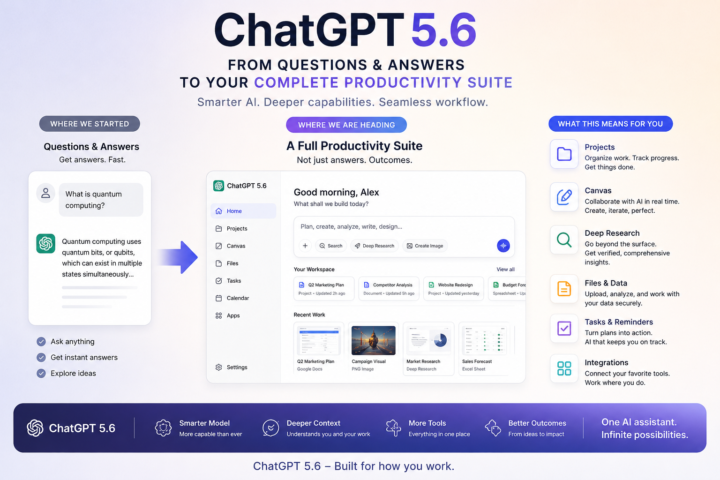
Hi all! 👋 Happy Monday and welcome to this week’s AI Monday Brief. Every Monday we will be sharing one AI development that’s actually worth your attention. Let’s dive in 🚀 🤖 OpenAI is now building an entire platform for work🤖 Last week, OpenAI introduced the GPT-5.6 family alongside new products like ChatGPT Work, bringing together AI for writing, research, coding and longer, more complex tasks in a single workflow. The focus is on helping people get meaningful work done. 💡 Why this matters For the past couple of years, we’ve judged AI largely by benchmark scores (which platform is better at tasks like writing, coding or solving problems) I think that’s starting to change. Soon, we’ll judge AI by a much simpler question: Did it save me time on a busy Tuesday afternoon? ✨The biggest opportunity for most professionals will be around redesigning everyday work so AI becomes part of the process, rather than something you occasionally open when you remember it’s there.✨ ‼️Should you care? ✅ Yes—if you regularly write emails, reports, meeting notes, presentations or work with large documents.
2 likes • Jul 14
Thank you Rachel, weekly briefs will be really useful. I do hope our NHS boards can have the assured governance and staff training they are seeking in place to allow us to access some of this functionality soon.
Jul 12 •
💡 How To Understand Complex Documents Faster – New Guide + Resources!
If you've ever uploaded a policy, report or strategy into ChatGPT and typed: "Summarise this." ...there's a good chance you've started in the wrong place. Summaries give you fewer words but don't necessarily give you better understanding. Let's move from: ❌ "What does this document say?" To ✅ "What problem is this document trying to solve?" That question will alter the quality of the conversation and set you up to navigate complexity with ease. We've put together a new guide on how to use AI to understand complex documents without outsourcing your thinking. Whether you're reading policies, business cases, research papers, strategies or guidance documents, the goal is to understand better (quicker!). 📄 Inside you'll find: - Practical prompts you can copy and paste - A simple framework for making sense of long documents - Ways to challenge AI instead of accepting its first answer - Techniques I use myself whenever I'm trying to understand something quickly ➡️ You'll find everything in the "Working with AI" section of the Classroom 👆 I'd love to know what you think!! And if you try one of the prompts on a document you're working on this week, let us know how it goes! 👇
1 like • Jul 12
This is brilliant Rachel, looking forward to trying it out!
1-10 of 11
@nicola-mckee-7903
Senior nurse leader in NHS Scotland driving safe staffing, patient safety and digital transformation, with a focus on data and AI in healthcare.
Active 47d ago
Joined Mar 23, 2026