Activity
Mon
Wed
Fri
Sun
Oct
Nov
Dec
Jan
Feb
Mar
Apr
May
Jun
Jul
Aug
Sep
What is this?
Less
More
AI Ranking (FREE)
9.5k
Free
AI Automation Made Easy
20.6k
Free
AI Made Simple
1.2k
Free
iScaleXchange
569
Free
The RoboNuggets Network (free)
78.4k
Free
AI Automation Vault
38.2k
Free
The Agentic Lab
2.5k
Free
AI Automation Society
460.6k
Free
AI Topia
2.2k
$54/m
16 contributions to Making Better Agents

Feb 21 •
Claude team directly addressed Open Claw
The Claude team, specifically Thariq Shihipar, a member of the Claude Code team at Anthropic, has directly addressed concerns about OpenClaw and third-party tool usage. On February 19, 2026, in response to community backlash over updated documentation, Shihipar clarified on X (formerly Twitter): https://x.com/trq212/status/2024212378402095389 “Apologies, this was a docs clean up we rolled out that’s caused some confusion. Nothing is changing about how you can use the Agent SDK and MAX subscriptions!” He further stated that Anthropic encourages experimentation with the Agent SDK for personal use, but emphasized that commercial or business applications should use the official API with API keys instead of consumer subscription OAuth tokens. This position was echoed by Anthropic’s official statement to The New Stack: “Nothing changes around how customers have been using their account and Anthropic will not be canceling accounts. The update was a clarification of existing language in our docs to make it consistent across pages.” While Anthropic has technically prohibited the use of consumer OAuth tokens in third-party tools (including OpenClaw) per their Terms of Service, they have confirmed they are not banning users for personal or experimental use.

0 likes • Feb 23
@Sean O. today i have a brand new claude account with the pro plan - and i set it up via 0auth. but its not working.
Feb 23 •
API Rate Limit
i've been trying to set up openclaw for the past few days and did some vibe coding. its been fun building programs to streamline my workflow. at the same time, today, my openclaw have been hitting API rate limit and its not using the fallback. the only working one is Kimi as the last resort fallback - but i do not wish to spend money on API - and i dont see Kimi as cheap as what everyone says. anyway, have any issues with this ? im using chatgpt 5.2 thru 0auth.

Feb 18 •
I moved to Palo Alto 🌉
Hey guys. Major update. I moved to the center of the action. Potentially the same neighborhood with Peter (i'll have to find him first). I am here to get you guys exclusive access to whats happening in realtime in the OpenClaw ecosystem. I can't wait to get started dropping exclusives and helping you guys get the most out of OpenClaw. It is my wish that each of us lucky to be part of this group become 100x more powerful with all these AI tools. PS: Pardon me this week guys. I will have to cancel all the lives as I prepare exclusive content and tools for the community in the coming days. I will be live on Sunday the 22nd. It will be phenomenal! Thanks for tagging along for the journey.

1 like • Feb 20
take care my friend!

Feb 13 •
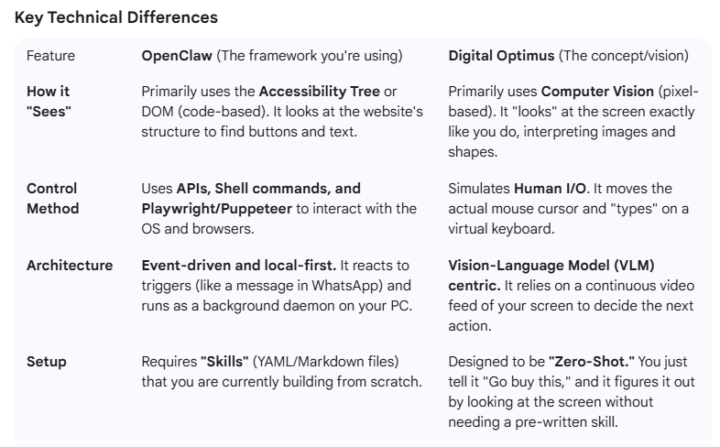
Elon Musk's 'Digital Optimus'
Elon Musk has been promoting his 'Digital Optimus' agent, which is basically a better version of Open-Claw. Which would you prefer?
Poll
5 members have voted
1 like • Feb 15
Humans need eyes and a mouse because that’s how we interact with screens. But an agent lives in the digital world already. It doesn’t need to “look” at pixels the way we do. If it can talk directly to websites, apps, and systems in their native digital form, that feels more natural for an agent. Faster, cleaner, less guesswork. The human-like screen vision looks impressive in demos, but it feels like making a machine pretend to be human instead of letting it do what machines are actually good at.
Feb 15 •
REAL OpenClaw UseCase
Saw this and thought it would be useful to share https://github.com/hesamsheikh/awesome-openclaw-usecases

1 like • Feb 15
Hi Dominic, how safe is it to download and use third-party skills for OpenClaw? It’s a powerful tool, and that’s exactly why I’m a bit cautious. If something malicious slips in through a third-party plugin or skill, it could work against us instead of for us. How confident should we be about the security side of this?
1-10 of 16

@new-life-8602
just retired and want to explore and improve my knowledge using AI. i have no programming experience except for Fortran back in 1980s. lol
Active 5d ago
Joined Feb 8, 2026
Penang
Powered by