

2d •
This is why YouTube Automation is worth learning!
Stop watching others earn—start building your own income stream today. 🎓 Get FREE YouTube Automation tips, strategies, and updates by joining our community. 👇 Join Now: 📲 Telegram: https://tinyurl.com/YToptimize� 📢 WhatsApp: https://tinyurl.com/YTptimize� 💬 Discord: https://discord.gg/3P5kKhJ6�


2d •
Build 1,000 Money-Making Websites with One Message
Hi everyone — we are probably the biggest OpenClaw fans in the world. 😄 We were also one of the earliest teams to build a cloud-computer platform around OpenClaw. In this post, we want to share some advanced ideas about AI harnesses, agents, and automation systems. Even if you are not one of our users, you can still apply many of these ideas to your own workflow. Building a website has never been easier In the past, launching a production-ready website required developers, designers, hosting, deployment, integrations, testing, and a lot of time. Today, the entire process can potentially be compressed into one message: “Build a production-ready demo website for this business.” No coding. No manually setting up every tool. No spending weeks connecting different services. Inside SignatureClaw, we pre-installed and configured the MCPs, deployment tools, service-layer workflows, design skills, upload systems, and other capabilities required to keep building continuously. This means the agent does not only generate code. It can design, build, deploy, test, improve, and continue working 24/7. However, even if you are not using our platform, the bigger lesson is still extremely valuable: You can package your service layer, deployment workflow, design skills, upload process, and business logic into tools, MCPs, skills, or reusable agent workflows. The technical implementation is another topic. Today, we want to focus on the higher-level idea: How do you design a system instead of completing a task? From the screenshot, you can see that a production-ready website can already be compressed into one instruction. For example: “Build a demo website for a local fitness business.” But that is only Level 1. The next level could be: “Research a profitable website niche, build one new website every day, and send me the results.” It is still one message. But now the agent is no longer completing one task. It is operating a repeatable production system. Then we can go one level further:
1
0


Mar 29 •
Been MIA but BACK! Launched Early Access for OCC Yesterday
Hey guys been MIA for a while but, its all been for great reasons. 1. Moved to Silicon Valley 2. Started a Company to Secure OpenClaw 3. Building Open Source Tools to Help the Community Get The Best Out of OpenClaw 4. Working on the "Making Better Agents" brand. For now I want you guys to go checkout openclawcode.ai ... if it sounds good to you signup for Early Access


5d •
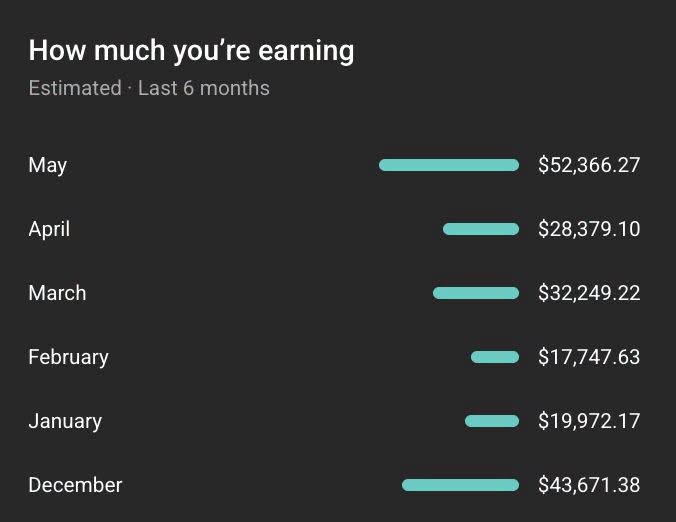
FROM $0 TO $52K MONTHLY FACELESS MASTERCLASS THIS WEEK
I'LL SHOW YOU HOW: 1. Pick a 6 figure Niche 2. Automate everything using A.I and Freelancers 3. How to consistently go Viral and Scale 10k/Month in 90 days 4. How to scale to Multiple channels Only a few new members will be accepted randomly — this is for action-takers only. 👇 Join now before spots close: https://tinyurl.com/2s4hj2ru Let’s build smart, not hard. 📈💰🎬”

9d •
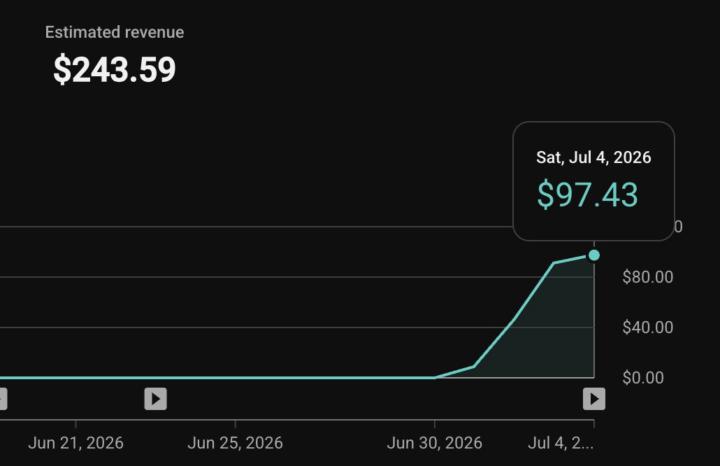
First 4 Days of YouTube Earnings!
Every successful YouTube channel starts somewhere. This is one of our client's first 4 days of earnings after getting monetised, and the results are already showing real potential. 💰 Consistency, the right niche, and a proven strategy can turn a brand-new channel into a growing income stream. If you're still waiting to start, this is your reminder that the best time is now. Ready to build your own YouTube income? Let's make it happen. 👇 No camera. No expensive setup. Just proven strategies to grow and monetise your channel. ✅ Learn YouTube Automation ✅ Grow Faster ✅ Monetise Smarter 👇 Join our FREE Telegram: https://tinyurl.com/monetizewitheasy1 📲 WhatsApp: https://wa.link/vq5pl9 💼 LinkedIn: https://www.linkedin.com/in/waheed-shina-7862a6386?utm_source=share_via&utm_content=profile&utm_medium=member_ios�
0
0
1-30 of 117

skool.com/openclaw-academy
Join and Learn how to create your own AI Assistants / AI Teams with OpenClaw/Clawdbot.
Leaderboard (30-day)
1
+5
2

+2
3
+1
4

+1
5

+1
Powered by