Activity
Mon
Wed
Fri
Sun
Aug
Sep
Oct
Nov
Dec
Jan
Feb
Mar
Apr
May
Jun
Jul
What is this?
Less
More
Memberships
Khudmukhtaar Growth Club
4.6k members • Free
NextGen AI
45.7k members • Free
AI Automation (A-Z)
164.5k members • $7/month
The AI Advantage
126.5k members • Free
Make $1k-$10k in 30 days
19.5k members • Free
183 contributions to Make $1k-$10k in 30 days



1 like • Jan 9
Class 2 Assignment https://docs.google.com/document/d/1IRN16IT6wgJu5rgvPTlk-0xmm_Yb043GomwFh0aPbBw/edit?usp=sharing
0 likes • Jan 18
@Muhammad Idrees Ai Automation class he nhi hoti ab 😭

Jan 9 •
New in this community
Assalam o Alikum! i am iqra , and i am learner and struggler. Please any body tell where to start and what do?
0 likes • Jan 9
@Iqra Bhatti Welcome to community Iqra. May Allah help you to Achieve your goals.
Jan 8 •
Day 1 of learning Ai Automation 30 Days Challenge.
📍I am starting this 30 days challenge of learning Ai automation. If anyone is interested in learning. You can also join us. 🙃 ⏰Time Dedicated : 💻Lecture Duration : 1 hr 15 mints 📲 Practicing Assignment : 2 hrs 1.First I Installed Anti Gravity software. 2. Then, explored its different features. 3. After that I tried to implement YouTube videos automation. 4. For that, I first tried to generate its workflow. 5. Then, it started to proceed. 6. After that It required to install python. 7. I Installed python successfully. 8. After that It commands to Add Google Claude. 9. I tried to add it but couldn't ..Inshallah Will see other solutions and try to resolve it. 💫I aim to learn this skill with whole dedication and passion. 💯 💫I am manifesting that this learning journey will lead me to my dream earnings.🤲🏻🙃( Inshallah Inshallah)
0 likes • Jan 9
@Mohammad Anas https://meet.google.com/dug-ivse-dnm You can join the live automation class
1 like • Jan 9
@Areej Iftikhar That's Good. Best of luck for your exams

Jan 9 •
Ai Automation Class 08-01-2026 Assigment
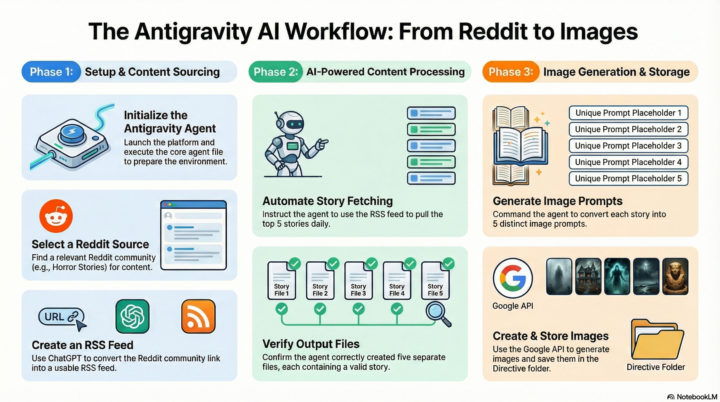
Class 2 AI Automation Procedure: Step-by-Step Guide Step 1: Platform Initiation • Launch the Antigravity platform and ensure that the agent environment is fully ready for operation. Step 2: Core Agent File Execution • Command the agent to execute the Agents.md file. • Wait for the agent to finish all executions and verify that all DOE (Design of Experiments) folders have been created successfully. Step 3: Content Source Selection • Navigate to Reddit and search for specific content genres, such as Horror Stories, to use as a basis for image creation. Step 4: Community Link Acquisition • Access a relevant Reddit community and copy the community link. Step 5: RSS Feed Generation • Input the Reddit link into ChatGPT with the prompt: “Create an RSS link from this Reddit community link”. • Copy the generated RSS link for use in the automation platform. Step 6: Main Automation Configuration • Paste the RSS link into the Antigravity agent and instruct it to create a system using the DOE framework. • The system should fetch the top 5 stories daily and arrange each story into separate files (labeled 1–5). • Verify that each file contains a valid story derived from the RSS link. Step 7: Output Verification • Perform a manual check of the generated files to confirm that all 5 story files were correctly created. Step 8: Image Prompt Development • Instruct the agent to convert each story into 5 unique image prompts and then use those prompts to generate the corresponding images. Step 9: Image Generation and Storage • Generate the images using the Google API key (Google Banana) while strictly following assigned API quotas. • Save the generated images and store all instruction files within the Directive folder.
1 like • Jan 9
Jizakallah kherr Brother for sharing these notes. 😊 These are really helpful. May Allah Almighty put a lot of barakah in your knowledge, time and Money. 🤲🏻💫

Jan 8 •
ChatGPT is making you lazy. NotebookLM is making me smarter.
Sab log AI se code likhwa rahe hain, lekin jab interview ya client meeting mein logic poocha jata hai toh sab blank ho jate hain. Main Web Dev seekhne ke liye ek different rasta le raha hoon. Maine NotebookLM ko apna "Second Brain" bana liya hai: - Documentation Library: Maine React aur Tailwind ki poori docs isme dump kar di hain. Ab jab main phasta hoon, main isse poochta hoon "Why is this happening?" bajaye "Write this code for me." - Client Research: Kisi bhi niche (e.g., Dental Clinics) ka saara data isme daalo, aur yeh mujhe 1 minute mein bata deta hai ke unki websites mein kya masla hai. - Zero Fluff: Sabse best cheez? Yeh ChatGPT ki tarah lambi lambi kahaniyan nahi sunata, sirf un sources se baat karta hai jo maine di hain. - Agar aap client dhoond rahe ho, toh generic scripts bhejna band karo. NotebookLM use karo unka business samajhne ke liye, phir unhe message karo. Jo log Web Dev mein struggle kar rahe hain, NotebookLM par ek baar apni mushkil documentation daal kar check karo. Game change ho jayegi. Baqi, agar kisi ne use kiya hai toh apna experience niche share karein! 👇
0 likes • Jan 8
Jizakallah for sharing this valuable information
1-10 of 183

Active 11d ago
Joined Oct 16, 2025