Activity
Mon
Wed
Fri
Sun
Jul
Aug
Sep
Oct
Nov
Dec
Jan
Feb
Mar
Apr
May
Jun
What is this?
Less
More
Owned by Muskan
Build AI automations & learn how to make money with AI — even as a beginner.
Memberships
Skoolers
174.3k members • Free
AI Automation Society
407.6k members • Free
AI Automation Base
364 members • Free
AI Automation Base
809 members • Free
NO BS Web Development with AI
25 members • Free
DIGITAL EMPIRE
112 members • $39
AI Automation First Client
1.8k members • Free
AI Income Lab
2.9k members • $29/month
AI Bits and Pieces
787 members • Free
68 contributions to AI Automation First Client

30d •
Your first client buys a workflow they can stop chasing 🔥
A first client usually does not care that much about the word "agent." They care about the work that keeps slipping. That is the better sales conversation. Not: "Do you want AI agents?" But: "Which repeated workflow is expensive because someone has to remember every step?" Examples: - leads not researched - prospects not qualified - follow-ups sent late - CRM fields left empty - invoices waiting for checks - records not matched - vendor documents missing - onboarding steps forgotten - reporting prep delayed - engineering review notes not prepared - exceptions not routed Then map the first AI-run department loop: - what comes in - what agents should check - what tools they can update - what memory they need - what runs on a schedule - what limits apply - where approval happens - what gets escalated - what gets logged That makes the offer feel much more real. The client can picture the work moving. The human team still approves risky outbound, finance exceptions, vendor mismatches, and engineering changes. But they are no longer the manual reminder system for every small step. Evermore is built around this operating model: software, setup, and operating support for managed AI teams that help run real department workflows. If you were helping a first client, which workflow would you map first because it is repeated, painful, and expensive to keep manual?

🔥
1 like • 28d
@Duy Bui it's really a great way to start with
Sep '25 •
Your Complete 30-Day Roadmap to Landing Your First $1,000+ Client
Welcome founding member! You're literally one of the first people here, and that's exactly where you want to be. The Promise: Follow this exact roadmap for 30 days. Land your first automation client. Or I'll personally help you until you do. WEEK 1: Build Your Authority (Even Starting from Zero) Day 1-2: The Foundation Setup Download these templates: Github Awesome Templates Day 3-4: Your Tech Stack Here's exactly what I use (most are free): - Automation: n8n, Zapier, or Make (pick ONE) - PDF Processing: Any tool you want (my suggestion: PDF Vector - go-to for reliability - free tier handles 100 pages) - Communication: Loom for demos, Calendly for bookings - Contracts: HelloSign or PandaDoc free tier Day 5-7: Your First "Proof" Create ONE simple automation that shows value: - Invoice extractor (Gmail → Spreadsheet) - Document organizer (Dropbox → Organized folders) - Research compiler (Web → Summary report) Assignment: Post your automation in comments. Get feedback from everyone. WEEK 2: Book Your First 5 Discovery Calls The 3-Message Method That Actually Works: Message 1: The Observation "Hey [Name], noticed you mentioned struggling with [specific problem]. Mind if I share something that might help?" Message 2: The Value "I built a simple automation that handles exactly this. Takes about 10 minutes to set up. Want me to show you how it works?" Message 3: The Close "I can jump on a quick call Tuesday or Thursday to walk through it. Which works better?" Where to Send These: - Your existing LinkedIn connections - Facebook groups you're already in - Local business owners you know - Previous colleagues or clients Goal: 5 calls booked by end of week 2 WEEK 3: Demo and Close Your First Deal The Problem Calculator Framework: Step 1: "How many hours per week does your team spend on [manual task]?" Step 2: "What's the average hourly rate?" Step 3: "So that's costing you $[amount] per month..."
🔥
0 likes • 28d
@Jenya Kruglova clients never has to do anything with any tool like N8N or make they need results
🔥
0 likes • 28d
@Kirk Shelton tools don't matter for clients
Jan 30 •
$20k/month in document automation - here are all my templates
📂 All my workflow templates are now in one place These are the exact automations I use to earn ~$20k/month from document processing clients. Finally organized everything into one repo: 👉 https://github.com/khanhduyvt0101/workflows Templates for n8n, Make, and Zapier. All free. No signup. Just grab what you need. Will keep adding more as I build them.
🔥
1 like • 28d
@Neha M Purty you can use them for yourself after download and learn from them and much more
30d •
🚢 First-client offer: shipping docs to tracker
If you are trying to land your first automation client, stop pitching "AI agents" as the offer. Pitch a document handoff the business already hates. Here is a simple example: "I help import/export teams turn shipping documents into a clean shipment tracker, so they stop copying ETA, route, container, and consignee details by hand." That is easier to understand than a giant AI promise. THE SIMPLE OFFER: Look for teams that receive shipping documents by email: - bills of lading - packing lists - commercial invoices - customs documents - arrival notices The first version does not need to replace their logistics software. It only needs to: - watch an inbox for shipping documents - extract the document type, B/L number, route, vessel, ETA, containers, weight, HS codes, and incoterms - calculate whether the shipment is arriving soon - log the result into a shipment tracker - send a normal or urgent notification to the team That is a strong first-client demo because the before/after is visible. Before: Someone opens the PDF, copies fields, checks dates, and messages the team manually. After: The document becomes a tracker row, and urgent arrivals get surfaced for review. Do not sell this as "fully automated logistics." Sell the smaller, safer outcome: "I can give your team a review tracker for incoming shipping docs, with arrival alerts when something needs attention." For a beginner, this is a better scope because you can demo it with one sample document and one Sheet before touching any complex system. If you want to study the structure, use the workflow JSON as a starting point and browse the full workflow library for more first-client offer ideas. ACTION FOR TODAY: Pick one niche that receives documents by email. Then write this sentence: "When a new ____ arrives, your team needs to extract ____, ____, and ____ before they can take action."
🔥
2 likes • 30d
@Duy Bui Pitch a document handoff the business already hates ,: right
May 20 •
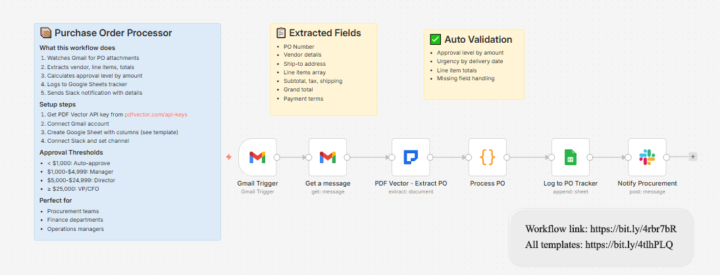
📦 First-client demo: PO review tracker
If you want a first-client demo that feels practical in 2026, do not start with a giant autonomous agent. Start with one boring document handoff that already annoys a business. Purchase orders are a good example. A small business might receive POs by email, then someone has to: - open the attachment - pull vendor and order details - check totals and dates - update a tracker - notify the person who needs to review it That is not a sexy AI use case, but it is easy for a prospect to understand. THE DEMO IDEA: Use this purchase order workflow as the demo asset. The workflow is simple: - Gmail watches for incoming purchase order emails - the message is fetched - PDF Vector extracts structured PO fields from the document - a code step formats the extracted data - Google Sheets becomes the PO tracker - Slack notifies procurement for review The important selling point is not "AI reads documents." The selling point is: "Your team stops copying purchase order details by hand. They get a clean tracker row and a review notification instead." For a first client, I would pitch this to: - small manufacturers - wholesale suppliers - construction vendors - local distributors - operations teams that still manage POs from email Keep the first version small. Do not promise full procurement automation. Do not promise perfect approval logic. Do not connect their ERP on day one unless they ask for it. Sell the first step: "I can turn incoming purchase orders into a clean review tracker, so your team only checks exceptions instead of retyping every field." That is easier to demo, easier to price, and easier to deliver. Use the workflow JSON as a starting point, then browse the full workflow library if you want more document workflow examples. ACTION FOR TODAY: Find 10 businesses where purchase orders are likely handled by email.
🔥
2 likes • May 20
@Duy Bui
🔥
1 like • May 20
@Duy Bui
1-10 of 68

🔥
@muskan-ahlawat-4812
AI Automation for PI Law Firms | Building & teaching real AI workflows that actually work | No-code • LLMs • Real systems
Active 35m ago
Joined Sep 26, 2025