Activity
Mon
Wed
Fri
Sun
Aug
Sep
Oct
Nov
Dec
Jan
Feb
Mar
Apr
May
Jun
What is this?
Less
More
Memberships
The AI Edge - AI for Business
152 members • Free
AI Solopreneur Club
356 members • $9/month
AI for Coaches & Creators
51 members • $7/month
AI Marketing Hub, SEO & Search
4.4k members • Free
AI Automation Agency Hub
327.8k members • Free
AI Enthusiasts
14.7k members • Free
AI Automation Society
418.4k members • Free
94 contributions to AI Automation Society

4d •
How to step up a second AI brain?
I've been using Claude Pro for a while and I want to build an "AI second brain" with it at the core. A few specific problems I'm trying to solve: - Remembering what I've already learned or researched - Speeding up how I consume and retain information - Getting help with writing and content — not just one-off prompts - Staying on top of tasks and projects without losing context I'm leaning toward combining Obsidian with Claude, and possibly using Claude Code to build automations around it (things like scripts to summarize notes, surface past research, or sync context). But I'm not sure how to connect these pieces in a way that actually works day-to-day. For anyone who has built something like this: → Where did you start — notes, tasks, writing, or something else? → Has anyone integrated Obsidian with Claude to auto-summarize notes or pull up past research? How did you set that up? → What's one thing you wish someone had told you before you started? Looking for real-world experience, including the parts that don't usually get talked about.

0 likes • 4d
So here is what I have done, I have created a Project folder and this project contains all my files including my context (about me, my website, goals, priorities, writing style etc), my projects, my plans, references (my design system, brand assets, resources, research etc). Within this Project folder I also have an Obsidian Vault/folder called Insights. This folder was created using the LLM Wiki Manager skill, which creates a Raw folder and a Wiki folder. Raw folder contains all your raw notes, resources, research etc and the wiki folder contains organized notes (concepts, frameworks, lessons, key isnights). Whenever you put something in the raw folder, you just use the LLM wiki Manager skill to ingest it and it turns it into organized knowledge that Claude can use and reference. So now, since the Insights folder (Obsidian Vault with all the organized knowledge) resides within my main Project folder, it has become into an ultimate context for Claude and I don't have to work in any other folder. So when I ask Claude to update my current projects, it has access to my Projects files, my context as well as organized notes, all in one folder. This has become my AIOS. I wish someone told me this sooner . LLM Wiki Manager: https://github.com/sametbrr/llm-wiki-manager
2 likes • 4d
@Reely Reely : This usually is a munual step as Claude does not know when you placed something in the raw folder (Unless you spcifically ask it to place it in the raw folder and ingest). For me I have 2 types of knowledge that I want ingested. 1- External Knowledge: This is other people's knowledge that I want to organize and learn from. So whenever I put something in Raw I run the LLM wiki Manager manually. 2- Internal Knowledge: This is basically my sessions with claude code ( because let''s face it we learn something new in each session). For this I have built a custom skill, I just run this skill at the end of each session and it saves the raw session in the raw folder and use the llm wiki manager skill to ingest and save Key Learnings, decisions made, preferences etc. So technically, in both cases it is a manual process.

4d •
DAY 2 - AIS Challenge
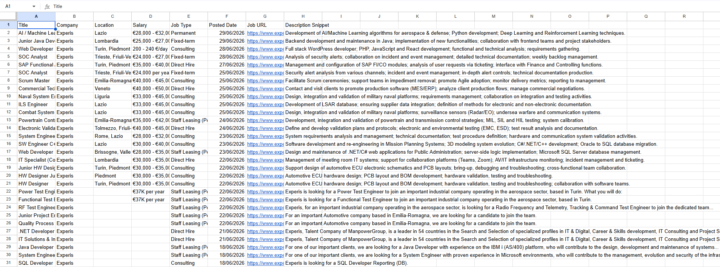
Day 2 complete! I was able to extract 59 job listings from websites across Italy and exported everything into a CSV. One thing I learned today is that not all websites are the same. One of the sites ended up using almost 290 Firecrawl credits by itself, so choosing the right source can make a huge difference. Really enjoying the challenge so far. Looking forward to Day 3! #AISChallenge
2 likes • 4d
Kudos, Awesome work @Davide Cester Keep going

11d •
2nd brain question...
I've watched some of Nate's and other's 2nd brain videos and currently going through the 2+ hr AI OS course. The thing I'm struggling with is how you access the information outside of Claude. I believe Nate might be using Obsidian...? He talks about bringing in his YT transcripts and other knowledge data to have it for context but not clear how that part works. If there are other people just starting to build their 2nd brains and want to connect, would love to chat and bounce ideas off others.
0 likes • 11d
Something I forgot to mention as you have asked how to access the info outside of Claude. Create a Vualt (folder) in Obsidian. Now when you use the LLM WIKI manager to setup this folder the raw and wiki folder created by Claude will be available in the Obsidian as well. This is how you access this info outside of Claude. @Eric Sebastian
0 likes • 11d
@Eric Sebastian Amazing :) You will have so much fun with it :)

11d •
Agent Builder SKILL.md
Hey everybody, I am looking for Nates Agent Builder SKILL.md file. Is there a place where i can find it at?
1 like • 11d
If it was mentioned in a Video, you can simply go to the Classroom and then Click on Youtube Resources. You can locate the video and its resources in the google doc. @E Man
11d •
Claude just became your newest team member in Slack
You can now tag Claude in Slack and assign it a task. You can simply assign it a request, and it breaks the task into stages, works through them with the tools it has access to, and responds in the thread with what it creates. In one channel, there is only one Claude and everyone in the channel can access it One team member can take off from where the other team member left. How cool is that. I am assuming they will do something similar with MS teams, Discord and Clickup. What do you guys think about this?
3
0
1-10 of 94

@muhammad-haris-4156
An Automation Nerd I
Building AI Solutions for Solopreneurs and sharing my journey!
Active 2h ago
Joined May 16, 2025
Canada
Powered by