Activity
Mon
Wed
Fri
Sun
Oct
Nov
Dec
Jan
Feb
Mar
Apr
May
Jun
Jul
Aug
Sep
What is this?
Less
More
E-Ink Tablet Users
1.5k
Free
8 contributions to E-Ink Tablet Users

Jul 23 •
Still running into problems
Hey folks: I'm feeling even dumber than usual. I was finally able to get the Binder program installed earlier this morning. However, my joy was limited because I then tried to follow the connection instructions, and was not able to connect via SSH. I opened a window (via PuTTY), but it then came back with "connection refused". My PaperPro Move was directly connected via USB and I if the connection had been able to open, I would have used the credentials (given in the section just under GPLv3 Compliance. I have my VPN and my antivirus turned off. The firewall supposedly is allowing all connections. So what the heck did I do wrong? Thanks in advance for any help you can enlighten me with.
0 likes • Jul 24
I'm not sure if it will help matters, or further complicate things, but I did additional analysis on the device (rmKPPM). These are the events which occurred as I tried to connect to Port 22 via USB. If I'm barking up the wrong trees, please let me know. I thought that I knew what I was doing...(simply connect to the USB device by using PuTTY). However, it has turned into a stupid nightmare of my own creation. As humbly as I can put it.....HELLLPPPP!! Many thanks. 🖖
0 likes • Jul 27
@Marc Brown Yes, it is awake

Mar 10 •
Calling all Linux users
We released a version of calsync for Linux but need some testers. Anyone have that OS running?
0 likes • Mar 11
Hi Jason, I have both RedHat and CentOS systems running. Will either of those be helpful to you?🤓
Feb 23 •
Issue launching Calsync on Windows
Some are having issues launching calsync and are getting system errors. please reply with your related issues and screenshots of the bugs you are receiving.
1 like • Feb 23
Here's what I currently have that's successfully downloaded. I'm on hold for this point, but I'm afraid I may have to check back in with you later. I'm about to leave to get groceries. I'll leave this section open in case you have any new steps for me. Once again, my sincere thanks.
Feb 23 •
Where or What Should I Be looking for?
Hi Jason. I saw your post about creating a new separate thread. I forgot to ask what I should look for to see your new thread.
1
0
Feb 23 •
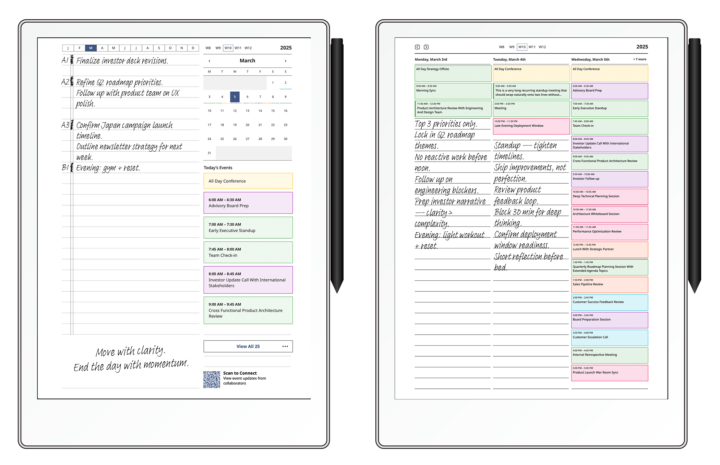
🚀 CalSync v1.0.27 is Live
We’ve officially released Version 1.0.27 — and this one brings meaningful refinements to planner rendering, week logic, and overall stability. This update continues polishing the experience so your reMarkable planner feels smooth, predictable, and clean across every layout on your tablet. ✨ What’s New • Improved week numbering logic for both Sunday and Monday week starts • Corrected year overview week alignment (no more mismatched week labels) • Grayed out out-of-range weeks for better visual clarity in year view • Strengthened internal linking between year → month → week → day views • Improved stacked planner layout rendering • Enhanced event card border styling and visual structure • Better recurring event indicators • Improved text wrapping for long event titles • Continued fixes for ghosted all-day events • Theme stability improvements (grayscale + color modes) • General performance optimizations This release is all about consistency and polish — especially around week logic and planner navigation. If you’re running CalSync, update now and let us know what you notice 👇 Your feedback continues to shape this app. — Jason Download: MacOs https://www.einkpads.io/api/calsync/darwin/releases/latest Windows https://www.einkpads.io/api/calsync/win32/releases/latest
0 likes • Feb 23
OK gang. I'm back. I'm currently clearing out any previous attempts that I've made to try and get this installed.
1 like • Feb 23
OK thank you. That way I won't clog up this thread with my screen shots of weird stuff. Thx. 🤓
1-8 of 8

@miguel-velez-white-4478
Retired Systems Engineer now consultant.
Active 62d ago
Joined Nov 25, 2025
Powered by