Activity
Mon
Wed
Fri
Sun
Mar
Apr
May
Jun
Jul
Aug
Sep
Oct
Nov
Dec
Jan
Feb
What is this?
Less
More
Memberships
SEO for Photographers
25 members • Free
Filmmakers & Photographers
4.7k members • Free
Wedding Filmmaker Mastery
652 members • Free
3 contributions to SEO for Photographers

4d •
Recommended Tool for Photographers: Clicky
Here's a tool I shared in yesterday's Q&A session which some of you have asked about. Its called Clicky - it's an analytics tool and complimentary/alternative to GA4 Analytics are important to know what's actually working on your site. Are people seeing your portfolio? Are they getting in touch? Or are they leaving your site without taking action? This is where understanding your website traffic is incredibly helpful. This is why Clicky is really useful. Why Should You Bother With Analytics? I know that you're a photographer, not a data analyst. But understanding what's happening on your site can help you figure out: - Which of your photos are the most popular with your visitors. - How people are finding your website (e.g., Google, Instagram, or a link from another site). - What pages they view right before they decide to contact you. - If your marketing efforts, like a Facebook ad, are actually bringing people to your site. Knowing this information is valuable. It means you can stop guessing and start making informed decisions to attract more of the clients you want. What Is Clicky and Why Is It Different? While Google Analytics is a well-known option, many people find it complex. Clicky is a great alternative because it’s built to be straightforward and gives you the information you need without a steep learning curve. One of its best features is that it shows you what's happening on your site in real-time. Useful Features in Clicky Clicky has some great features that are especially helpful for photographers: - Real-Time Visitor Info: You can see visitors as they arrive on your site, where they came from, and what pages they're looking at. This is great for seeing the immediate impact of a new blog post or social media share. - Heatmaps: This is a fantastic feature that shows you exactly where people are clicking on your pages. Are they clicking on a specific portrait? Or is a landscape photo getting all the attention? It helps you understand what your visitors are drawn to. - Uptime Monitoring: If your site ever goes down, Clicky can send you an alert so you can get it fixed quickly. - Cleaner Data: It’s very effective at filtering out bots and spam traffic, so the stats you're looking at are from real people. - Privacy-Focused: Clicky respects visitor privacy and is GDPR-compliant by default, which is important for building trust with your audience.

0 likes • 4d
@Simon Hogben Thanks Simon! Any particular plugin I should look out for?
0 likes • 4d
@Simon Hogben Thanks!
6d •
Recommended Tool for Photographers: Social Share Preview
I wanted to share a super useful and FREE tool that can help you with your website's SEO and social media presence. It's called Social Share Preview. https://socialsharepreview.com/ What does it do? It lets you see exactly how your website, blog posts, or portfolio pages will look when you or someone else shares them on platforms like Facebook, Twitter, LinkedIn, and Pinterest. Why is this important for photographers? As photographers, visuals are everything! When you share a link to your beautiful online portfolio or a new blog post, you want the preview to look amazing, right? A broken image or a weird-looking title can stop people from clicking. This tool helps you: • Make a great first impression: Ensure your featured image and title are perfect before you share. • Improve your branding: Control how your brand is represented on social media. • Increase website traffic: A great-looking preview encourages more people to click through to your website, which is a positive signal for SEO. It's super simple to use. Just paste a link from your website into the tool, and it will show you the previews for different social networks. If the preview doesn't look right, it's likely an issue with your website's "Open Graph" tags. This tool helps you spot those issues so you can fix them. Give it a try and let me know what you think! It's a quick and easy way to make sure your website is putting its best foot forward on social media.
0 likes • 6d
This looks great! Thanks for sharing. I am unsure of how to make changes to the image sizes when it suggests reducing the size - "Image - og:image has been found - The ratio of your og:image isn't optimal - Image size is optimal (<8mb)"
9d •
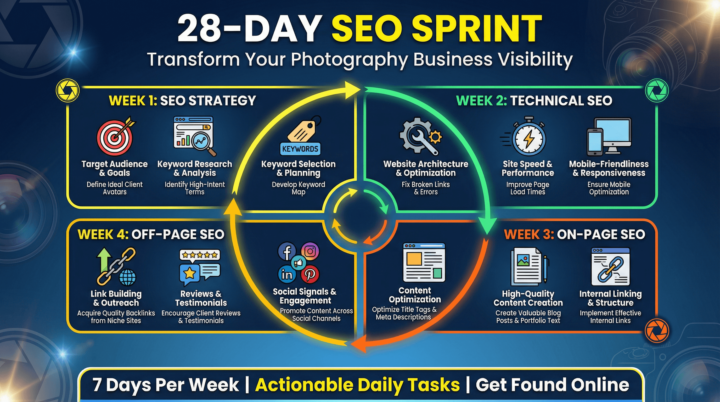
🚀 NEW MODULE DROP: The 28-Day SEO Sprint! 🚀
Hi everyone! I'm excited to shared a brand new module I've just added to the course: The 28-Day SEO Sprint Action Plan! I know how overwhelming SEO can feel, so I've taken everything from the course and distilled it into a focused, day-by-day roadmap to get you taking action and improving your website SEO in just four weeks. What is the 28-Day SEO Sprint? It's a downloadable PDF guide that walks you through a daily action plan, covering: • Week 1: SEO Strategy • Week 2: Technical SEO • Week 3: On-Page SEO • Week 4: Off-Page SEO No more guesswork, no more wondering what to do next. Just a clear, actionable plan to transform your photography business's visibility. Where to find it: You can find the new module in the course classroom now! It includes the full 28-Day SEO Sprint PDF, ready for you to download. I can't wait for you to dive in and start seeing the results. Let me know in the comments what you're most excited to tackle first! 👇
0 likes • 6d
Brilliant!
1-3 of 3

Active 2d ago
Joined Jan 30, 2026
Stirling
Powered by