Activity
Mon
Wed
Fri
Sun
Dec
Jan
Feb
Mar
Apr
May
Jun
Jul
Aug
Sep
Oct
What is this?
Less
More
Skool Extensions 🧩
1.2k
5.0
Free
AuDHD Burnout Solutions
22
4.8
$25/m
4 contributions to Skool Extensions 🧩

🔥
Jun 25 •
Skool API + Skool MCP (VIP Feature 💎)
𝗦𝗸𝗼𝗼𝗹 𝗥𝗘𝗦𝗧 𝗔𝗣𝗜 — 𝗗𝗿𝗶𝘃𝗲 𝗬𝗼𝘂𝗿 𝗖𝗼𝗺𝗺𝘂𝗻𝗶𝘁𝘆 𝗙𝗿𝗼𝗺 𝗬𝗼𝘂𝗿 𝗢𝘄𝗻 𝗧𝗼𝗼𝗹𝘀 Everything you do by hand inside Skool — read posts, manage members, create events, pull the leaderboard — your own scripts and automations can now do too. The Skool REST API exposes your community data over plain HTTP, so n8n, Postman, a cron job or any tool that speaks REST can read and write to Skool without a person clicking through the UI. A new "Integration" section in Settings is where it lives. Flip one toggle and the API arms for your account; flip it off and every call stops answering at once — there's no half-on state to forget about. A built-in documentation view lists every available endpoint with its parameters, so you can wire up a request and see the shape of the response without leaving Skool or hunting through a separate doc site. The API speaks the same surface the Extension itself uses — posts, comments, members, events, categories, the leaderboard, community info and more — so anything you've watched a panel do, a script can do on a schedule. VIP-gated; the toggle and the docs view both sit in Settings → Integration. 𝗦𝗸𝗼𝗼𝗹 𝗠𝗖𝗣 — 𝗖𝗼𝗻𝗻𝗲𝗰𝘁 𝗮𝗻 𝗔𝗜 𝗔𝘀𝘀𝗶𝘀𝘁𝗮𝗻𝘁 𝗦𝘁𝗿𝗮𝗶𝗴𝗵𝘁 𝘁𝗼 𝗬𝗼𝘂𝗿 𝗖𝗼𝗺𝗺𝘂𝗻𝗶𝘁𝘆 The Model Context Protocol is how AI assistants like claude.ai, ChatGPT and Claude Code plug into outside tools. Skool MCP gives them a door into your community: connect the new MCP server once and an assistant can read and manage your Skool data in plain conversation — "summarize this week's posts", "tag every member who joined in March", "create an event for Friday" — without you scripting a single call. Setup lives next to the REST API in Settings → Integration and is built to be copy-paste simple. A guided panel hands you the server URL, lets you create an access key, and walks you through adding it as a custom connector in claude.ai. From there the assistant signs in once and receives its own short-lived token, so your key never has to live inside another app. You manage your own keys from the same panel. Give each key a label so you remember which tool it's for, see when it was last used, and revoke any of them the moment you stop needing it. Each key is shown exactly once at creation and never again — so it stays as private as your password. VIP-gated, and it rides on top of the same REST surface, so anything the API can do, the assistant can do through it.

1 like • 5d
@Emily Sophia Just here
0 likes • 2d
Is there a mobile version of extension please anyone


0 likes • 7d
1234 I declare a gif war

🔥
Jun 16 •
👋 Hey Skool Extensions Friends! Let’s Get to Know Each Other
Hi everyone! I’m Kimberly Armatys, your new Skool Extensions Moderator. I’ve been loving this tool since March, and a few of my favorite features are: ✅ Global calendar – Keeps all my communities meetings in one place (game-changer for organization!). ✅ Community pins – Never lose track of my favorite communities again. I’m at 97 communities last count with the pins - SMH 🤦♀️ and definitely need to review those I’m using now ✅ Screen enhancements – Customizing my Skool look setup makes it feel like my space. A little about me: 1️⃣ Wellness + numbers nerd – Certified aromatherapist and semi-retired tax professional / accountant (yes, I love my spreadsheets!). Ask me anything about aromatherapy & an essential oil, then I can check my blends well with spreadsheet about it! 2️⃣ Foodie at heart – I love cooking up nourishing meals (and sneaking essential oils into recipes!). Coffee or tea (caffeine or non-caffeine just has to taste good). 3️⃣ Community builder – I’m here to help make this space even better for all of us. I love engaging, learning and sharing with community members. My motto I’ve adopted from a presentation to give more than you take in a community. Your turn! Share a few things about yourself: 🔹 What’s one feature in Skool Extensions you can’t live without? 🔹 A hobby or passion you’re proud of. 🔹 Your go-to comfort food or drink. Looking forward to connecting with you all! 💛 PS - I love photos and digital scrapbooking/organizing digital photos too. PSS - I love sports too! Go CHICAGO teams! Hockey, football, basketball, golf, soccer, baseball, and more.

0 likes • 7d
I'm Michael 39 from The UK finally Skool is fun at last I have various disabilities ADHD autism in colour blind I have dyslexia and Dyspraxia also
🔥
Apr 14 •
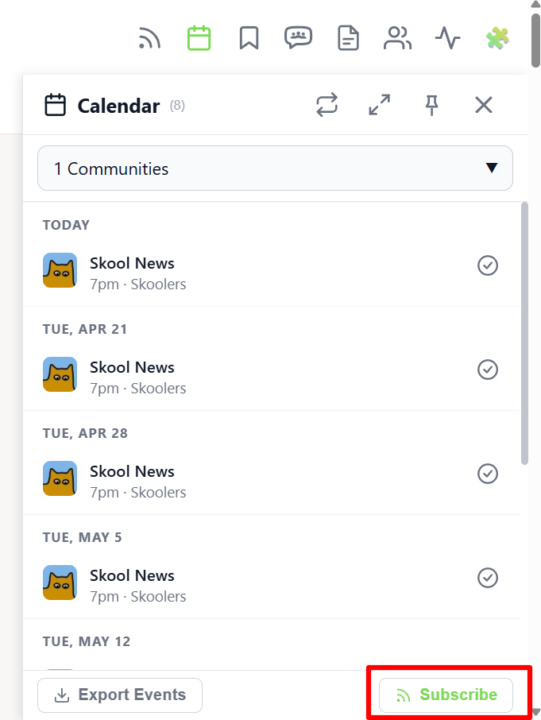
Calendar Subscribe
𝗖𝗮𝗹𝗲𝗻𝗱𝗮𝗿 𝗦𝘂𝗯𝘀𝗰𝗿𝗶𝗯𝗲 — 𝗦𝗸𝗼𝗼𝗹 𝗘𝘃𝗲𝗻𝘁𝘀 𝗶𝗻 𝗬𝗼𝘂𝗿 𝗣𝗲𝗿𝘀𝗼𝗻𝗮𝗹 𝗖𝗮𝗹𝗲𝗻𝗱𝗮𝗿 You already have Google Calendar, Apple Calendar or Outlook open all day — so why check a separate sidebar to know when the next Skool event starts? With Calendar Subscribe you get a personal iCal feed URL that pulls every event from every Skool community you're part of directly into the calendar app you already use. Open the Calendar Sidebar and click the Subscribe button in the header. A dialog shows your private iCal URL together with one-click instructions for Google Calendar, Apple Calendar, Outlook (Desktop) and Outlook.com — copy the link, paste it into your calendar app's "Add by URL" / "Subscribe" dialog, and you're done. Your external calendar refreshes the feed automatically, so newly created Skool events appear without you lifting a finger. The feed is personal to your account and covers every community you've joined — no per-community setup, no manual exports, no missed live calls. Whenever you leave or join a community, the feed updates on the next sync. Combined with the Attend button and the per-event Add-to-Calendar menu, Calendar Subscribe turns Skool into a first-class part of your everyday scheduling workflow. --- 𝗞𝗮𝗹𝗲𝗻𝗱𝗲𝗿-𝗔𝗯𝗼 — 𝗦𝗸𝗼𝗼𝗹-𝗘𝘃𝗲𝗻𝘁𝘀 𝗶𝗻 𝗱𝗲𝗶𝗻𝗲𝗺 𝗽𝗲𝗿𝘀ö𝗻𝗹𝗶𝗰𝗵𝗲𝗻 𝗞𝗮𝗹𝗲𝗻𝗱𝗲𝗿 Du hast Google Kalender, Apple Kalender oder Outlook sowieso den ganzen Tag offen — warum also extra in eine separate Sidebar schauen, um zu wissen, wann das nächste Skool-Event startet? Mit dem Kalender-Abo bekommst du eine persönliche iCal-Feed-URL, die jedes Event aus jeder deiner Skool-Communities direkt in die Kalender-App zieht, die du ohnehin nutzt. Öffne die Kalender-Sidebar und klick auf den Abo-Button im Header. Ein Dialog zeigt deine private iCal-URL zusammen mit Klick-für-Klick-Anleitungen für Google Kalender, Apple Kalender, Outlook (Desktop) und Outlook.com — Link kopieren, im "Per URL hinzufügen" / "Abonnieren"-Dialog deiner Kalender-App einfügen, fertig. Dein externer Kalender aktualisiert den Feed automatisch, sodass neu erstellte Skool-Events ohne dein Zutun erscheinen.
1 like • 7d
A very simple way thanks for explaining
1-4 of 4

@michael-muirhead-8022
I'm Mic to friends I have ADHD ,autism,colourblind , dyslexia and dyspraxia I'mMarried 39;years old a huge marvel and wrestling fan DC Pokémon
Active 3h ago
Joined Oct 23, 2026
Powered by