Activity
Mon
Wed
Fri
Sun
Oct
Nov
Dec
Jan
Feb
Mar
Apr
May
Jun
Jul
Aug
Sep
What is this?
Less
More
AI Automation Made Easy
20.4k members • Free
auratech lab
849 members • Free
Ninjas AI Automation
5k members • Free
The RoboNuggets Network (free)
75k members • Free
Chase AI Community
77.3k members • Free
AI Visual Production Lab
5.2k members • Free
MechaPizzAI Community
2.3k members • Free
AI Video Bootcamp
27.5k members • $9/month
Thomas Skool Community
2.2k members • $15/month
9 contributions to The Weave Way™ | Master Nodes

8d •
Day 1. The Gen Effect challenge starts now.
September 1st, so the challenge is live. One Gen Effect node every day this month, and I'm already deep in it. Quick reminder of what this node is: you describe an effect and get back a working node with full control. Sliders, values, whatever the effect needs. No coding required, though writing your prompt in JSON helps a lot. The best way I can explain it: imagine every tool in Photoshop/Premiere, except you build the exact one you need and combine them however you want. Here's the thing that surprised me on day one. The effect that's already earned a permanent spot in my workflow isn't visual at all. It's a purely practical one that just saves me time, every single day. I expected the flashy stuff to win me over first. Instead it was the boring, useful node. That tells you how wide this thing goes. Because that's the real point here. This node is diverse in a way that's easy to underestimate. Illustrators, photographers, retouchers, VFX, editors, anyone working creatively with image or video can pull something out of it. It can sit in the middle of a workflow or be the final step. It can be a wild visual effect or a tiny rotate tool. Non-destructive, so no quality loss, and you can chain and combine them endlessly. 📅 First batch drops in a week. It'll be a mix, from proper visual effects to the dead-practical stuff, for both stills and video. Preview below of what's coming. 👇 And the challenge is open. If there's an effect you'd actually use, drop it. I'll build the ones that come from this community with my own credits and time.


0 likes • 5d
I’ll share my workflow when I get back from vacation! I created about 250 gen effect nodes organized by category on the day of the announcements. I’d love to hear your feedback!
Jul 2 •
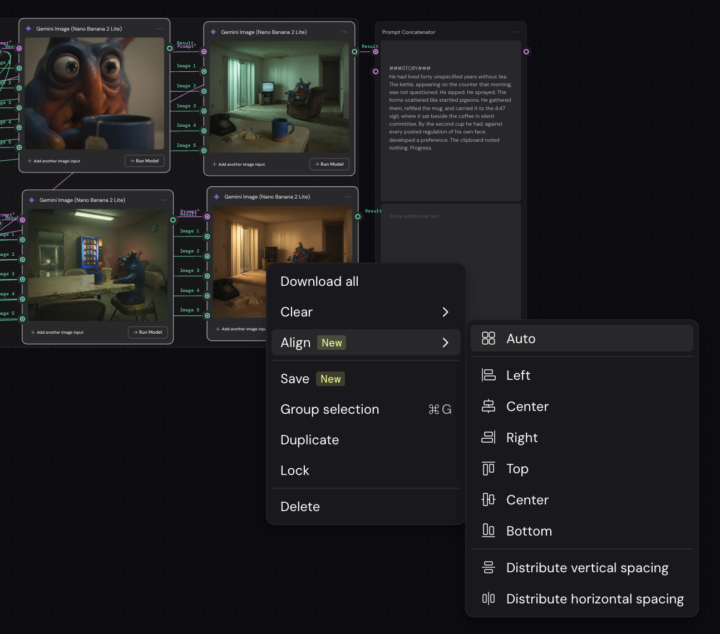
No more excuses for a messy canvas. Weave added Align.
Small update, big for anyone who cares about clean workflows: Align is now in the right-click menu. Auto, left, center, right, distribute spacing. One click and your canvas is tidy again. If you build workflows other people have to read, this earns its place fast. And if your nodes are still scattered everywhere, that's on you now.
0 likes • Jul 3
I'm waiting for this simple feature for a while !
Apr 14 •
Three canvas updates just dropped in Weavy — and they're ones you'll actually use daily.
1. Drag to Connect. Pull a wire, hover over a node, and it locks in automatically. 2. Router from Handle. Double-click any handle and a router spins up instantly. No extra steps. 3. Multi-Wire Select. Draw a box around your wires. Delete the whole mess in one go. Small changes. Big difference in how fast you can build. What feature would make your workflow feel smoother? Drop it below 👇

1 like • Apr 14
Yes same, I rename and group all the routeurs, not my favorite part, but I like to see my workflow well organised. And it motivate me to push it the workflow further because everything is connected. I have so many workflows to build !
1 like • Apr 14
@Jamy Vodegel nice ! Love to see I am not the only one !
Mar 28 •
🏁 Rims Workflow — Your Turn
Drop your biggest takeaway from this classroom lesson. One sentence is enough. Now the real challenge: this workflow is not about rims. It's about placing any product in any context. A sneaker. A piece of furniture. A bag. A bike. How would you make this work for your own projects? What would you change? Share your workflow or your idea below. 👇

0 likes • Mar 28
@Jamy Vodegel I love this version. Creating the artistic direction is the most interesting part for me. When I’m able to turn a vision into something real, that’s the part I enjoy the most.
1 like • Apr 3
@Jirka Stávek yes this month possible. Actually I'm working for a big client to create him a garment and model editorial studio photoshoot system inside weavy. Fashion domain is the biggest Ai market actually. Agencies try to know how to do it with volumes, consistency and reproductibility
Apr 2 •
New filter update.
A small visual update to the Weavy platform: you can now select your input and output, and filters will automatically match the appropriate models. Nice use of color!

2 likes • Apr 2
Weavy is truly the best; it’s evolving so quickly. The market is really changing, and I’m happy to be part of it!
1-9 of 9

Active 20h ago
Joined Mar 12, 2026
INTJ
Powered by