Activity
Mon
Wed
Fri
Sun
Jan
Feb
Mar
Apr
May
Jun
Jul
Aug
Sep
Oct
Nov
Dec
What is this?
Less
More
Memberships
KubeCraft Career Accelerator
810 members • $1,167/month
KubeCraft (Free)
11k members • Free
5 contributions to KubeCraft (Free)

Oct 28 •
How do you access your homelab?
For the past two years or so, I've been using Wireguard to tunnel into my homelab while keeping most services running locally on my network. It works well enough, but I'm wondering how others here access their homelabs. I know this community has both people new to homelabbing and experienced self-hosters. I'd love to hear whats worked (or failed spectacularly) for you. Some specific things I'm curious about: - Are you exposing your services to the internet or just running them locally - If you are exposing them, how? Using VPN solutions (Wireguard, Tailscale) or some type of reverse proxy (Cloudflare tunnel, NGINX) - What made you choose your current setup Curious to hear what everyone’s running, and whether you’d do anything differently looking back.
1 like • Oct 28
@John Dough Wow, really nice! I like that you put so much though into it, especially the security side of things. I hope to implement some, if not all of it when i migrate my homelab to kubernetes soon, especially the personal website part!
1 like • Oct 29
@John Dough Completely agree with your approach to privacy and security. Keep up the great work!

Oct 28 •
Customizing Your Terminal Name — Give Your Lab Some Personality!
Hey folks 👋 While practicing Bash commands in my home lab, I found a quick way to customize the terminal name — and it honestly makes your setup feel way more personal and DevOps-ready 😎 Instead of the default name: root@pve:~#:~$ You can make it something like: devlab@ubuntu:~$ ⚙️ Try it yourself: For Mac (Zsh) or Ubuntu (Bash) users — open your config file: nano ~/.zshrc # for Mac nano ~/.bashrc # for Ubuntu Add this line: PROMPT='devlab@lab %1~ %# ' # zsh PS1='devlab@lab:\w\$ ' # bash Save and reload: source ~/.zshrc || source ~/.bashrc Optional — rename your system too: sudo hostnamectl set-hostname devlab It’s a small tweak, but it really makes your terminal feel like your own playground. If you’ve customized yours too, drop a screenshot or name idea below 👇
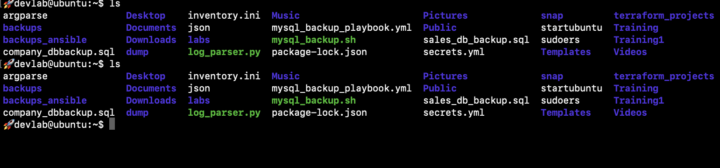
2 likes • Oct 28
I use this relatively minimal one, however i always have a different color of '>' on every machine 😁. If you use zsh and like customizing you can check out https://ohmyz.sh/, they have a lot of predefined themes and plugins you can use.

👑
⭐
Oct '24 •
Start Here: Introduce Yourself & Get Your First Win
Welcome to KubeCraft. The community where (aspiring) DevOps engineers become undeniable. You are not here to collect endless tutorials. You are here to get hired, build real skills, and move forward with people who want the same outcome. Inside KubeCraft, we share one mission: Become a high paid DevOps engineer while solving real world problems together trough DevOps Craftsmanship. You are no longer doing this alone. You are part of a focused group built to push your growth every step of the way. We help you to: • Build real world DevOps skills through projects, challenges, and proof of work • Land your first DevOps role or level up your current one • Stay accountable inside a community that expects action, not excuses You are in the right place if: • You want to become a DevOps or Cloud engineer and are passionate about this craft • You are willing to do the work, ask questions, and support others • You want a real DevOps environment, not another passive course platform Follow these steps: 1. Post your introduction below (and level up to level 2+ fast) 2. Like & reply to other introductions 3. Your onboarding shows how this community works and what is expected 4. You will see exactly how to create momentum fast with the Welcome to the KubeCraft, Crafter. Let’s get to work.
Poll
2470 members have voted
3 likes • Oct 28
Hi everybody, I'm Marko from Serbia. As I'm in my final year of university I've decided to build up my skills and break into the industry as a DevOps engineer! I'm exited to learn and grow together with this community. Looking forward to connecting with everyone 😁

Oct 27 •
Used docker-compose successfully :)
Just had a pretty sweet victory: I successfully set up Docker Compose to get my FastAPI, React, and PostgreSQL patient management app running with containers. Feeling great about that one! It's really nice to see it actually working in practice. Next: Kubernetes :)
9 likes • Oct 27
Great job! I actually also went on to polish my docker skills by studying this docker course Mischa recommended in one of his youtube videos. If anybody is interested this is the link: https://www.youtube.com/watch?v=RqTEHSBrYFw
2 likes • Oct 27
@Tomasz Wesołowski Thank you, I'll have a look at that one as well!

Oct 26 •
Relaxing post, don't take it seriously..🙂
I love my work. Sometimes I need to touch the nature. It boosts my productivity 10x. These are some of my last expeditions in the wild mountainous forest in Bangladesh. Guys, what do you do to charge up and conquer?

4 likes • Oct 26
Pics look good! I like to take motorcycle rides trough some nature 😁
1-5 of 5