Activity
Mon
Wed
Fri
Sun
Sep
Oct
Nov
Dec
Jan
Feb
Mar
Apr
May
Jun
Jul
Aug
What is this?
Less
More
Memberships
Learning Jazz Violin
815 members • Free
Strum Bowing Groove Academy
434 members • Free
5 contributions to Learning Jazz Violin
Jul 4 •
Recording
If I'm listening to the backing track in here, how do I record at the same time? Or are you using two devices...
2 likes • Jul 5
Hi @Tamsin Haggis - I posted this in @Matt Holborn's tutorial, but am pasting it in this original thread here. Best wishes! Hi Jazz friends! When I first started recording myself with a track playing, I thought I needed a lot of gear, but found that my laptop and onboard camera app is really all I need to submit my recordings - if you have a Windows 11 computer. Here's how: 1. Get your backing track ready. 2. Then open your Camera app (every Windows 11 computer has one) 3. Click on the video camera icon on the right menu (or wherever it resides for you) to start your recording. 4. Start your backing track (whether CD, your music library, iTunes, YouTube, etc.). 5. Start playing! I like to click back on my camera app so I can make sure the frame is catching what it needs to while I am recording. You may have to mess around with setting volumes, and having a webcam, and/or an audio interface connected to your laptop will make it sound more professional and clear. So, with only one device, you can do it all! Unfortunately, Mac's don't have an onboard camera app but you can explore the app store to find one and try it there as well. Happy playing!

Jul 5 •
READ ME-Recording yourself
Hi all a little step by step for recording yourself playing with a backing track easily. Had a few questions about this so thought I would clarify. This is the most simple way to do it but you will need 2 devices. (Most of us have this nowadays I’m sure) 1. You will need a laptop/pc with inbuilt speakers or that have speakers attached/bluetooth 2. Make sure you can hear the backing track coming out of those speakers 3. Set up your phone to record you and the backing track. Doesn’t need to be amazing picture quality just make sure we can see you play 4. Hit record then press play on your laptop Let me know if you have any questions.
0 likes • Jul 5
Hi Jazz friends! When I first started recording myself with a track playing, I thought I needed a lot of gear, but found that my laptop and onboard camera app is really all I need to submit my recordings - if you have a Windows 11 computer. Here's how: 1. Get your backing track ready. 2. Then open your Camera app (every Windows 11 computer has one) 3. Click on the video camera icon on the right menu (or wherever it resides for you) to start your recording. 4. Start your backing track (whether CD, your music library, iTunes, YouTube, etc.). 5. Start playing! I like to click back on my camera app so I can make sure the frame is catching what it needs to while I am recording. You may have to mess around with setting volumes, and having a webcam, and/or an audio interface connected to your laptop will make it sound more professional and clear. So, with only one device, you can do it all! Unfortunately, Mac's don't have an onboard camera app but you can explore the app store to find one and try it there as well. Happy playing!
Jun 16 •
Lick of the Week
Challenge! Record your version of this, depending on what’s doable for you, either… In the original key (C Major over a G7) In a few other keys Inside an improvisation over a standard Or as we did last night in practise club, see below… We worked on this one in practise club last night. We took the pattern that this line is based on and played it all the way through all the chords in the C major scale, helping us understand why the melody works and how we can use it. What does this do? Helps us navigate the major scale with patterns and enclosures Drills the sound into our ears and fingers Serves as a technical exercise for our left hand If you are interested in trying out the jazz violin practise club for freejust send me a message or comment on this post.

5 likes • Jun 16
I don't know if you meant us to post our recording, but here it is. I slurred the first two notes but I like the distinctness of the separate bow strokes, as you did.
Jun 15 •
New To Jazz Violin?
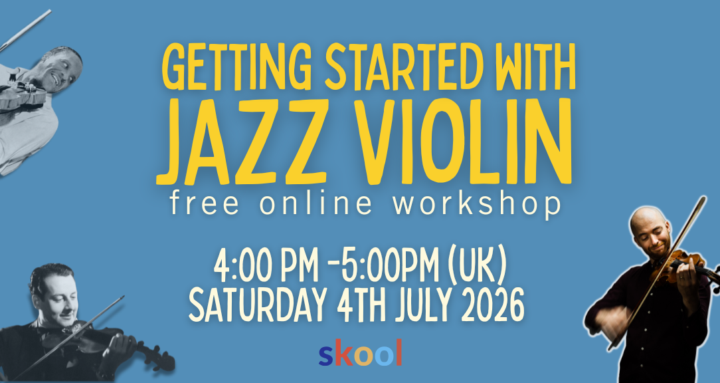
Our free starter workshop last month was a blast! We had about 15 people from all over the world join us to work on the A section of Lady Be Good. I'm running the next one on July 4th! It's going to be a repeat of the same material for anyone new or anyone who couldn't make it. Register HERE
1 like • Jun 15
It was great, Matt! I learned a lot. I also learned that I knew more than I thought I did (by instinct, really, rather than through training). I really enjoyed it and highly recommend it!
Jun 13 •
What you up to this weekend?
I’m mainly hanging out with family today and tomorrow, I’m sat in a park in south east London right now not really doing much moving because I injured my knee… This afternoon at 4pm however I’m jumping on zoom for a free workshop “getting started with jazz violin”, just for you LJV skoolers. It’s for violinists who are totally new to jazz who want a simple way in. You can sign up via the link below or in the calendar section up top. https://us02web.zoom.us/meeting/register/cWbXLCGRSPOcRwg_nXlFUA#/registration Let me know in the comments what you are up to this weekend! If you are practising, why not show us what you are up to with a video?

0 likes • Jun 13
Hi there from Carlisle Pennsylvania! Had a concert last night with my band for a Library summer concert series, and playing a beautiful deck gig at a restaurant/bar this evening. Looking forward to attending your workshop soon!
1-5 of 5
@marianna-schaffer-2616
Electric violin and 5-string bass player, playing 70's rock, roots, blues, contemporary Christian, and anything else I'm asked to play.
Active 7h ago
Joined Jun 3, 2026
ESTP
Carlisle PA
Powered by