Activity
Mon
Wed
Fri
Sun
Aug
Sep
Oct
Nov
Dec
Jan
Feb
Mar
Apr
May
Jun
Jul
What is this?
Less
More
Owned by Lolita
Learn how to go LIVE on TikTok with pro audio, sound card setups, music, and real strategies to turn viewers into income.
Memberships
AI Freedom Launch Accelerator
3.2k members • Free
Less Hustle Tribe
5.1k members • Free
GoHighlevel For Entrepreneurs
1k members • Free
NextGen AI
45.9k members • Free
The Aigent Lab
180 members • $67/month
BMS Masterclass
5k members • Free
Skoolers
165.8k members • Free
AI CRE8R™
328 members • $3/month
Darren Monroe Marketing Vault
33 members • $25/month
65 contributions to TikTok LIVE For Creators

1 like • 2d
😂😂 Happy Friday!!!

3d •
Claude or ChatGPT
Good morning everyone! I hope everyone’s having a great Thursday so far! This is off-topic, but which AI tool do you prefer I’ve been annoyed with ChatGPT lately and a friend recently put me onto Claude. I tried it as a free trial and I actually like it! ChatGPT has been giving me false information lately and I’m looking for a second AI opinion lol!
1 like • 3d
👍🏾 Claude is my top ai tool I use! We have different skills and projects created and set up, not only for our real estate business for my content creation business as well.
1 like • 2d
@Michelle Brassel 😂😂 Yes it will.
8d •
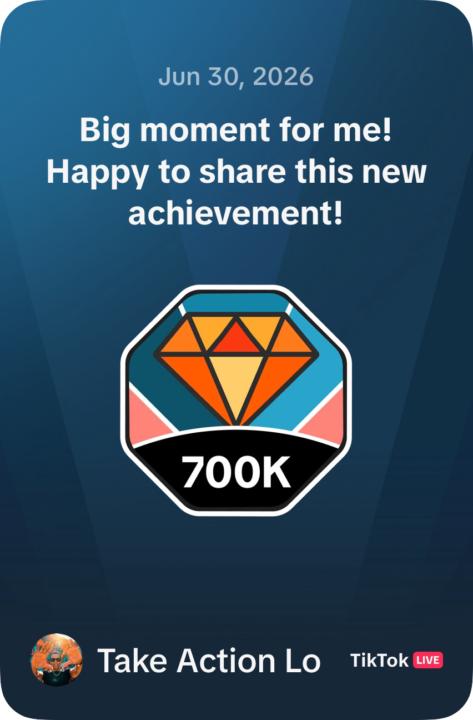
💎 700,000 DIAMONDS — HERE’S WHAT THAT MEANS IN REAL MONEY
I was asked to see the back end. Let’s get into it. TikTok recently notified me — I’ve received over 700,000 diamonds on TikTok LIVE. With under 22,000 followers. 💰 THE BREAKDOWN Here’s how diamonds convert to dollars: - 700,000 diamonds × $0.005 = approximately $3,500 in gifts - From a loyal live audience - With no viral moment. No massive following. No shortcut. Just showing up live. Consistently. 📈 MY REAL STORY I started with 5 to 10 people watching my lives. I went from 2,300 to 10,000+ followers in under 60 days going live consistently. I made it fun. I added music, old school R&B, soul, funk. The vibe grew. The community grew. The diamonds followed. 700K didn’t happen overnight. It happened because I kept showing up when the numbers were small. 🔥 NOW LET ME BE REAL WITH YOU Some of you have gone quiet. I see you. And I need you to hear this — Every week you don’t go live is a week your audience didn’t get to meet you. The only difference between where I am and where you are? I went live. That’s it. ✅ YOUR ASSIGNMENT THIS WEEK Go live once. That’s all. No perfect plan. No perfect setup. Just hit the button. Then drop 🎙️ in the comments so I know you did it. I’ll personally cheer you on. Let’s go. 💜👊🏾
1 like • 3d
@Michelle Brassel Hey, thought I responded lol. You are more than welcome and of course I will going live 😊👊🏾
5d •
🚨 TUESDAY UPDATE: What Just Changed on TikTok This Week
Here's what's new and what to do about it. 👇 📊 THE ALGORITHM JUST SHIFTED — PAY ATTENTION TikTok now shows your video to your followers FIRST. If they watch to the end and engage fast — TikTok pushes it wider. If they don't — it stops there. You now need a 70% completion rate to go viral. Up from 50% last year. The play: ✅ Hook your audience in the first 3 seconds — no slow intros ✅ Post when YOUR followers are actually online ✅ Keep energy up the entire video — no dead zones ✅ Don't panic at slow starts — videos now grow over time. Give it 24-48 hours before you judge it. 🎵 NEW: LIVE TALENT FEATURE FOR MUSIC CREATORS TikTok just dropped a "Live Talent" feature built specifically for music-based LIVE creators — DJs, musicians, singers. TikTok is investing in YOU. Get in front of this wave NOW before everyone catches on. 📸 NEW: COVER TITLE FEATURE — USE THIS TODAY Add a floating searchable title to your videos. Think of it like SEO for TikTok. The play: Next time you post about your LIVE add a Cover Title like "How I Make Money Going LIVE" or "TikTok Sound Card Setup." Free organic reach. No extra work. ⚠️ HEADS UP TikTok now notifies creators when someone tries to screenshot or screen record your LIVE. Your content is protected. ✅ YOUR ACTION STEPS THIS WEEK: 1. Update your TikTok app — new features only appear on updated versions 2. Try the Cover Title on your next post 3. Tighten your opening 10 seconds before your next LIVE 4. Go LIVE at least once — the Live Talent feature means TikTok is pushing music creators right now. Don't sleep on it. Questions about any of these? Drop them below. 👇

1 like • 4d
🙄😬 TikTok is always making some sort of changes or updates as all social media platforms do (don't believe we can get around that). Main thing to keep in mind is they reward for consistency. As far as viewers, it can fluctuate. My last two lives the viewers were a little lower but always seems to pick back up as long as I stay consistent. Here is a better breakdown that I found for the live talent feature: TikTok LIVE Talent — What It Is (Quick Version) It's TikTok's official status program for musicians/singers who go LIVE. Basically TikTok saying "you're a verified performer" and rewarding you for it. What You Get: - 🎁 Exclusive high-tier gifts fans can send you - 🏅 Official badge on your profile - 🎤 Priority access to music campaigns (like Music On Stage) - 📈 Extra reach via Music LIVE Spotlight How to Qualify: - 18+ and 1,000+ followers - Clean account (no violations) - Apply/audition — post performances using #MusicOnStage or join TikTok LIVE casting events. Bottom line: If you sing or perform, this is a status worth chasing — more visibility + more ways to get paid while you're LIVE. 🎶
1 like • 3d
@Michelle Brassel 😊 Wow, chills…. “I would never be lying there thinking, man I really wish I had gotten that damn license.” 😂 💜 That’s not just clarity, that’s your soul talking. And you listened. And look at how it played out, the machine came back too expensive to justify. Not broken. Not cheap. Just expensive enough to make you CHOOSE. And you chose yourself. 🔥 This is the most powerful thing I’ve seen shared in this community. She didn’t wait until the fear went away. She made a decision with her whole chest while still scared. THAT is what betting on yourself looks like. And she’s keeping the day job while building the dream, that’s not reckless. That’s strategic AND courageous. We are ALL rooting for you in here Michelle. 💜 Now go build. The music world needs exactly what YOU bring to it. 🎧🎶🔥 👊🏾 Feel free to post and or add to the calendar when you go live if you like. Myself and hoping others will definitely join to support you.
9d •
🎆 HAPPY 4TH OF JULY FAM! Freedom, Gratitude & A Message From My Heart
Happy Fourth of July! 🇺🇸 Today is about freedom. And I want to take a moment to connect that to something bigger than fireworks and cookouts. Freedom looks different for all of us. For some of us freedom means leaving a 9 to 5 that's draining the life out of us. For others it means building something our kids and family can be proud of. For some it means finally having the courage to press that go live button. And for others it simply means waking up and choosing to bet on yourself one more day. Whatever freedom looks like for you — I want you to know that you are closer to it than you think. I'm grateful for every single one of you in this community. You could be anywhere on the internet right now. You chose to be here. You chose to learn, grow, and take action even when it felt uncomfortable. That's not small. That's everything. I've watched a few of you of you go from "I'm terrified to go live" to hitting that button and having your audience beg you to stay on longer. I've watched breakthroughs happen in real time right here in this group. And I don't take that lightly. 💜 Here's your reminder going into this holiday weekend: 🎆 You don't need to have it all figured out. Just keep moving. 🎆 Progress isn't always loud. Sometimes it's quiet and behind the scenes and that still counts. 🎆 The version of you that's living in freedom, financially, creatively, professionally — is being built right now. Every post. Every LIVE. Every time you show up. 🎆 Don't compare your Chapter 1 to someone else's Chapter 20. Stay in your lane and keep building. 🎆 And most importantly, celebrate how far you've already come. Not just where you're going. This community exists because I believe in your potential more than your fear does. Whether you're a realtor trying to generate leads, a DJ building your brand, a creator monetizing your passion, or an entrepreneur building your first income stream online, there is room for ALL of you to win. And we're going to win together. Enjoy your holiday. Rest. Celebrate. Eat good food. Laugh with your people. You deserve it.

1 like • 6d
@Michelle Brassel 😭 A SEVEN YEAR OLD sending 213 hearts and telling you "come back here, I want to hear Lo"?! I am DONE. That is the most precious thing. 😂💜 Tell him DJ Lo says thank you. Those 213 hearts made my whole year. 🎧 Now back to YOU — The fact that you shipped that machine out and you're waiting on a sign? That's faith in action. And here's what I know — either way the answer comes back, you already know what you're going to do. Both paths lead somewhere great because YOU are the variable, not the machine. ✅ It gets repaired — finish what you started, use that certification to fund the dream properly ✅ It can't be repaired — go all in on what's been calling you since 2017 with no looking back What's not an option either way? Stopping. 😂 The turntables, the controller, the equipment, it's all coming. TikTok LIVE will help fund it. Gifts, affiliates, bookings, brand deals. That's the whole point of this community. Keep us posted on that steno machine 🙏🏾🔥
1 like • 6d
@Michelle Brassel 😊👊🏾🔥 NICE!!! Post when you are going live here (an hour or so before) if you want so myself and anyone else here in the group can come and support you.
1-10 of 65
@lolita-sheriow-6951
Content Creator, RE Coach and Digital Marketer chasing BETTER & helping others do the same.
Active 7h ago
Joined Dec 10, 2025