Activity
Mon
Wed
Fri
Sun
Aug
Sep
Oct
Nov
Dec
Jan
Feb
Mar
Apr
May
Jun
What is this?
Less
More
Owned by Lara
You wrote the book – now make it heard & reach thousands of listeners on the main platforms. Free resources, step-by-step guides. EN · DE · ES
Memberships
Course Creator Community ❤️🔥
162 members • Free
Code your ideas - Vibe Coding
486 members • Free
Strong Core Moms
62 members • Free
The A.T.M. Method | Amazon
673 members • Free
KDP Publishing
1.2k members • Free
KI Buch Club 🔥 ⭐⭐⭐⭐⭐
748 members • Free
GOOSIFY: Skool Made Fun
13.1k members • Free
🎬 AI STORYTELLERS 📖
507 members • Free
28-Day Action Plan™
185 members • Free
7 contributions to Skool Extensions 🧩

🔥
4d •
🎉 We Just Hit 1,000 Users
🎉 1,000+ Extension Users! What started as a small project is now being used by more than 1,000 people. A huge 𝘁𝗵𝗮𝗻𝗸 𝘆𝗼𝘂 to everyone who has installed the extension, shared feedback, reported bugs, suggested new features, and supported the project along the way. Your feedback has had a direct impact on its development. And this is only the beginning. There are many more features, improvements, and ideas on the roadmap, and I'm excited to continue building them together with you. Thank you for using the extension and being part of this journey. Here's to the next 1,000! --- 🎉 Über 1.000 Extension-Nutzer! Was als kleines Projekt begann, wird inzwischen von über 𝟭.𝟬𝟬𝟬 𝗡𝘂𝘁𝘇𝗲𝗿𝗻 verwendet. Ein riesiges 𝗗𝗮𝗻𝗸𝗲𝘀𝗰𝗵𝗼̈𝗻 an alle, die die Extension installiert, Feedback gegeben, Bugs gemeldet, neue Features vorgeschlagen oder das Projekt unterstützt haben. Eure Rückmeldungen haben die Entwicklung maßgeblich beeinflusst. Und das ist erst der Anfang. Es warten noch viele neue Features, Verbesserungen und Ideen darauf, umgesetzt zu werden. Und ich freue mich darauf, diesen Weg gemeinsam mit euch weiterzugehen. Danke, dass ihr die Extension nutzt und Teil dieser Reise seid. Auf die nächsten 1.000!


🔥
5 likes • 4d
congratulations!
🔥
9d •
🚀 Live Call Tomorrow!
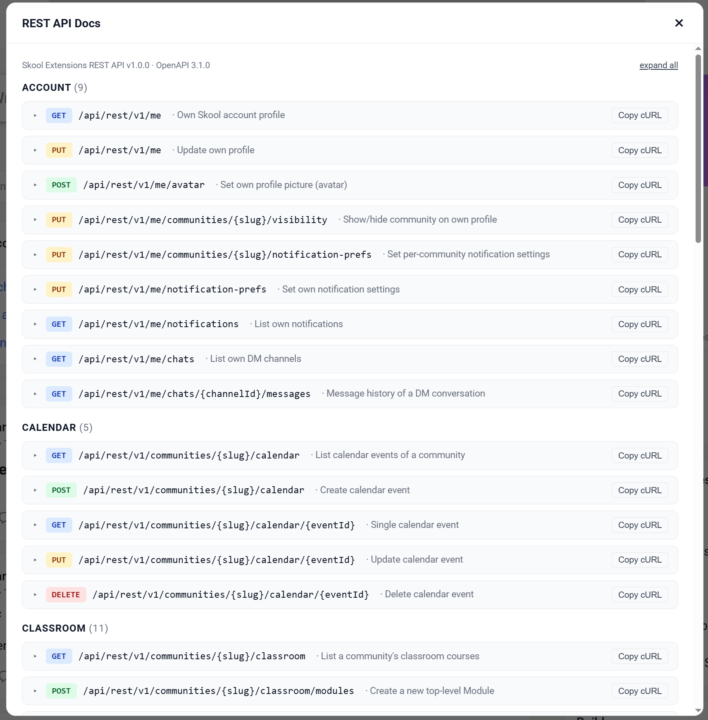
Join me tomorrow for a live session where we'll cover: - Skool 𝗔𝗣𝗜 - Skool 𝗠𝗖𝗣 - Live 𝗤&𝗔 Whether you're building tools, exploring AI integrations, or simply want to get more out of Skool, this call is for you. Bring your questions, ideas, and projects — see you there! 🔥 P.S. Check it in the global calendar ✔️
🔥
3 likes • 9d
[attachment]
🔥
14d •
Schedule Posts (Premium Feature 👑)
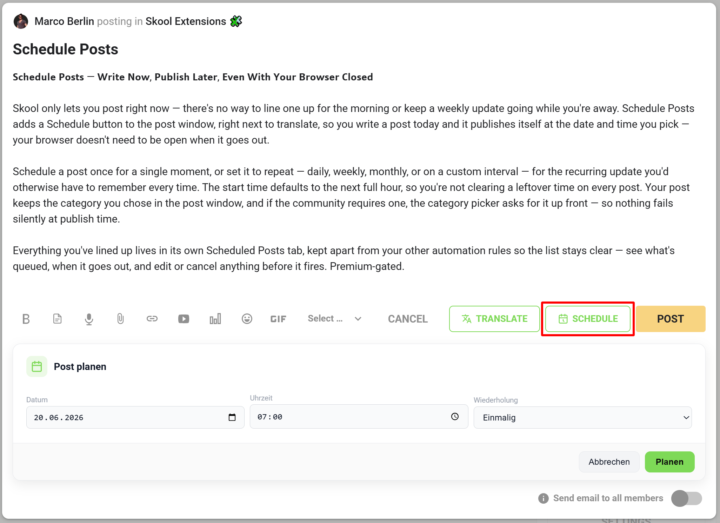
𝗦𝗰𝗵𝗲𝗱𝘂𝗹𝗲 𝗣𝗼𝘀𝘁𝘀 — 𝗪𝗿𝗶𝘁𝗲 𝗡𝗼𝘄, 𝗣𝘂𝗯𝗹𝗶𝘀𝗵 𝗟𝗮𝘁𝗲𝗿, 𝗘𝘃𝗲𝗻 𝗪𝗶𝘁𝗵 𝗬𝗼𝘂𝗿 𝗕𝗿𝗼𝘄𝘀𝗲𝗿 𝗖𝗹𝗼𝘀𝗲𝗱 Skool only lets you post right now — there's no way to line one up for the morning or keep a weekly update going while you're away. Schedule Posts adds a Schedule button to the post window, right next to translate, so you write a post today and it publishes itself at the date and time you pick — your browser doesn't need to be open when it goes out. Schedule a post once for a single moment, or set it to repeat — daily, weekly, monthly, or on a custom interval — for the recurring update you'd otherwise have to remember every time. The start time defaults to the next full hour, so you're not clearing a leftover time on every post. Your post keeps the category you chose in the post window, and if the community requires one, the category picker asks for it up front — so nothing fails silently at publish time. Everything you've lined up lives in its own Scheduled Posts tab, kept apart from your other automation rules so the list stays clear — see what's queued, when it goes out, and edit or cancel anything before it fires. --- 𝗣𝗼𝘀𝘁𝘀 𝗽𝗹𝗮𝗻𝗲𝗻 — 𝗝𝗲𝘁𝘇𝘁 𝘀𝗰𝗵𝗿𝗲𝗶𝗯𝗲𝗻, 𝘀𝗽𝗮̈𝘁𝗲𝗿 𝘃𝗲𝗿𝗼̈𝗳𝗳𝗲𝗻𝘁𝗹𝗶𝗰𝗵𝗲𝗻, 𝗮𝘂𝗰𝗵 𝗯𝗲𝗶 𝗴𝗲𝘀𝗰𝗵𝗹𝗼𝘀𝘀𝗲𝗻𝗲𝗺 𝗕𝗿𝗼𝘄𝘀𝗲𝗿 Skool lässt dich nur sofort posten — es gibt keine Möglichkeit, einen Beitrag für den Morgen vorzubereiten oder ein wöchentliches Update laufen zu lassen, während du weg bist. „Posts planen" fügt dem Postfenster einen Planen-Button hinzu, gleich neben „Übersetzen": Du schreibst einen Post heute, und er veröffentlicht sich von selbst zum Datum und zur Uhrzeit, die du wählst — dein Browser muss dafür nicht offen sein. Plane einen Post einmalig für einen einzelnen Zeitpunkt oder stell ihn auf wiederkehrend — täglich, wöchentlich, monatlich oder im eigenen Intervall — für das regelmäßige Update, an das du sonst jedes Mal denken müsstest. Die Startzeit steht standardmäßig auf der nächsten vollen Stunde, sodass du keine übrig gebliebene Uhrzeit bei jedem Post wegklicken musst. Dein Post behält die Kategorie, die du im Postfenster gewählt hast, und braucht die Community eine, fragt die Kategorie-Auswahl gleich danach — so scheitert nichts still beim Veröffentlichen.
🔥
3 likes • 11d
@Veronika Stix Hi Veronika, schön, dich hier zu treffen
🔥
3 likes • 11d
@Zak King 😂
🔥
12d •
Keyboard Shortcuts
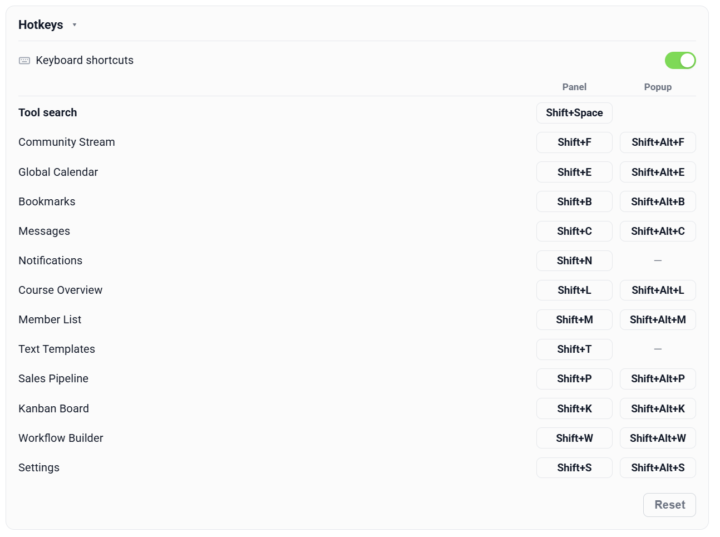
𝗞𝗲𝘆𝗯𝗼𝗮𝗿𝗱 𝗦𝗵𝗼𝗿𝘁𝗰𝘂𝘁𝘀 — 𝗢𝗽𝗲𝗻 𝗔𝗻𝘆 𝗣𝗮𝗻𝗲𝗹 𝗪𝗶𝘁𝗵𝗼𝘂𝘁 𝗥𝗲𝗮𝗰𝗵𝗶𝗻𝗴 𝗳𝗼𝗿 𝘁𝗵𝗲 𝗠𝗼𝘂𝘀𝗲 Every Skool Extensions panel sits behind a toolbar click — fine once, tiresome when you bounce between Calendar, Members and the Stream all day. Keyboard Shortcuts turns the whole toolkit keyboard-first: a new Hotkeys section in the Settings carries a master switch that turns shortcuts on or off, and from there every panel gets its own key combo. Each panel carries two bindings — one to open it in the sidebar, one to pop it out into the larger window — so you land straight in the view you want. Click a binding field, press the combo you'd like, and it's set. The defaults follow a simple scheme — Shift plus the panel's letter for the sidebar, Shift+Alt for the pop-out — but every one is yours to rebind. Live conflict detection flags a combo that's already taken before it can collide, and one click resets the whole set back to defaults. Your bindings are saved and synced across your devices. There's also a Tool search — its own shortcut opens a search box over the page where you type to filter every tool and panel at once. Enter opens the match in the sidebar, Shift+Enter pops it out. No hunting through the toolbar when you can't remember where something lives — open the search, type a few letters and go. Keyboard Shortcuts can be toggled on or off in the Hotkeys section of the Extension Settings. --- 𝗧𝗮𝘀𝘁𝗮𝘁𝘂𝗿𝗸𝘂̈𝗿𝘇𝗲𝗹 — 𝗝𝗲𝗱𝗲𝘀 𝗣𝗮𝗻𝗲𝗹 𝗼̈𝗳𝗳𝗻𝗲𝗻, 𝗼𝗵𝗻𝗲 𝘇𝘂𝗿 𝗠𝗮𝘂𝘀 𝘇𝘂 𝗴𝗿𝗲𝗶𝗳𝗲𝗻 Jedes Skool-Extensions-Panel sitzt hinter einem Toolbar-Klick — einmal okay, lästig, wenn du den ganzen Tag zwischen Kalender, Mitgliedern und dem Stream springst. Tastaturkürzel macht das ganze Toolkit tastatur-first: Ein neuer Bereich „Tastenkürzel“ in den Einstellungen hat einen Hauptschalter, der die Kürzel ein- oder ausschaltet, und von dort bekommt jedes Panel seine eigene Tastenkombination. Jedes Panel hat zwei Belegungen — eine öffnet es in der Seitenleiste, eine klappt es ins größere Popup-Fenster auf —, sodass du direkt in der gewünschten Ansicht landest. Klick ins Belegungsfeld, drück deine Kombi, fertig. Die Standardwerte folgen einem einfachen Schema — Shift plus der Anfangsbuchstabe des Panels für die Seitenleiste, Shift+Alt fürs Popup —, aber jede lässt sich neu belegen. Eine Live-Konflikterkennung markiert eine bereits vergebene Kombi, bevor sie kollidieren kann, und ein Klick setzt das ganze Set auf die Standardwerte zurück. Deine Belegungen werden gespeichert und über deine Geräte synchronisiert.
🔥
4 likes • 11d
so cool! Thank you @Marco Berlin
🔥
0 likes • 11d
@Kristine Alise ✨👍

🔥
13d •
Workflow creation question
I just upgraded to Premium and would like to create a workflow to welcome new members into my Skool in a POST (I already have an auto DM message that's on) which I am currently doing manually. What I do now is that every time 1 or 2 new members join, I manually create a celebration post to welcome them in. I tag the new member by name and celebrate their arrival into my Skool. Is there a way to create a workflow so that this becomes automatic? Could the workflow include a GIF as well? Thanks for your help!
🔥
3 likes • 12d
great to hear all about this automations... I am only beginning, no automation yet... and hope to change this ... and I am going to change this!
1-7 of 7

🔥
@lara-knutzen
Author & Mentor | Building Global Audio Ecosystems 🎧
English • German • Español
Active 1m ago
Joined Jun 11, 2026
ENFJ
Stuttgart/ Germany
Powered by