Activity
Mon
Wed
Fri
Sun
Nov
Dec
Jan
Feb
Mar
Apr
May
Jun
Jul
Aug
Sep
Oct
What is this?
Less
More
Owned by Joshua
I play PLO (Pot-Limit Omaha).
CoinPicks Genesis
6.7k
5.0
$1/m
Obsidian Metrics
32
Free
Obsidius
209
Free
CyberWebPAGE
68
Free
Agexa: $100¥ Growth Operator
304
5.0
$150/m
Computer Repair Academy
68
Free
Texas Notary State Meetups
202
$11/y
$1k Commission Blueprint
601
4.9
$37/m
The Construct
112
Free
6 contributions to YouTube SEO Academy

Jun 29 •
Reach your home network from anywhere, privately.
Jeff Geerling walks through PiVPN with WireGuard, including DNS, port forwarding, and phone setup with a QR code. Clear and honest about security responsibilities. Requires a public IP or workaround; CGNAT users will need Tailscale instead. Resource: Build your own WireGuard VPN with PiVPN — https://www.jeffgeerling.com/blog/2023/build-your-own-private-wireguard-vpn-pivpn/ (Jeff Geerling) WireGuard or OpenVPN for a home server, and why?

0 likes • Jun 29
Great 🔥 information.
Jun 26 •
Self Hosting (NAS Setup for Beginners)
A Raspberry Pi plus an external USB drive can serve as shared network storage for every device on your home network. the official tutorial walks through the full command-line setup. The Raspberry Pi Foundation's NAS guide covers SSH connection, drive partitioning and formatting, Samba configuration, and accessing the share from macOS, Windows, and iOS. It assumes comfort with a terminal but no programming experience. This isn't a replacement for a dedicated NAS appliance if you need terabytes of data, but it's a solid way to share files locally and learn Linux basics in one project. How to build a Raspberry Pi NAS — https://www.raspberrypi.com/tutorials/nas-box-raspberry-pi-tutorial/ (Raspberry Pi, official tutorial) What would you store on a Pi NAS — documents, photos, media, backups?

1 like • Jun 27
Yes. I would store on a Pi NAS. Documents, Photos, Media and Backups. 🔥

Dec '25 •
hello everyone
im arthur , im here to learn and collaborate on raspberry related project coupled with AI . thank you
0 likes • Jun 24
Welcome, Arthur. 🔥
Apr '25 •
Introduce Yourself
Kick things off by introducing yourself! Share a bit about your background, interests, and any thing you're eager to dive into. It's a fantastic way to connect with like-minded enthusiasts from the start. I've also provided an intro template for inspiration—feel free to use it or put your unique spin on your introduction!

1 like • Jun 24
Hello, I'm Josh. 🔥🔥🔥 I'm currently based in Austin, Texas, and I joined the Pi Mastery community to sharpen my Raspberry Pi skills and build thinqs. 💯💯💯 I'm excited to learn and grow in these 2 areas: Linux Raspberry Pi When I'm not tinkering with tech, I enjoy: Poker Reading Writing ✍️
Oct '25 •
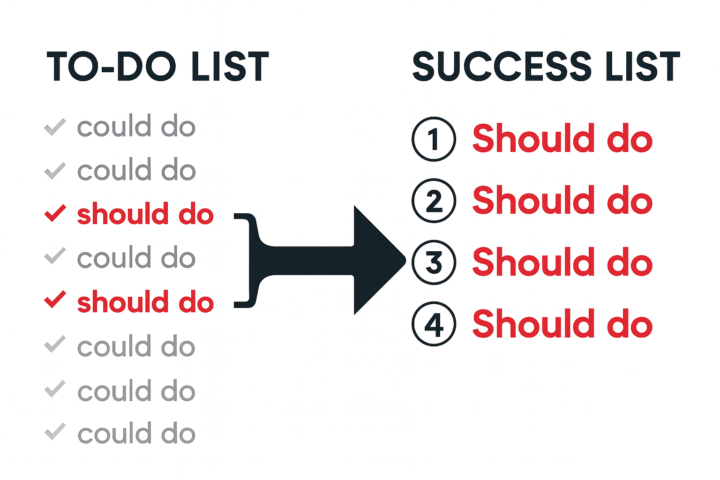
The “Success List” Trick (~10 minutes, big clarity)
Last week we talked about how doing one thing deeply beats doing five things in parallel. This week: how do you choose what matters, when family, work, and life are all yelling for attention? The 3×3 Monthly Reset - 3 Personal Priorities (e.g., exercise 20 min, read 30 min, 3-min cold shower) - 3 Business Commitments (e.g., 30 min content creation, 30 min learning, 30 min deep work) I don’t hit 100%, but this keeps me honest and moving forward. How to try it: the day before a new month, pick your 3 + 3. Put them on your calendar (recurring reminders help). Done. The Daily Backup Plan (when monthly feels heavy) Turn your to-do list into a success list: 1. Brain-dump everything you could do. 2. Cross out all the “coulds.” 3. What’s left are the essential “shoulds” that’s your success list for today. 4. Do the top one first. Only then earn the right to do #2. Tip: if you’re unsure, ask “What’s the one thing that, if done, makes everything else easier or unnecessary?” Action Plan (pick one) - Set your 3×3 for next month (3 personal + 3 business), or - Do the success list trick today and complete one must-do. Question for you How do you keep yourself on track? Hit reply and tell me your system Work with me: https://tidycal.com/adileng/pi-mastery
1 like • Jun 23
Action Plan: 3 x 3 🔥🔥🔥
1-6 of 6
Active 1d ago
Joined Jun 23, 2026
U.S.