Activity
Mon
Wed
Fri
Sun
Mar
Apr
May
Jun
Jul
Aug
Sep
Oct
Nov
Dec
Jan
Feb
What is this?
Less
More
Owned by Joe
Shorten links, create and share GIFs, capture testimonials, view member course progress, bookmark Skool posts and more!
Memberships
Grok
10 members • $19/month
Unmuted Money
177 members • Free
ProveWorth.com Community Proof
419 members • Free
AI Online Educators & Coaches
357 members • Free
Skoolyard 🧃
753 members • Free
Atomic Performance
91 members • Free
🎮 OnlyLANs Gaming Group
82 members • Free
Skool Proof Stories 🎦🚀
3 members • $9,999
UNFAIR ADVANTAGE
264 members • Free
3 contributions to AI Online Educators & Coaches

🔥
23d •
Using iPhone Voice Memos with NotebookLM
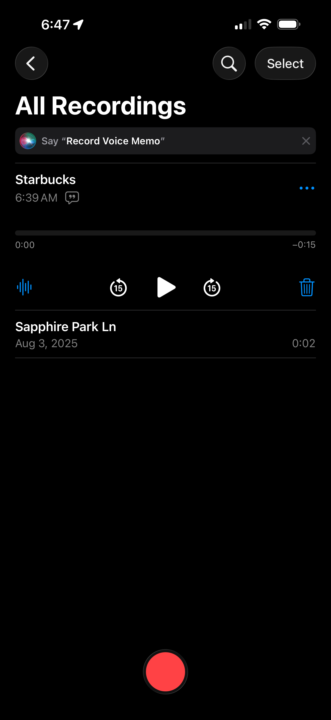
Hey All, Here’s one cool workflow I’ve tested and wanted to share regarding NotebookLM. I often find myself away from my computer and have an idea and don’t want to forget it. So, I was looking for a way to capture my thoughts on the go and add it to my NotebookLM sources. Here’s what I came up with on iPhone: 1. Download the NotebookLM app 2. Use the Voice Memos app to capture my thoughts 3. After saving the memo, click the … next to the memo, then copy transcript 4. Open the NotebookLM app and your notebook 5. Go to sources -> Add source 6. Select the Copied Text option 7. Paste in your voice memo transcript Viola! Unfortunately, the Studio feature on the app is nothing like in the browser… it would be cool if you could spin up some reports while on the go, but it’s not there yet. I’m sure in time they will have it. Can’t wait to be able to have an idea, capture it, generate some assets, and post them within a few minutes from your phone. I’d be surprised if Google isn’t working on this.
🔥
0 likes • 4d
@Rebecca Bogart for me it’s video call transcripts -> notebook LM -> make cool stuff 😎
🔥
1 like • 3d
@Iryna Ishchenko hmmm strange. Not sure if the model/version matters, but I'm on a pro max 16

👑
⭐
🔥
25d •
How I Use NotebookLM to Never “Create Content” Again
NotebookLM is my secret weapon for turning everything I've already created into more assets, better trainings, and promotional materials that actually sound like me. In this video I show you exactly how I use it: → How I turn one training into slides, podcasts, infographics, AND carousel content without writing from scratch → The "critique" feature that tells you what's unclear, contradictory, or missing in your own teachings → Why uploading OTHER experts' videos helps you structure YOUR content (without stealing their ideas) → How to generate quizzes and flashcards your students will actually use → The simple prompt that creates a 2.0 version of any course or challenge you've already made This is how I create more while doing less. 🎬 Watch the full breakdown: https://www.youtube.com/watch?v=tapWDph5iDY&views
🔥
2 likes • 25d
My mind was blown after 2 minutes, now I am having to force myself to watch the whole thing before I go and start tinkering!
🔥
0 likes • 23d
@Evelyn Weiss the value per second in your video is next level!
👑
⭐
🔥
Dec '25 •
🎁 Sam Altman Just Dropped Secret ChatGPT Xmas Easter Egg Feature (How to Try It)
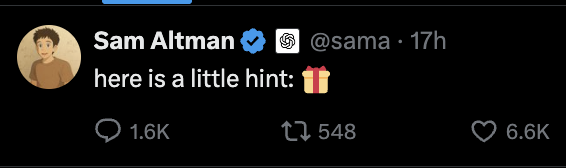
Sam Altman posted something cryptic on X last night: "here is a little hint: 🎁" Turns out it's a hidden ChatGPT feature. Here's how it works: How to Try It 1. Open ChatGPT and start a new chat 2. Send just the gift emoji: 🎁 3. It'll ask you to upload or take a selfie 4. Sora (OpenAI's video tool) generates a short personalized Christmas video of you The video pulls from your previous ChatGPT conversations to personalize it. Santa tells you whether you've been naughty or nice based on what ChatGPT knows about you. You don't get to choose the style or what happens—it just creates something based on your history with the tool. A Few Things to Know - Looks like it's one video per person (trying again gives you the same one) - Other holiday emojis like 🎅 and 🎄 might also trigger it - The more you've used ChatGPT, the more tailored the result The Marketing Angle Worth noting how OpenAI launched this: no announcement, no campaign. Just a single emoji post that got people curious enough to figure it out themselves. I hope you can see how they leverage Altmans personal brand. If you try it, share what you got in the comments.
🔥
2 likes • Dec '25
So far so good... Santa doesn't even need to keep a naughty/nice list anymore!
🔥
3 likes • Dec '25
😮🤣
1-3 of 3
Online now
Joined Dec 18, 2025
Virginia
Powered by