Activity
Mon
Wed
Fri
Sun
Apr
May
Jun
Jul
Aug
Sep
Oct
Nov
Dec
Jan
Feb
Mar
What is this?
Less
More
Memberships
Claude Code Kickstart
544 members • Free
The RoboNuggets Network (free)
37.2k members • Free
AI Creative Club
1.4k members • Free
AI Video Creators Community
4.8k members • $9/month
The Weavy Way™ | Master Nodes
155 members • Free
AI Video Bootcamp
14.9k members • $9/month
AI Automation Society Plus
3.3k members • $99/month
AI Realism Starter Hub
15.7k members • Free
NextGen AI
16.3k members • Free
2 contributions to The Weavy Way™ | Master Nodes

11d •
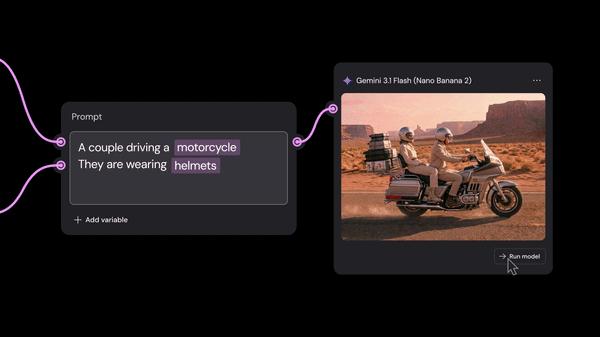
Weavy update: Variables
You might have seen this somewhere in your timeline. It's now possible to add variables to your prompt which can help tremendously in speeding up your prompting proces and iterating for example.Have you tried it yet?

2 likes • 11d
@Jamy Vodegel e.g.: If you were an ecomm brand selling a tshirt that came in 10 different colors, you'd need images of the model wearing the tshirt in different colors for your product page - in which case, a node like this could come in quite handy? While you could technically just change the color of the tshirt in the full prompt or the outfit prompt node, listing up all the colors like this and plugging them in would be a little quicker, I would presume? Not groundbreaking, but still...😅
Feb 2 •
How do you add 'character' to your AI renders? 🎞️
Hey everyone, I wanted to open up a conversation about the 'look' of our work. In my past life as a photographer and filmmaker, I was obsessed with "realness." That digital, clinical perfection was usually the enemy. We spent our time adding grain, hunting for the right LUTs, and emulating old film stocks in post-processing—anything to give the image some soul. Now that we’re all deep into AI, that "plastic," over-polished look is everywhere. It’s technically impressive, but it’s often a dead giveaway that it was made by a machine. Usually, you’d fix this in post-processing (Lightroom, Photoshop, etc.). But what’s interesting about the node-based tools we’re using now is that we can bake that character in during the generation process. I’m curious to hear from the community: What’s your go-to move for breaking that AI glassiness? I’m currently mapping out a few different workflows to show exactly how you could handle this, so stay tuned for those. But for now how are you guys doing it?
Poll
6 members have voted

1 like • 27d
@Jamy Vodegel Thanks for sharing that Jamy, that was very helpful. Yes, finding just the right setting for the sliders/weights seems to be tricky with image enhancers/upscalers. I'll look into Magnific (native UI), since inside Weavy, it seems to struggle with hig-res images.
1 like • 26d
@Jamy Vodegel Agree! To get to the point where AI actually does things easily & quickly for you takes a lot of time + iterations.
1-2 of 2