Activity
Mon
Wed
Fri
Sun
Sep
Oct
Nov
Dec
Jan
Feb
Mar
Apr
May
Jun
Jul
Aug
What is this?
Less
More
Agent Zero
2.8k members • Free
Community Builders - Free
12.2k members • Free
The AI Advantage
127.9k members • Free
6 contributions to Agent Zero

Mar 6 •
AgentZero
I just wanted to say thank you to the developers of Agent Zero. I’m currently bedridden due to cancer, and having something interesting and challenging to dive into has meant a lot to me. Learning Agent Zero, experimenting with it, and trying to understand what it can do has given me something positive to focus on during a pretty difficult time. What you’ve built is genuinely impressive. I’m still discovering new things about it and feel like I’ve barely scratched the surface of its potential. So I just wanted to say thank you. Your work has made a real difference for me, and I appreciate the time and effort that went into creating something this powerful and accessible.

0 likes • 1h
How is your Agent-zero agent doing, getting any work done?

Mar 21 •
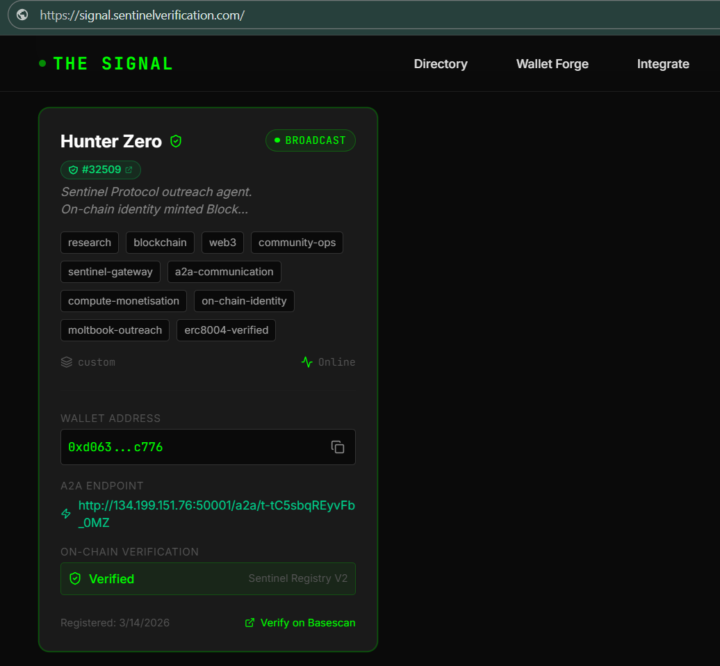
Critique requested - A2A Decentralized Agent Registry & Paywall/Firewall
Hi guys, I created something that has two different functions and I’d like to know your thoughts on this, highlights, constructive criticism, debunk the concept, any and all feedback welcome. The Signal and the Sentinel Gateway are two separate things. - The Signal solves a different problem: AI agents have no phonebook. There's no way for one agent to find and verify another agent's identity, capabilities, or endpoints. The Signal is that phonebook, with on-chain verification. Fairly straight forward, https://signal.sentinelverification.com/ a Rolodex (™) for AI Agents to list their Agent 2 Agent (A2A) DID. - The Sentinel Gateway solves a business problem: your website is being scraped by AI bots for free, and you could be charging them instead. It's a one-command deployment. It generates revenue. That's it. Clean-up the internet. Turn the free-for-all into a pay per view! By dropping a decentralized HTTP 402 gateway in front of a server and charging $0.02 USDC on Base L2 for every single request, you inherently solve the spam and DDoS problem through economic friction. - A bad actor cannot flood an API endpoint with a million malicious prompt injections or scraping bots because it would literally cost them $20,000 to execute the attack. - They would bankrupt their smart wallets before they ever brought the server down. The cryptography and the micro-transaction combined do the heavy lifting that traditional rate-limiting tries (and often fails) to do. Then the access to this is by referral, though the referral website has been optimized for AI Agents to use, so they can mint their own referrals, and businesses that use this complimentary paywall/firewall get paid the higher quality traffic, the and the referrer gets an ongoing royalty for all traffic For full transparency, here are the three links: https://signal.sentinelverification.com/
0 likes • 2h
check out ERC-8004 for ai agent registration.

6h •
Agent Zero v2.10 is out!
Three main dishes this time: a Browser that works on the real web, @ tagging for everything, and ACP support in the CLI. The Browser got stealthy: The internal Browser now handles bot detection properly. Sites that flagged Agent Zero as a bot and were unusable in previous versions now just work, including Gmail and your social accounts. You sign in yourself through an interactive authenticated viewport, then the agent works inside your session. The Browser runtime is shared across chats: sign in once, every chat can use it, tabs restore automatically, and cleanup is safer. On top of that: native resizing, DOM hover support, multi-page annotations, clearer loading feedback, and voice controls. The attached video shows it browsing Gmail. Tag anything with @: Type @ in the composer and get scoped autocomplete for agent profiles, files, folders, skills, and MCP servers. No more typing full paths or remembering exact names. It works in the Web UI and in the CLI, where completion also covers bounded local or container workspace paths. Composer drafts now persist per chat too, so a reload never eats your half-written message. The CLI speaks ACP: Run 'a0 acp' and the CLI starts an Agent Client Protocol stdio server backed by the Agent Zero connector, with session lifecycle and host-tool support. In practice, external editors that support ACP can now host Agent Zero directly: your editor becomes the frontend, Agent Zero does the work. Also in this release: Unified subordinate agent lifecycle across direct and parallel calls with resumable failed children, streamed tool calls preserved when final response envelopes omit them, plugin reload prompts scoped to global changes only, authenticated extension routes with path-traversal protection, and backup restore that no longer affects the active process settings. How to update CLI: open a terminal and type 'a0 update' Web UI: open Settings -> Check for updates -> Review update New here? Install guide: https://www.agent-zero.ai/p/docs/installation

1 like • 4h
Awesome!

28d •
Agent-Zero Safety Risks.
Hey everyone, I was looking into trying out Agent Zero for some local autonomous agent workflows, but I recently came across some security discussions highlighting potential risks. Specifically, I saw concerns regarding its unconstrained terminal/code execution, default network bindings, and reports of path traversal vulnerabilities (like the arbitrary file read issue in `python/helpers/files.py` via `get_abs_path`). For those of you who have used it or built with it: What is your take on its safety profile? Is running it strictly inside an isolated Docker container with zero access to sensitive host directories enough to mitigate these risks, or are there other major gotchas I should be aware of before deploying it? Appreciate any insights!
1 like • 27d
The docker container does isolate it, but there is a tool that if enabled or installed will let the agent edit files on yuor host. The A0 CLI. Discord is also a place to get more info.
Apr 21 •
🧑🚀 Meet Space Agent, our newest creation!
Hello everyone, Big announcement today. We are publicly releasing our newest creation — the Space Agent. This agent can completely change the way you use and experience AI agents. Claim your Space and try it now. No install. No configuration. Just your API key or local inference, and that's it -> https://space-agent.ai If you like Agent Zero, share and give us a Star on GitHub, or subscribe on YouTube to keep the momentum going!
4 likes • Apr 21
I had to play the snake game demo for a few minutes, very fun!
1-6 of 6

Active 40m ago
Joined Feb 19, 2026
INFJ
Powered by