Activity
Mon
Wed
Fri
Sun
Aug
Sep
Oct
Nov
Dec
Jan
Feb
Mar
Apr
May
Jun
What is this?
Less
More
Owned by Jenni
Understand your nervous system, build capacity, and learn practical tools for a steadier, more resilient life.
For business owners and creatives building sustainable capacity, meaningful work, and success that doesn't come at the expense of their well-being.
Memberships
Matrescent Moon Sanctuary
7 members • Free
Grow With Evelyn
3.3k members • $7/month
Self-Healing Caregiver Leaders
42 members • Free
Neurodiverse Learning Hub
56 members • Free
The Better Brain Project
137 members • Free
The Peaceful Path
151 members • Free
Becoming More Me
1.9k members • Free
Somatic Intuitive
45 members • Free
NeuroImprint™ Money Lab
9.9k members • Free
33 contributions to SmartScaleAI

Nov '25 •
🤖 This Week’s Must-Know AI Breakthrough: Generative Tools Revolutionize Small Business Marketing
If you’ve been waiting for a practical reason to jump into AI for your business—this is your week. November’s biggest technology story is the explosive growth of generative AI tools that let you create high-quality videos, 3D graphics, and interactive marketing materials, all with simple text prompts or drag-and-drop features. What does this mean for us, as small business owners? - Unmatched Speed & Creativity: New platforms now allow you to design professional video ads, product showcases, and social posts in minutes—no tech team required. - Affordable Access: These tools used to be reserved for massive companies, but today they’re affordable and easy for solo founders and lean teams. - Real-World Impact: Businesses are streamlining marketing, improving customer experiences, and standing out against competitors—simply by leveraging AI for content and workflows. Try This: - Explore tools like Runway ML, DALL-E, and the AI Apps directory for ready-made solutions tailored to your marketing needs. - Start small—automate one task this week, like creating a video for social media, and watch how much time you save. 💡 Question for the group: How are you using generative AI (video, images, copy) in your business? Share wins, tools, or challenges you’ve encountered—let’s help each other ride this wave and grow smarter together!


1 like • Nov '25
I’ve been using AI mostly to support the creative and organizational side of my work - things like drafting educational posts for my community, outlining workshops, and helping shape ideas into something cohesive when my brain feels a bit scattered.
Oct '25 •
⚙️ Build Smarter, Not Longer — The 80/20 Prototype Rule
Most people waste time building because they skip the plan. The pros? They flip it: 80% planning, 20% building. That’s how you move faster without rebuilding three times. 💡 Your Game Plan: - Pick ONE idea. (Task tracker, lead capture, proposal generator—keep it simple.) - Map it out: - * Frontend: what users see - * Backend: what makes it run - * Database: where data lives (even local storage counts) - Prep before you build. Write your PM prompt. Sketch your flow. Then build in hours, not days. - Design smart. Few colors, clean spacing, clear text, instant feedback. - Test like a stranger. Open in incognito—if it makes sense instantly, you nailed it. Visit Classroom Day 26 for demo, slides and written guide instructions. 🚀 Takeaway: Better prep = better builds. When you slow down to plan, you speed up results—and your prototypes feel intentional, not accidental. 💬 Quick challenge: What’s one small change in your planning process that saved you time (or sanity) this week? Drop it below 👇

6 likes • Oct '25
I’ve learned that taking even ten extra minutes to sketch out a flow before touching a single tool saves me hours later. It helps me see what actually needs to exist versus what’s just “nice to have.” Slowing down in the planning phase really does make everything feel more intentional and less chaotic once I start building.
Oct '25 •
How to Make Your Next Idea Impossible to Ignore
Ever pitched an idea and watched eyes glaze over? That’s not your idea failing—it’s your format. Words explain. Prototypes prove. Inside our latest classroom session — “When Words Fail, Prototypes Win” — we walk through how to stop over-explaining and start showing your ideas using AI-built prototypes (no code, no waiting). Here’s the 4-step play you’ll master: 1. Find Your Prototype Idea Pick one real problem — like a lead form, pricing calculator, or client portal — and commit to building it. 2. Think Like a Product Manager (PM) Define 3 things: • The one core feature • What your user can actually do • The simplest working version (your MVP) 3. Prompt Like a Builder Use AI twice: - First, to write your PM plan - Then, to turn that plan into builder-ready instructions for a no-code tool like Lovable 4. Build It Live Drop your prompt into Lovable → watch your concept come to life → refine, share, and test. 💡 In the Classroom Day 25: We’ll walk through a full demo together — including: - The exact prompts (PM + Builder) - A live Lovable build (other tools can be used too) - Printable step-by-step slides 🔁 Takeaway The fastest way to align your team, win a client, or validate a vision isn’t more talking — it’s prototyping. Stop pitching hypotheticals. Start showing proof. Question: How are the learnings so far? Have they been helpful? I'd appreciate honest feedbacks so I can improve better. Looking forward to your insights.

2 likes • Oct '25
This was such a great session — I really appreciated how practical it was. The step-by-step structure made it feel doable, even for those of us who don’t naturally think like product builders. The “words explain, prototypes prove” concept really stuck with me too; it’s such a clear reminder that sometimes showing the idea is the strategy. I’ve found the learnings overall to be super helpful and confidence-building — especially seeing how easily AI can support that creative process without overcomplicating it.
Oct '25 •
How to Make Remote Work Collaboration/Meeting Fun...
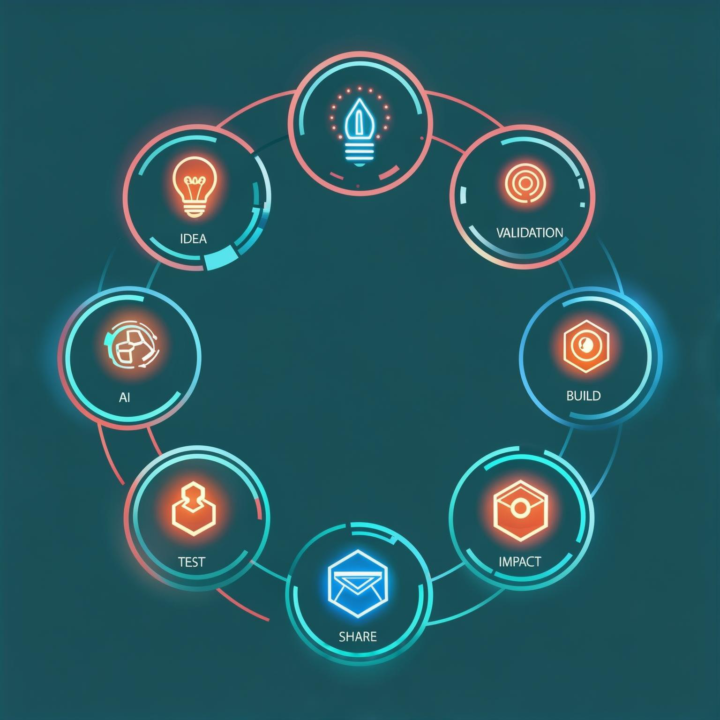
Introducing the... IceBreaker Generator (using the 7-Step Loop Framework). Build Smarter, Faster & Actually Have Fun Doing It 😎 Let’s be honest — remote work made it super easy to ship features… but way harder to feel connected while doing it. It’s all about going from idea → validated app → shared tool in just seven practical steps — designed to help you stop overbuilding and start solving real human problems. Here’s what you’ll learn 👇 ✅ Validate your ideas before you build 🧠 Guide AI like a real teammate (not just a chatbot) ⚙️ Test, tweak, and ship faster with Lovable 💬 Build tools that connect with people — not just automate tasks 💡 It’s not just a dev process — it’s a mindset shift that helps you create faster, better, and with real impact. 🎥 Join me in Classroom Day 24 We’ll walk through a live demo of The 7-Step Loop in action, complete with: - Real prompts + live examples - A plug-and-play guide you can reuse - Resources + templates to help you start building today Because building fast is great — but building something that matters? That’s where the magic happens. ✨ Quick challenge: describe your next build idea in three emojis or GIFS👇
2 likes • Oct '25
[attachments]
Oct '25 •
⚡ Build Your Own Productivity Dashboard — Simple, Smart, and Game-Changing
Ever feel like your to-do list is managing you instead of the other way around? 😅 This build flips the script. In under 30 minutes, you’ll create a fully customized Productivity Dashboard — powered by AI, built with zero code — that helps you stay clear, focused, and in control. Here’s what you’ll unlock 👇 ✨ Personal + Business Wins - Streamline your day — everything from tasks to notes lives on one screen. - Save time, money, and mental energy by ditching app overload. - Track progress visually, stay consistent, and make better decisions faster. - Learn the same prompting and automation skills that power real business systems. - Build once, adapt forever — personal habits today, client workflows tomorrow. 🎥 The full step-by-step demo is waiting for you in Classroom Day 23 — complete with prompts, templates, and a raw build you can follow along with. 💬 Your turn: What’s one area (personal or business) you’d love your dashboard to help simplify first?

1 like • Oct '25
@Karen Vidgeon Exactly. My to-do list is ever-changing and I would love some help streamlining that for productivity.
1-10 of 33

@jenni-lynn
Helping people understand their nervous systems and build sustainable capacity for meaningful work and life.
Active 7h ago
Joined Sep 22, 2025
INTJ
Humble, TX