Activity
Mon
Wed
Fri
Sun
Jun
Jul
Aug
Sep
Oct
Nov
Dec
Jan
Feb
Mar
Apr
What is this?
Less
More
Memberships
Women Lead AI
854 members • Free
10 contributions to Women Lead AI

Feb 19 •
🛠️ For everyone who asked about Lovable on our last call...
A few of you messaged me after the Learning Lab AI call about Lovable and vibe coding so I went ahead and put together a full walkthrough video. I went into details on how I built a real working web app from scratch. No code. No developer. Just prompts. The example I used is a cost calculator for my 3D printing business but the principles apply to literally any tool you'd want to build for your own business. Landing pages, dashboards, booking forms - all of it. I also cover the best practices that most people skip, which is honestly where things go wrong when people try this for the first time. If you've been curious about vibe coding but didn't know where to start, this is a good place. The prompts I used are in the description so you can just copy and adapt them for your own use case. Would love to know is there a tool or calculator you'd want to build for your business? Drop your ideas below and perhaps you would like to make it as part of our Build Your AI Side Project Sprint? 👇

1 like • Feb 21
After the last webinar I built a webbapp in Loveable based om my carrier. Kind of a skill set. So easy and fun to do. I need to tweak it a little bit since I did it based on my cv and some of the text should be updated. But overall so much fun. If you want I can share the link to show you the outcome so far. But an easy way to create something that clients, recruiters or other perhaps other companies can have a look at to get an overview in a nice way to show your skill set.
0 likes • Feb 23
@Robin Rozum https://procure-ace-hub.lovable.app/#experience
Feb 16 •
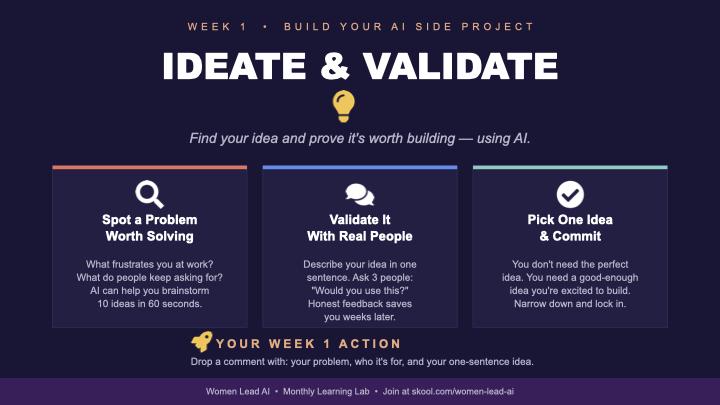
🚀 IT'S GO TIME "Build Your AI Side Project" Sprint Starts NOW!
Over the next 4 weeks, we're going from idea → launched project. Whether you want to build a tool, an app, a workflow, or something you've been sitting on for months, this is your sign to actually do it! 🧠 Let's talk Week 1(This week!): Ideate & Validate Your only job this week is to land on ONE idea and check that it's worth building. If you're staring from a blank page start with a problem, not a product. What annoys you at work? What task do you keep doing manually? What do people around you complain about? The best side projects solve real, boring problems. Use AI to brainstorm with you. Open ChatGPT or Claude and try something like: "I work in [your field]. What are 10 repetitive tasks that could be automated or simplified with AI?" Then pick the one that made you go "oh, that's interesting." Validate before you fall in love with it. Ask yourself three things: Would I actually use this? Would anyone else? Can I explain it in one sentence? If yes to all three - you've got something. Week 1 tasks: drop a comment below with: 1. The problem you want to solve 2. Who it's for 3. Your one-sentence idea Don't overthink it & if you're stuck, comment below and we'll brainstorm together! No one gets left behind. 💪 Let's build something. 👇
1 like • Feb 21
Problem: Reaching out to Middle size companies and actually get leads. Who is it for: It is for my future side hustle business that I want to create. One-Sentence idea: Go in and deep dive in companies spend reports, to generate ROI with 10-15% and take a commission.
Jan 31 •
Keep on top of your emails
This is something that I tried out this week at work. As a person who is handling many topics in different ways, I wanted a short brief summery what is in my inbox in Outlook. I ran into this prompt, and I tried it out. It works surprisingly well. It sort of gives you a good briefing of a "to do list" based on your emails. I have put a schedule on it for twice a week and will try it out for a while. Perhaps you like to try it out. Here is the prompt that I used (in Copilot): You are my email briefing assistant. Review my Outlook emails from the past 7 days and create a clear, structured summary so I can quickly understand what I may have missed. Focus on: Important or time-sensitive emails. Messages that require a reply or action from me. Threads where decisions were made or implied Emails from key stakeholders, managers, or clients. Any risks, deadlines, or follow-ups mentioned. For the output, provide: 1. A short executive summary of the week's email activity. 2. Key emails grouped by theme or sender. 3. Actions I need to take. 4. Deadlines or dates mentioned. 5. Anything urgent or high-risk. 6. Suggested next steps so I can clear my inbox confidently. Keep it concise, structured, and easy to scan.
Jan 11 •
Quick poll: Monthly AI Learning Lab calls?
I'm thinking about starting a monthly call where 3-4 of us present something new we've tested or built with AI. Nothing formal - just "here's what I tried, here's what worked, here's what flopped." Could be: - A new tool you're experimenting with - A workflow you automated - A prompt that's saving you hours - An AI feature that changed how you work - Something that totally didn't work but taught you something Would you be interested in joining these calls? If yes drop a comment with information: 1. What day of the week works best for you? (thinking evenings UK time) 2. Would you be up for presenting something at the first one? No need to be an expert just show us what you're learning in real-time. If enough people are keen, I'll set up the first one for this month.
Poll
21 members have voted
0 likes • Jan 13
It would be great to join once a month. Weekdays works best for me personaly, but I am sure this is for most of us. Next week I have a meeting with AI consults to help and learn more about agents that I could use to look into legal agreements that contains a lot of negotiations. That could perhaps be of some interest.
Jan 9 •
AI tools
Hi. I think it would super interesting to hear what AI tools you are using and for what. I can start. I use Copilot for work since that is a secure AI tool. For personal use I use mostly ChatGPT and playing around with its future. I pay for the plus version. I did create agents for different uses but I am a beginner. I have also tried out NotebookLM and I cave it my cv and they did a good video presentation with it.
1-10 of 10

@jasminka-bach-7732
Global procurement leader learning AI for better decisions, personal relevance, and building businesses.
Active 15d ago
Joined Jan 5, 2026
Gothenburg, Sweden
Powered by