Activity
Mon
Wed
Fri
Sun
Apr
May
Jun
Jul
Aug
Sep
Oct
Nov
Dec
Jan
Feb
Mar
What is this?
Less
More
Memberships
Learn Power Apps
2.6k members • Free
Tech Workshops
65 members • $25/m
8 contributions to Learn Power Apps

Nov '24 •
Shutting this down by December 9th - Join the New One!
We are moving to a much more feature rich community! Join now before we shut this one down! If you have any concerns, you may comment below, or email us at [email protected] 📨 🔴 UPDATE 4:10pm EST -- I just want to reassure everyone you will still have access to anything/everything you've purchased in the past. I'll be sure to have everything in Whop before the cut off date. If you're upset about any of the details or have concerns, just email us at [email protected] and we'll make sure you're taken care of. ➡️ Call to Action: ============================= 1. At least click on the 1st link down below which is 100% FREE. 🆓 2. Comment below! 😋👍 ➡️ Why are we moving? ============================= - Skool costs us $500 every month. - I've created separate Skool communities for different purposes and based on the limitations of Skool. It gets complex and confusing having material spread out all over the place. Each of these communities costs me $99 a month. - Even though I have a lot of content and offerings, the structure needs to be simple and straight forward for you guys. - With the new features in Whop, I can serve you guys better and more efficiently. - Don't worry: if you purchased anything, you will retain access to it, but please join the free option below. ➡️ Stay in by clicking on these links: ============================= 1. FREE - https://whop.com/learn-power-apps/ 2. Insiders Group - https://whop.com/super-power-labs/ (50% off Black Friday Deal) 3. Accelerator Program - https://whop.com/power-performance-accelerator/ (join the waiting list if you're interested) ➡️ Black Friday Offer - 50% OFF ============================= - Limited-time offer lasts until December 3rd at midnight! Normal price is $97/mo. - Discounted price is $47/mo. - Promo Code: ➡️ black_friday_2024 ⬅️ - https://whop.com/checkout/plan_yNLZQnjHdiBP9?d2c=true

1 like • Nov '24
Hi Darren i also made a new free account. Just to let you know do you are able to transfer earlier purchases
Feb '24 •
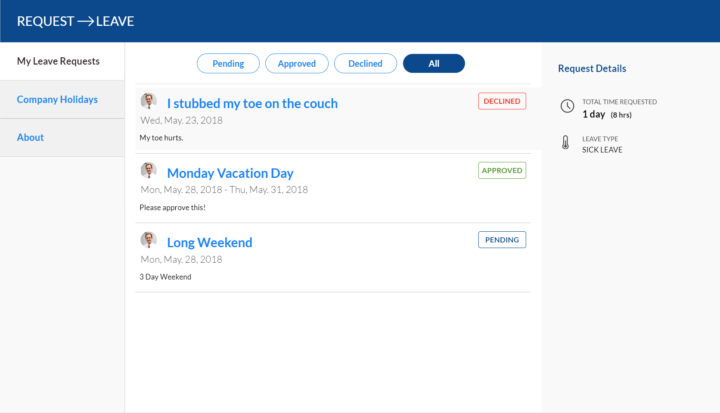
Workshop #2! PTO (paid time off) App
Get your 30% off by filling out this questionnaire: https://forms.office.com/r/Dvt7mvJHR9 - What? - This particular workshop will be on building a PTO (paid time off) App - When? This Friday, Feb 23rd, 2024 at 1pm EST and will last at least 2.5 hours, but could go over for questions or to resolve bugs, etc. 5pm EST will be a hard stop. - Where? - Links will be sent out to those who have registered. - Why? - The most valuable benefit to attending a live workshop is that you can ask questions and actually do the work and get our help to make sure your app is working! How to sign up? - Discounted price of $47 (30% off): https://buy.stripe.com/00g7u95sc04tgRW6oq ----- This discount is based on you providing valuable feedback you can provide. ----- Fill out this questionnaire: https://forms.office.com/r/Dvt7mvJHR9 - Full price price of $67.14 if you don't want to provide any feedback: ----- https://buy.stripe.com/4gw15Lf2M2cBatyaEJ ...also, because you're going to miss out on the best and most exciting workshop/webinar we've ever done before!! That's why! Also, @Kurt Larson says you will become cool like him by the time it is over. ...and that's saying a lot! 😁👍👍 Those who have already purchased, if you're not able to make this one or don't like the topic, you may choose between getting the recording for it, or applying what you've paid to future workshops you'd like to attend. Please post any questions below! We're looking forward to this!!
0 likes • Feb '24
Recieved the email, what's the next step and at what time ?
1 like • Feb '24
Sorry was an hour early

Dec '23 •
** SOLVED** Last() formula not working
I'm writing this in my phone so I don't have any screen shots. Here is the issue... I have a table being displayed on a gallery. The table is from sharepoint and it's called BuyoffSubkit. When click the record on the table the OnSelect set that record to varOnChangeRecord. The on the same screen, you then write a DCN and part number. The button at the bottom of the screen is supposed to get some information from the varOnChangeRecord and the rest of the data from the txtinput fields to make a new records on another table on the screen. The table is called BuyoffInspection. Now, critically what I need to have happen is that for every record on the BuyoffSubkit table it shows what the subkit number is corresponding to the title field. But on the BuyoffInspection table, each record needs to have a sequence number corresponding to the number of DCN's added. So within my patch, I tried to set up the If() statement that states in normal speak: "if you can't field a title And subkit number that matches varOnChangeRecord, then the sequence number is 1." Then I started writing the "if false" portion of the If() and it will not work! I was trying to do something like this: Last(LookUp(BuyoffInspection, varOnChangeRecord.title = title, And varOnChangeRecord.subkit_name = subkit_num), subkit_num) Or it was something like that. When I do just the LookUp() in a label field, I actually get a "1"... because it's finding the first record for that title and subkit. But had manually built 2 records in sharepoint to test formula so I thought using Last() would display 2... but it doesn't. And I've tried filtering and sorting... and I just have no idea why it won't show me the last subkit number for that kit and title! Please let me know what I've done wrong!
1 like • Dec '23
Hi Guy, thanks for the explanation. Do i understand you correct that table wise there is a table Customers or Contracts where the Title (SPE4A1-17-G-00050) refers to ? So a 1 to many relation ? From the example i don't exactly get where the relations is with customers/contracts. But basicly what you need to do in plain text. Before adding a row in Buyoffinspection you have a relationsship to the other table (contract/Customers) so use the ID from the other table to filter this table (Buyoffinspections). with that ID (i guess it is Title here). Add the filtered in a collection on start off the screen (buyoffinspection) use forall to loop through it with the aggregate function (max), i peronally would store the result it in a Variable so it less consumptive while doing repetitive tasks. And on add of new kit you referer to it variable+1
0 likes • Dec '23
@Elvis Eyobor it is not my project but from Guy and indeed the ERD would clarify a lot

Dec '23 •
Bing Maps in Power Apps
Using the Map control and Address Input control for Bing Maps, is there a way to leverage the "Search within Radius" to return the zip codes within the given radius? [from Address Control documentation ( Enter and resolve addresses in maps - Power Apps | Microsoft Learn ) ] Radius - Sets the radius, in meters, around Latitude and Longitude to constrain address suggestions. Requires Search within radius to be on.Floating point numberProperties; Advanced: Radius
2 likes • Dec '23
Hi Eric, was a nice braincracker. But only if you have a collection containing postalcodes (wich would be a big collection) wich you insert in your adressinput you can check wether it is within the set radius. But the result of the adress input is always a single row not a collection. Figured maybe "*" gives back "Everything" but to bad it doesn't

Dec '23 •
SQL Varbinary type to Display within PowerApps Form
I am still very new to Power Apps and this is my first application build. Apologies if this is a duplicate post, but I wasn't able to locate I'm in the process of creating a new Power Solutions but having issues with display a varbinary(max) field into a text - SQL Server backend (condensed data sources and normalized) - Each Screen will be a drill down into modifying /updating record details of an operational task - Some records have to verify either an image or PDF upload (can accept multiple files) - Images and PDF files are originally collected from a webhook and inserted into the varbinary field as well as a Image Type field (image/jpg value) - Images are stored on the SQL database only and are not stored on network drive, SharePoint List or SQL FileStream reference - Created a secondary column to convert varbinary(max) to varchar(max) Main Issue: - Obvious issue - Power Apps doesn't directly display/show varbinary(max) within an Image Control - Unable to show the varchar(max) within a Form / Image Control correctly Found this to use within the Image Control "data:image/jpeg;base64," & ImageUpload Troubleshooting: - Several online searches for this scenario but can't get a clear resolution to the formula/conversion needed to correct the display problem Conversion Code used for the varbinary field type to varchar: CAST('' as xml).value('xs:base64Binary(sql:column("CommunityProjects.ImageUpload"))', 'varchar(max)') Note: The above I am still questioning if the CAST syntax is correct for what Power Apps needs. Other considerations: - Not sure if I have all the Property values correct - Possible the original webhook collected did not collect all the information required for the field type conversion that is preventing the image display Still testing other areas, but if someone has come up with a more elegant solution, I would love to try it out.
3 likes • Dec '23
Can't you change the column in your SQL from Varbinary to Image ? See info in link : https://www.youtube.com/watch?v=qX3i8456YwU
1-8 of 8
Active 3d ago
Joined Oct 29, 2023
Powered by