Activity
Mon
Wed
Fri
Sun
Aug
Sep
Oct
Nov
Dec
Jan
Feb
Mar
Apr
May
Jun
What is this?
Less
More
Memberships
Educational Content Creators
617 members • $47/month
Imperium Academy™
67k members • Free
AI Automation Society
417.1k members • Free
Freedom Copy Collective
63 members • Free
17 contributions to AI Automation Society

7d •
Large Files vs Condense Files?
I've heard on Substack from a big AI creator with 700k+ subscriber that he stopped using his markdown files that were 20,000 words long and cut it to 2,000 words. The reason for this was because Claude was able to read the 2,000 word markdown file much more clearly, gave less hallucinations, and performed better overall. The thing is, the completely contradicts what Nate does. Nate has dozens of files he regularly updates with Claude Code and it seems to be working for him as he's sharing it with us. The only question would be: Would the AI work more effectively and better overall if it was cut? There's only one way to find out. RIght now I use a lean markdown file on Claude Cowork and that handles things perfectly for me but I want to enhance my AI skills as I'm starting my agency. I'll stop using the lean markdown file and go with more of the approach that Nate uses and see if it works better or worse. Maybe things are just different when it's Cowork vs Code? If anyone knows what I'm talking about please let me know!!
0 likes • 6d
@Gavin B Yeah bro true appreciate the reply
1 like • 6d
@Chetan Mishra Yeah it'll be interesting I'm about to test it in the incoming month where I'll have a bunch of calls, notes, decisions, etc. so there will be a ton of stuff to put in.
7d •
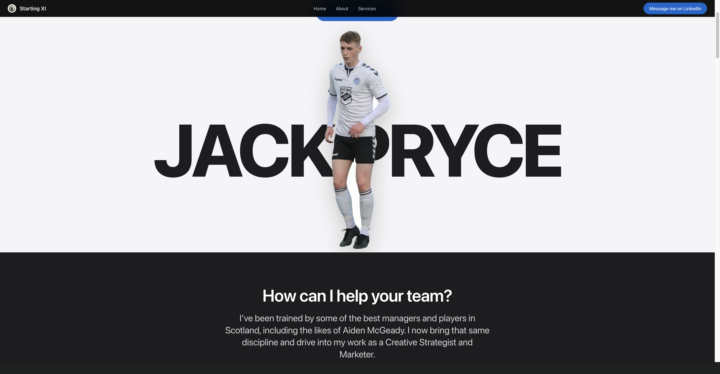
Made My First Website W/ CC!
Made my first website w/ Claude Code and it literally took like 2 hours! Plus it didn't use all my tokens and I'm only on the $20/mo plan - I was using some tactics from Ruben Hassid to get more tokens. I think it looks pretty good for the first time and it can still be tweaked and improved on!
0 likes • 6d
@Nigel Vargas Thank you Nigel!!
0 likes • 6d
@Nigel Vargas 100% man it's addictive haha

💎
⭐
7d •
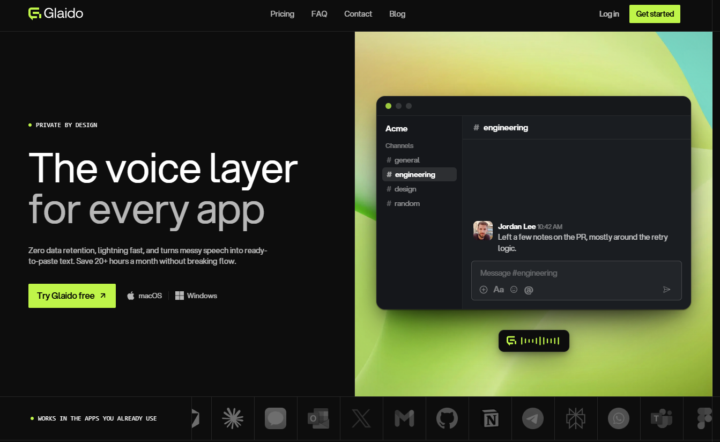
🎉Glaido is live on Windows. Try Free, then 40% off.
I'm a co-founder of Glaido, building it with Jack Roberts, Dave Ebbelaar, and Jannis Moore. It's a voice tool built around two things: speed and privacy. Fastest on the market, completely private. It used to be Mac only. It's now on Windows too, so all of you can use it. You get 40% off your first 3 months ($20/mo → $12/mo) with this code: D5J6BIF8K4P Next 30 days only 👉 https://get.glaido.com/nate I switched from Wispr Flow a few months ago and it just felt better. If you're on Wispr, try Glaido free, use the code, and tell me if you feel the difference. If you want to switch back after, no hard feelings. Good to know - Mac + Windows - Snippets: insert any text instantly with one word - Dictionary: save your own words, import straight from Wispr Flow - Agentic Mode: manipulate any text on your screen with your voice - Webhooks coming to Agentic Mode soon (huge) - We action feedback almost immediately Give it a shot and drop your thoughts in the community.
6 likes • 7d
Nice man!!!

7d •
AI OS tuning help
Hi guys! I’ve watched the video of setting up the AI OS, and I'm kind of disappointed because I anticipated something WOW. I’m not a newbie in that field and already know many things, so after finishing the video, I still have questions, but they kind of go beyond its scope. I want help from advanced users who have already built it for themselves and use it regularly. If you’re not such a user, please, don’t paste LLM-generated answers just to get likes. Thanks for your understanding. Given: 1. I’m using a Mac Mini with an external SSD as my main drive (my user “igor” lives there). 2. I already have ‘igor/Coding Projects’ folder where I have several projects where we do code with Claude. 3. On top of that, in my main ‘igor’ folder, I have several folders, and some of them are small projects for short-term goals (car search, apartment search, etc.). 4. I’m a perfectionist and prefer to build the architecture upfront :) Questions: Q1: The main question is - how do I organize my folders in a proper way? In the video, Nate shares “one single folder for everything”. All info (personal, business, everything) is stored in one folder. I can’t afford it, because I feel that’s illogical. I feel that I need to keep my “business projects with git repositories” out of everything else - it's just a cleaner approach for me. Following that, I have no idea how to organize it. I don’t want to copy the needed files from other folders and repos into my “AI OS” folder, and, moreover, keep them up to date across all places. I can share basic info about all other projects, repos, and keep that summary in the “AI OS” folder. But, I feel something wrong with such an approach, but can’t put my finger on it. Also, this could potentially be resolved via per-project memories & claude.mds, but it still needs triggers to be triggered without me guiding the LLM. So, what can you suggest? Q2: Do I need 1 LLM Wiki or many? I’ve heard about Karpathy’s wiki from the beginning, but I didn’t need it as I’m fully down the rabbit hole with my business project. Now, when I read about it, I can’t decide whether to have one big wiki for everything or create a wiki for meaningful projects/folders. On the one hand, I have an idea to add a wiki to each of my coding projects to keep documentation up to date and quickly gather needed info without burning tokens. On the other hand, one huge wiki for every aspect of my life seems better, as I can directly query it and get answers to everything. But ingesting seems horrible (either everything lives in the raw folder or I maintain multiple versions of the docs in both sides - wiki and its original source). I don’t know the right answer, but I anticipate that it is a double-edged sword where there’s no universal solution )
0 likes • 7d
@Vedant Heda That makes more sense, I was reading a Substack from Ruben Hassid (he's big on AI) and he's recently suggested going from a massive markdown file to now just a really small one with the basics in it. Apparently it helps Claude to understand what actually matters. I'm now torn on who to listen to; Nate has tons of markdown files and Ruben has the bare bones. I guess I'll just test and see what works best, that's the only way to really know, right?
0 likes • 7d
@Brian Williams Nice, same - it's much easier to read in Obsidian I think brother

7d •
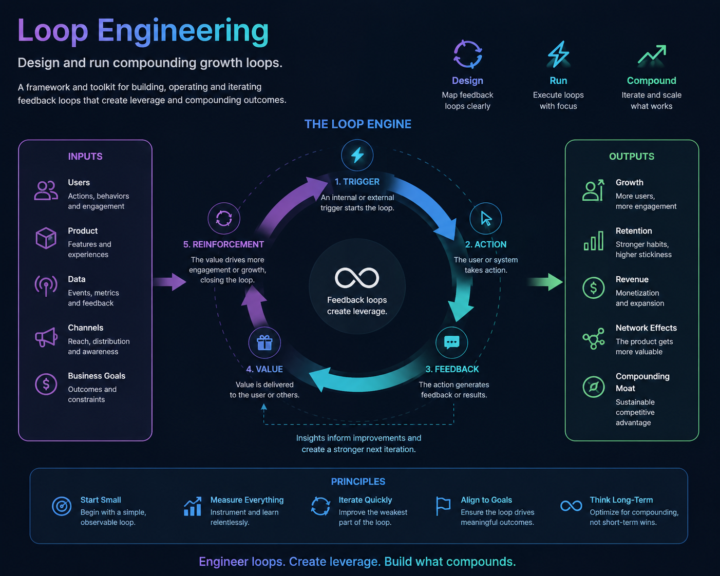
Loop Engineering is the next evolution after prompt engineering #Synthara
Instead of manually prompting AI, you design systems that think, act, learn, and repeat. Triggers → Actions → Feedback → Value → Reinforcement. This open-source project breaks down the mindset, patterns, and tools needed to build real AI loops — from state handling to cost awareness and reusable workflows. If you’re building with AI agents and want leverage, not babysitting, this is worth exploring 👇 🌐 https://github.com/cobusgreyling/loop-engineering
1 like • 7d
Great!
1-10 of 17

Active 2d ago
Joined May 28, 2026
ENFP
Glasgow, Scotland
Powered by