Activity
Mon
Wed
Fri
Sun
Mar
Apr
May
Jun
Jul
Aug
Sep
Oct
Nov
Dec
Jan
Feb
What is this?
Less
More
Memberships
AI Online Educators & Coaches
358 members • Free
The AI-Driven Business Summit
6.3k members • Free
Skool Scale Camp
4k members • Free
1 contribution to AI Online Educators & Coaches

🔥
23d •
Using iPhone Voice Memos with NotebookLM
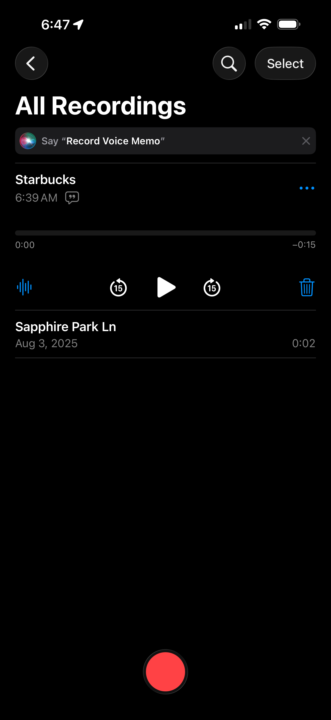
Hey All, Here’s one cool workflow I’ve tested and wanted to share regarding NotebookLM. I often find myself away from my computer and have an idea and don’t want to forget it. So, I was looking for a way to capture my thoughts on the go and add it to my NotebookLM sources. Here’s what I came up with on iPhone: 1. Download the NotebookLM app 2. Use the Voice Memos app to capture my thoughts 3. After saving the memo, click the … next to the memo, then copy transcript 4. Open the NotebookLM app and your notebook 5. Go to sources -> Add source 6. Select the Copied Text option 7. Paste in your voice memo transcript Viola! Unfortunately, the Studio feature on the app is nothing like in the browser… it would be cool if you could spin up some reports while on the go, but it’s not there yet. I’m sure in time they will have it. Can’t wait to be able to have an idea, capture it, generate some assets, and post them within a few minutes from your phone. I’d be surprised if Google isn’t working on this.

1 like • 11d
This is great! I didn’t know there’s a Notebook LM app. Downloading it now👍
1-1 of 1

@irena-kulusic-4417
Helping female solopreneurs make business simple and scalable using ChatGPT. Save 10+ hours/week & grow with ChatGPT.
Active 23m ago
Joined Jan 1, 2026
Powered by