Activity
Mon
Wed
Fri
Sun
Oct
Nov
Dec
Jan
Feb
Mar
Apr
May
Jun
Jul
Aug
Sep
What is this?
Less
More
3 contributions to AI Bits and Pieces

Nov '25 •
Meta AI Releases Omnilingual ASR
A Suite of Open-Source Multilingual Speech Recognition Models for 1600+ Languages: https://www.marktechpost.com/2025/11/11/meta-ai-releases-omnilingual-asr-a-suite-of-open-source-multilingual-speech-recognition-models-for-1600-languages/
1 like • Nov '25
@Michael Wacht You are most welcome, Michael!

Nov '25 •
🧩 ChatGPT in Action: Small Prompt, Big Image Upgrade
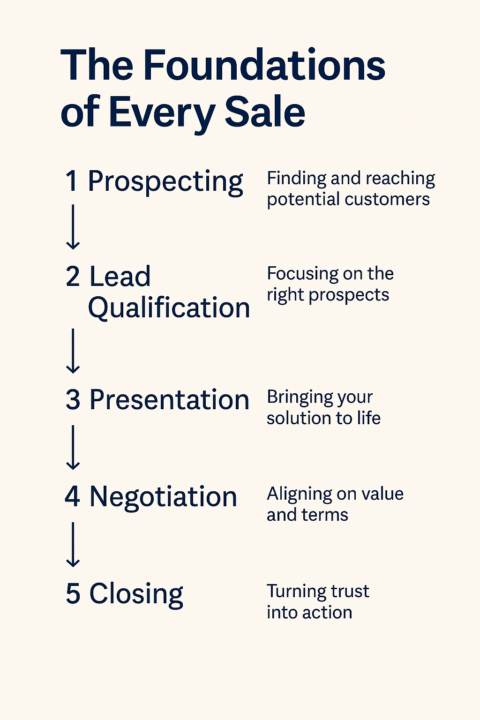
While creating a post of common Sales Terms, ChatGPT asked: “Would you like me to create a Week 1 Visual Summary Card (200×200 or square carousel) to accompany this — something that maps the five stages as a continuous flow?” I simply replied, “yes.” It created the first version — a plain black-and-white image. So I followed up with one simple thought: “An image that is more visually appealing.” That’s it. And the second image? ✅ Vibrant ✅ Polished ✅ Ready to post 💡 Lesson: With ChatGPT, if a thought crosses your mind — type it. You never know which small prompt will spark a big improvement.
2 likes • Nov '25
Great tip, Michael. Thank you
Oct '25 •
📦 Out of The Box in 60: Synthesia.io
After successfully creating a few selfie avatar images in the first 30 minutes, in this post, I move on to test Synthesia video creation in various scenes using my likeness and a stock avatar. App: Synthesia.io🕒 Time: 60 Minutes 📂 Topic: Selfie and Stock Avatar Video What is Synthesia.io? Synthesia is an AI video and image creation platform that allows users to generate professional-looking videos using AI avatars and voiceovers. With just a few clicks, you can turn text into polished images and videos—featuring yourself or others—with zero production skills required. Quick Start: Simply uploaded five different headshots—and started creating videos with a few clever prompts. 💡 The videos below are 100% AI-generated using text prompts and one video uses a presentation template. No edits. No enhancements. These are very rough as I was trying out a wide range of prompt scenarios. Hand gestures are very unnatural, and I will need to smile more on refined head shots to better show my upper lip. Video 1: My avatar in blue suit, introducing services in an office (13 sec.) https://share.synthesia.io/e9f3543b-1fa2-4001-a2e8-c53bffb8ab89 Video 2: My avatar as a keynote speaking at an event with a doppelganger (not by design) (8 sec.) https://share.synthesia.io/f11b6413-94cc-4c6c-99d1-bff27533b542 Video 3: My avatar in blue suit, introducing services in an office version 2 (12 sec.) https://share.synthesia.io/128a207a-8f87-48f8-82df-d467ea7fe07a Video 4: Stock presentation/avatar with company logo. (1 min. 35 sec.). This video used an avatar available in their library. They have several to choose from in the event you don’t want to use your likeness. https://share.synthesia.io/7340c4d6-21d5-4416-b2ba-c3803498ac2b
3 likes • Oct '25
Great idea, Michael! Thank you!
1-3 of 3

@george-dan-1795
20 yrs in SEO → built RankedContent.ai to score and optimize content for SEO/GEO/AEO. Ask me anything about SEO and AI search - happy to help free.
Online now
Joined Oct 18, 2025
Powered by