Activity
Mon
Wed
Fri
Sun
Sep
Oct
Nov
Dec
Jan
Feb
Mar
Apr
May
Jun
Jul
Aug
What is this?
Less
More
1000 True Fans
11 members • Free
YouTube For Beginners🏆
338 members • Free
Build Your Online Business
1.5k members • $9/month
Like A CEO
172 members • Free
The Solo CEO AI Lab
276 members • Free
Your First $5k Club w/ARLAN
33.6k members • Free
11 contributions to Digital Roadmap AI Incubator

20d •
👀 Claude Cowork Learns by Watching You Work
Anthropic introduced a new way to teach Claude a skill by recording your screen while you complete a task, turning a one time demonstration into something it can repeat on its own from that point forward. - You record your screen while doing a task, talking through it out loud as you go, and Claude watches the entire process before turning it into a reusable skill it can run again without needing written instructions from you. - The new skill gets saved automatically and can be found under Record a Skill in the plus menu of the Claude desktop app, ready to trigger whenever the same kind of task comes up again. - The feature is available now on Pro, Max, and Team plans, meaning most existing paid subscribers can start recording skills today without needing to wait for a wider rollout or upgrade their plan.
1 like • 20d
@Nicole McCain AI I've been on vacation so just getting back into my AI obsession so right on time! I've missed you and hope you're enjoying your freedom!

21d •
Fable 5 $100 credit! Claim it now!
Check your Claude account NOW if you haven't. They're giving an extra $100 in free Fable 5 credits. Yay! 🥳

1 like • 20d
Claimed!
Jun 6 •
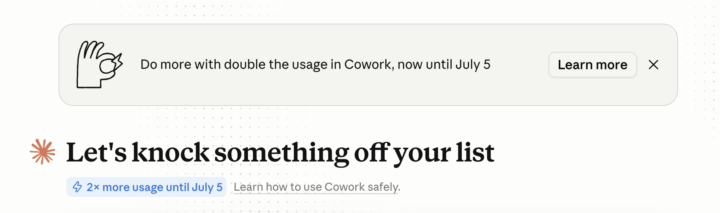
Get Extra Claude Cowork Tokens!😎
Good news for us Cowork users! Anthropic is running a promo now until July 5th to get more people to use Claude Cowork and they just doubled our 5 hour usage limits! Nothing you need to do in order to apply this, it should be active and up to date in your Claude Desktop app. (Note: this is only for Cowork and not Chat or Code) Hope this can save some of you guys on some token costs $$$
1 like • Jun 7
You know I'm already on it, ha.
May 3 •
How to Export Your Replit App
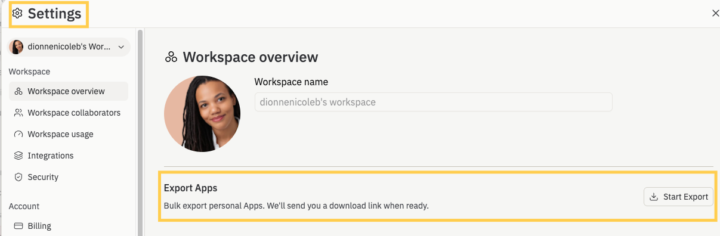
If you took advantage of Replit Free Code Day @Nicole McCain AI mentioned, great job! 🎉 Now, you need to EXPORT your entire app (aka all the files created to make it work like it's currently working) because they only keep your app on the platform (for the free version) for 30 days. When you log into your app project, it will tell you something like: Your published app will expire in 28 days. Upgrade to keep your published app running. It's all good though! Because you can continue to work on it in ChatGPT/Codex or Claude Code to complete it! (No addition dollars spent). There are ways to host it via Github+Supabase+Vercel (for 100% free) but you don't have to worry about that right now. I just want you to know it's *possible* so you don't wonder: well, if I'm not hosting it on Replit or Lovable, how will I be able to use it? You created it so *you* own it. So export it and keep the files handy! 1. Log into Replit 2. Click on Settings 3. Click Export (see attached) I just don't want anyone to lose their hard work! Their business model is to get you to build and then pay to keep it live, but you do have other options. Any questions? Just ask below.
1 like • May 3
@Nicole McCain AI Listen!!! As soon as I was done, I clicked the EXPORT button so fast. Now I'm curious what you built! I created a bookmark directory for myself (that I'll eventually share with my audience so they have easy access to what I recommend).
1 like • May 3
@Nicole McCain AI Fire! I love how your brain works :)

Oct '25 •
Viewable File Formats in ChatGPT
Most people have no idea what can be displayed in ChatGPT and what can't. Since this isn't mention anywhere, I'll put it in here: -> Chat = inline message pane, Canvas = side panel: 📃Plain text & Markdown Chat: renders normally Canvas: renders normally (type: document) 🎨Images (PNG/JPG/GIF) Chat: displayed inline Canvas: inline in document or via img tag in code/html or code/react. 📐SVG (as file/image) Chat: shown as image Canvas: image or inline via in code/html or code/react. 📐Raw SVG markup Chat: shown as code only; Canvas: rendered when embedded in code/html or code/react. 📰HTML — Chat: shown as code only Canvas: rendered with live preview in code/html. 💻CSS + JavaScript Chat: not executed Canvas: executed in code/html preview. React components Chat: code only Canvas: interactive preview in code/react (default export required). Libraries (Tailwind, shadcn/ui, lucide-react, recharts, Framer Motion) Chat: n/a; Canvas: supported in code/react. 🧜Mermaid diagrams Chat: may not render Canvas: reliable via code/html or code/react by loading Mermaid. ➕Math / LaTeX — Chat basic inline math sometimes Canvas: use KaTeX/MathJax in code/html or code/react. 🎥🔉Audio/Video Chat: usually links only (Youtube LInks can also be embedded as live play, though) Canvas: HTML5 / in code/html or code/react. 🌐WebGL / Canvas 2D Chat: no interactive support Canvas: supported via code/html or code/react (e.g., three.js). 📕PDFs Chat: link only Canvas: no native viewer—link or render pages as images/HTML. 📃Long docs / code files Chat: awkward to scroll Canvas: ideal for long, printable docs and iterative code editing. Bonus tips: So, if you want to display more "complicated" or things that are normally unsupported, tell it to create html code and embed it there, etc. P.S.: If you want to export any doc easily as PDF, Markdown or DOCX, just tell ChatGPT to open a canvas and put it there. Or, alternatively, tell it to open a canvas and write "Hello" or whatever. Then you can copy the text yourself and paste there. 😀
3 likes • Oct '25
This is the sexiest list I've ever seen!!!! I ask ChatGPT to output in .md all of the time since it's easier for AI to read and understand what's important and the order of things :)
1-10 of 11