Activity
Mon
Wed
Fri
Sun
Aug
Sep
Oct
Nov
Dec
Jan
Feb
Mar
Apr
May
Jun
What is this?
Less
More
Memberships
E-Ink Tablet Users
1k members • Free
3 contributions to E-Ink Tablet Users

May 12 •
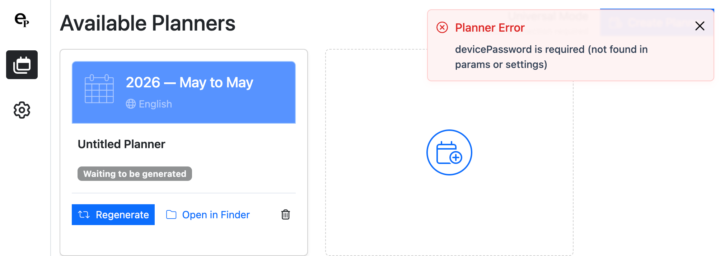
Universal Mode not working
I have purchased EPCalSync so I can use it with my Kindle Scribe so am working in Universal Mode. However I cannot generate a calendar as I get the error shown. Please help!
0 likes • May 17
@Jason Smith This is what I mean:
0 likes • May 19
@Jason Smith That would be a start. Given I am using a Kindle Scribe I can't rely on my annotations staying in place each time I upload a PDF so having just a day version is more practical.

Apr 20 •
🚀 CalSync v1.1.0 is LIVE — Universal Mode (iPad + More)
This is one of the biggest updates we’ve released. We’ve introduced Universal Mode — which opens CalSync up beyond just reMarkable. 📥 Download Latest Version (1.1.0) Apple Silicon (M1 / M2 / M3) https://www.einkpads.io/api/calsync/darwin/arm64/releases/latest Intel Mac https://www.einkpads.io/api/calsync/darwin/x64/releases/latest Windows https://www.einkpads.io/api/calsync/win32/releases/latest What’s New — Universal Mode - Works with all popular tablets (including iPad) - No Developer Mode required - Generate your planners exactly the same way as before - Planners are transferred manually in this mode 💡 What this means Until now, CalSync was tightly integrated with reMarkable. With Universal Mode, you can now: - Use CalSync on devices like iPad - Generate planners anywhere - Stay in full control without needing special device access This makes CalSync more flexible, portable, and accessible. ⚖️ Important to understand - reMarkable Mode → Full automation (push directly to device) - Universal Mode → Manual transfer, but works everywhere - You now choose what fits your workflow. We’re opening the door wider with this release. More flexibility. More devices. Same powerful planner system. Let me know what device you’re using this on 👇
0 likes • May 2
So can I use this with a Kindle Scribe and create PDFs to be email to my Kindle email address?
Apr 27 •
Is there a way to trial EP CalSync?
Like many others, I am sure, it's great to be able to test out Remarkable before committing to such a large purchase. Is there a way to trial EP CalSync to see if it helps make the case to keep it? Also do you need to permanently set the Remarkable in developer mode or is that just for install? Thanks.
0 likes • Apr 28
Thanks Darryl - very helpful!
1-3 of 3

Active 3h ago
Joined Apr 25, 2026
Powered by