Activity
Mon
Wed
Fri
Sun
Oct
Nov
Dec
Jan
Feb
Mar
Apr
May
Jun
Jul
Aug
Sep
What is this?
Less
More
Local Newsletter Launchpad
1.7k members • Free
The Vibe Code
417 members • Free
Sendpush.io
208 members • Free
AI For Business Owners
121 members • Free
Smart AI Operators
3.5k members • Free
The Asset Based Agency
898 members • Free
AI Automation Syndicate
1k members • Free
AskSpot.ai User Community
343 members • Free
36 contributions to AskSpot.ai User Community

Jan 22 •
🚨 Live Help Session: Local “Date Night Planner” Bot
Hey AskSpot community! 👋 In this Live Help Session, we’re building a Local Date Night Planner Bot using Canvas or IntelliForm — a fun, high-conversion tool that helps users plan the perfect night out in seconds. This bot guides users through simple choices like mood, budget, and vibe — then recommends a complete dinner + activity combo, while promoting local restaurants and venues. Perfect for creators working with: • Local businesses• Tourism & city guides • Restaurants & entertainment venues • Lead-gen tools for lifestyle brands Here’s what we’ll cover: • How to structure a Date Night planning experience • Asking the right preference-based questions • Using AI to generate unique dinner + activity combos • Adding booking links and venue info • Turning indecision into action (and conversions) Join us live at 11am ET today — no registration needed: https://us02web.zoom.us/j/81360629264?pwd=gvPiQhNjk4qERxsitSqdKz2ikcwg7n.1 Questions? Drop them here or email [email protected]

2 likes • Jan 22
I really like this idea as an engagement tool for the newsletter!

Aug '25 •
ChatGPT-5 Introduction video from OpenAI and Sam Altman
This is the video on the home page of OpenAI https://youtu.be/0Uu_VJeVVfo Pretty interesting. They talk about the new features of GPT-5 and what it's good at.
1 like • Aug '25
Yes, it was very interesting. I actually watched the whole thing yesterday.
9 likes • Aug '25
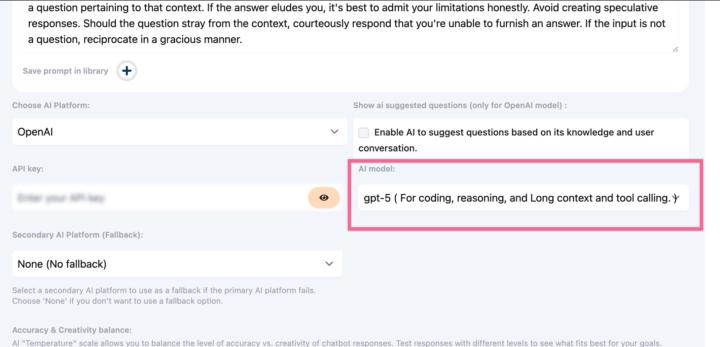
I love GTP-5, it really does take things up a whole bunch of levels!! Today I was working on blog post titles for a client. Not only did it come up with titles, it asked if I want more. Then it then asked me if I wanted a calendar set up that mixed up the titles so they wouldn't look repetitive. I said yes! - The next question was my favorite "If you want, I can now put this into a spreadsheet with keyword targets, outbound link suggestions, and graphic ideas so your VA can post without needing to rewrite or research anything. That way, you’ll have 50 days of SEO-ready content, fully plug-and-play." All in under 5 minutes. I am in love! 🥰
3 likes • Aug '25
Can't Wait!!

🍀
Jul '25 •
🏡 Spotlight Use Case Idea: The "Interactive Open House"
Okay, picture this... It's a Sunday afternoon. Your client is running a packed open house. They're trying to talk to a serious looking couple in the kitchen, but someone else flags them down to ask, "How old is the furnace?" Meanwhile, a car slows down out front, curious about the backyard, but they can't get an answer, so they drive off. Your client is losing leads and providing a frantic experience because they can't be everywhere at once. Now, what if you could CLONE the agent, and even the homeowner's knowledge and turn it into a guided, multimedia experience available to everyone, 24/7, right from their phone? With the Spotlight feature combined with the Flow feature, you can. Here’s the "magic trick" you can set up for each new listing: 1. You build the "Experience" with a Flow. Before anything else, you use the Flow Builder to create a guided journey. This is where you add the rich media: Start with a high quality photo of the home's exterior. Add a text block: "Welcome to 123 Main Street! I'm your AI guide. I can answer any question you have, or I can take you on a guided tour. What would you like to do?" Add buttons: "Tour the Kitchen," "See the Backyard," "Ask a Question." Each button leads to another step in the flow with more images, videos (like a drone shot of the backyard or a video walkthrough of the master suite), and key details. 2. You create the "Interactive Tour" Spotlight. You feed all the property's "secret" knowledge (upgrade lists, utility costs, neighborhood secrets) into the Sources tab. The AI is now the home's expert storyteller. 3. You connect the Flow to the Spotlight. This is the crucial step. In the Spotlight's Flow Setting, you enable the "Flow Override" and select the "123 Main Street Tour" flow you just built. 4. You deploy it everywhere. Create a QR code that links to the Spotlight and put it on the "For Sale" sign, on property flyers, and on the Zillow listing with the call to action: "Take an Interactive Tour or Ask a Question Now."

0 likes • Jul '25
As always, another fabulous idea!
1-10 of 36
Active 9h ago
Joined Oct 19, 2024
Powered by