Activity
Mon
Wed
Fri
Sun
Nov
Dec
Jan
Feb
Mar
Apr
May
Jun
Jul
Aug
Sep
What is this?
Less
More
Owned by Bucky
Cinematic content creation tips and discussions to elevate your storytelling & design skills.
13 contributions to Cinematic Content Creation
Aug 17 •
⬇️ Download: COLOUR Information PDF
Some information I follow and compiled over the years from what I've learnt. Let me know if you'd like more posts like this.
0 likes • Aug 18
@Kayla C Im glad! 🫡
Aug 6 •
Instead of upscaling with A.I
I tried to repaint the subjects, then add my own version of their faces. It didn’t turn out exactly the same but it ended up coming out better than expected. I’ve been turned off by certain upscales with a.i recently, sometimes they just create a whole new version instead of tweaking the quality. It can be good for some but just for my style, It didn’t work for me. 💬Anyone else having trouble with A.I recently?
2
0

Aug 5 •
Taking this Seriously 🫡
🫠 I owe everyone here and every one that comes from my instagram an apology for inactivity. Life gets in the way, but no excuses I'm going to be posting daily here to help and build others, lets start again. 👀 These are my recent creations. 💬 Ask questions, critique, input, feedback, comment.
3
0


Apr 15 •
SAVE MANDATORY IMAGES OF VERY LOW QUALITY
Hello everyone! I wanted to share a technique I used on a project where the material was very poor quality but still required and couldn't be modified. However, when it came to cropping it, it was almost impossible to know where to cut because it was pixel upon pixel. However, it was resolved precisely. First of all, I want to clarify one point. In these cases, the AI reinterprets, making it impossible to maintain fidelity to something that isn't clearly visible. However, it gave me the key to reaching an agreement with the client. It's simple, but I'll share it with you. Take the image, run it through Topaz Giga at 2x magnification, and you'll see that it regenerates the image, never exactly in the details, but in the shape, which allows you to crop it. By creating a layer with Topaz at 2x, you can save the selection and apply the mask to the original image. You'll notice that the shape matches, and then you'll need to sharpen it and, above all, reduce noise. This way, the image is enhanced, giving a polished and detailed finish. I hope this is helpful!
0 likes • May 19
I’ve seen a lot of content showing really nice upscale enhance tools that have been great, so this is nice to know 🫡 I’ve been using Gemini Pro with a specific prompt I found on X, it works okay obviously it’s not UHD because Gemini doesn’t make it that size but it’s good for small detail fixes 🙏🏾 also sorry for the delay just been busy moving out and stuff 🫡
Apr 6 •
Visual References Folder:
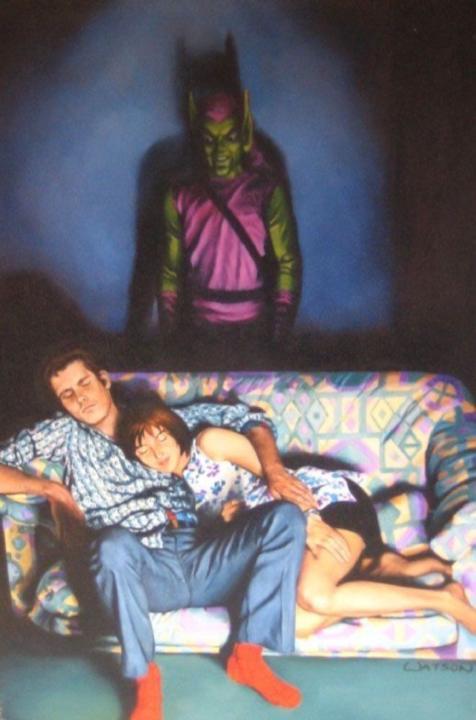
Came across these on Pinterest cos they have cool algorithm, I like how they play with shadows and both tell a different story. Goblin one is friggen funny, and the other is really powerful. Post some random art, photo, video, etc you like, I and probably everyone else are intrigued by other peoples interests. 🙏🏾
2
0
1-10 of 13
@bucky-logo-4235
Cinematic graphic designer. I make things look expensive without needing a big budget. Posters, edits, visual anything to not make your feed look mid.
Active 41d ago
Joined Oct 24, 2024
Sydney