Activity
Mon
Wed
Fri
Sun
Aug
Sep
Oct
Nov
Dec
Jan
Feb
Mar
Apr
May
Jun
What is this?
Less
More
Memberships
E-Ink Tablet Users
1k members • Free
3 contributions to E-Ink Tablet Users

Feb 23 •
🚀 CalSync v1.0.27 is Live
We’ve officially released Version 1.0.27 — and this one brings meaningful refinements to planner rendering, week logic, and overall stability. This update continues polishing the experience so your reMarkable planner feels smooth, predictable, and clean across every layout on your tablet. ✨ What’s New • Improved week numbering logic for both Sunday and Monday week starts • Corrected year overview week alignment (no more mismatched week labels) • Grayed out out-of-range weeks for better visual clarity in year view • Strengthened internal linking between year → month → week → day views • Improved stacked planner layout rendering • Enhanced event card border styling and visual structure • Better recurring event indicators • Improved text wrapping for long event titles • Continued fixes for ghosted all-day events • Theme stability improvements (grayscale + color modes) • General performance optimizations This release is all about consistency and polish — especially around week logic and planner navigation. If you’re running CalSync, update now and let us know what you notice 👇 Your feedback continues to shape this app. — Jason Download: MacOs https://www.einkpads.io/api/calsync/darwin/releases/latest Windows https://www.einkpads.io/api/calsync/win32/releases/latest

0 likes • Feb 23
Hello Jason I am quite happy that we can now get all of our information on the remarkable pad but I was wondering if there is a way to have only a 12 hour span on time so that the writing is not so small. If there was a way to change time slots to only show maybe 12 hours during a day that would all for bigger text in each field.
Jan 26 •
🚀 New Update Released - version 1.0.22
☑️ Better wireless support. ☑️ Improved reliability when pushing planners to your device ☑️ Safer device connection handling to prevent sync conflicts ☑️ Better protection of handwriting/content files during updates ☑️ More stable carousel uploads ☑️ General bug fixes and stability improvements Download: MacOs: https://www.einkpads.io/api/calsync/darwin/releases/latest Windows: https://www.einkpads.io/api/calsync/win32/releases/latest
0 likes • Jan 26
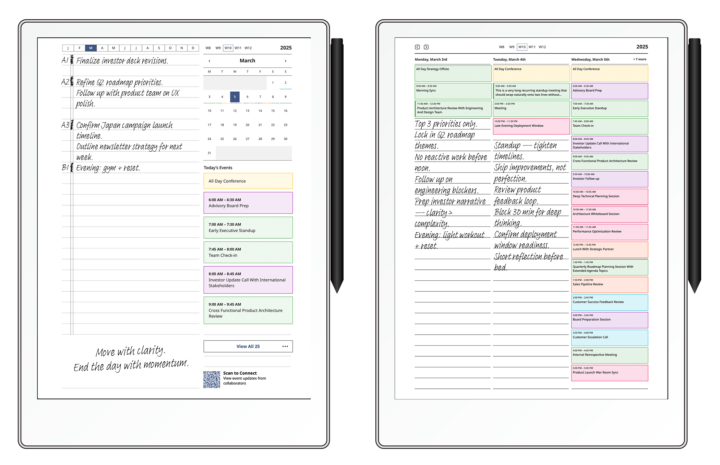
Hello Jason Here are two screen shots of my calendar and my remarkable and I would like to know if there is a way for them both to be the same. Thanks
Jan 4 •
Missing Information
I have created a planner and set up with my calendar but after I generate it and push to device not all information is displayed in the time slots. Only two lines appear. Is there a way to show more information.
0 likes • Jan 7
I am putting events in my apple calendar and then sync through the Eink app to the remarkable but only one line will transfer and you can't read any of the other information that was put down for that hour time slot.
0 likes • Jan 19
I had to reformat my hard drive and forgot to deactivate my software and now it won't let me activate it again. I can not get anybody from support to e-mail me back and let me know how to fix this. Can anybody tell me how to get in touch with the EP software group support. I have e-mailed them twice and no response.
1-3 of 3

Active 3h ago
Joined Jan 4, 2026
Powered by