Activity
Mon
Wed
Fri
Sun
Aug
Sep
Oct
Nov
Dec
Jan
Feb
Mar
Apr
May
Jun
What is this?
Less
More
Owned by Angela
This is a community for Xennial men and women ready to glow, grow, reset, and build confidence, purpose, and legacy in their next chapter.
Memberships
MULTIPLY your coaching
1k members • Free
Panda for Skool: The CRM +
414 members • Free
AA: AI Anonymous
61 members • Free
Deal Hub
342 members • Free
Reframe & Rise Women
165 members • Free
🎙️Skool Summit Stage🎙️
277 members • Free
BrandU
2.1k members • Free
TS
The SLD TRIBE
5.6k members • Free
Just Create It With AI
475 members • Free
5 contributions to Tech-Lite Business Builders

🔥
3d •
TRy this Wish List Prompt
Create a premium Pinterest-style "My Wish List" collage. Design a beautiful vertical 9:16 collage using realistic, high-quality photography with warm natural lighting, soft film grain, neutral earthy tones, and an elegant Pinterest aesthetic. The collage should contain 12 to 20 different images arranged naturally like a mood board with overlapping photos, torn paper edges, Polaroids, magazine cutouts, and subtle shadows. At the top, add elegant white handwritten lettering that says: MY WISH LIST Include images that represent these dreams and goals: - [Dream home] - [Dream car] - [Holiday destination] - [Financial goal] - [Health goal] - [Fitness goal] - [Family dream] - [Relationship goal] - [Business goal] - [Creative hobby] - [New skill to learn] - [Dream purchase] - [Pet] - [Volunteer or charity goal] - [Favourite lifestyle] - [Anything else I want in my future] The collage should feel: - Inspiring - Hopeful - Peaceful - Modern - Luxurious without being flashy - Realistic and achievable - Like pages from a premium lifestyle magazine Avoid cartoon illustrations, icons, clip art, AI-looking graphics, or excessive text. Leave a little breathing room between images so each dream stands out.
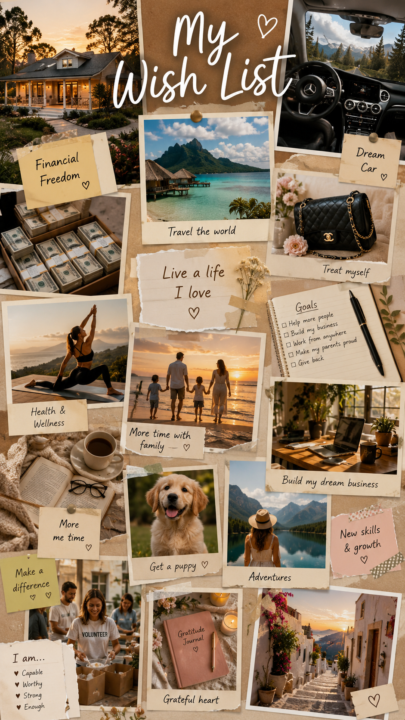

🔥
4 likes • 3d
My Wish List
🔥
Apr 28 •
answer this question
Answer this question in the comments: "𝗜𝗻𝘀𝗶𝗱𝗲 𝘁𝗵𝗶𝘀 community, 𝘄𝗲 𝗮𝗿𝗲 𝘁𝗵𝗲 𝗺𝗲𝗺𝗯𝗲𝗿𝘀 𝘄𝗵𝗼 ___."
🔥
3 likes • Apr 28
Thrive
🔥
Apr 16 •
I need your help....
Help me to help you. Please everyone comment below what they are promoting at the moment. I am planning something awesome that will hlep you make more sales but I need to know what you are selling so I can customise it as much as possible for you . @Ted Mauro @Suzie Kemper @Teri Francois @Michelle Pieterse @Brenda Montgomery
🔥
1 like • Apr 23
starting a skool community for xennials
🔥
1 like • Apr 23
@Jenelle Livet It's Gen X and early Millennials (The Best of Both Worlds)
🔥
Jan 18 •
Tech Lite Business Builders Communities
Here is a list of members skool communities. Lets support each other @Ted Mauro Cash Flow Association https://www.skool.com/cashflowassociation/about?ref=29e6268e50694c05b3211ea049d2e24b @Tamsin Boshoff The Overflow Circle & Co. https://www.skool.com/the-overflow-circle-7972/about?ref=29e6268e50694c05b3211ea049d2e24b @Lisa Tucker Fierce and Fit-ish https://www.skool.com/fierce-fit-ish-club/about @Maria D Itara-Sommerlad Rise and Thrive https://www.skool.com/rise-and-thrive-with-success-8099/about @Danele Louw Community Digital Wealth Builders https://www.skool.com/digital-wealth-builders-6611/about @Chris Fletcher Network Builders https://www.skool.com/grow-together-3449/about @Kamala Maharjan Digital Accelerator Community https://www.skool.com/digital-accelerator-community-7790/about @Brenda Tillmann Community The Rebuild Community https://www.skool.com/the-rebuild-community-8508/about @Susan Ritchie 50+ TikTok Growth Mastery https://www.skool.com/tiktok-growth-mastery50/about?ref=29e6268e50694c05b3211ea049d2e24b @Jessica Franses Vitruvian Art Collectors Club
🔥
2 likes • Apr 23
Southern Soul Xennial💥Society skool.com/southern-soul-xennialsociety-3115 This is a community for anyone born between 1965–1983 who are ready to elevate, evolve, and embrace their next chapter with confidence and purpose.
🔥
Apr 22 •
Big Update: Creating Images with AI Just Got WAY Easier
OpenAI has upgraded the image tool inside ChatGPT… and this one is actually useful for everyday people, not just tech experts. Try the prompts in the first comment Here’s what that means for you 👇 1. Text finally looks normalIf you’ve ever tried AI images before, the words looked messy or wrong now? You can create things like posts, quotes, and thumbnails with clear text. 2. Better quality imagesImages are sharper and fit properly for places like TikTok, Instagram, or websites. 3. More realisticFaces, lighting, and details look much more natural. Less of that “fake AI look.” 4. It follows your instructions better. You can ask for specific things and it actually listens. Example: “Create a post with a heading, image, and button” → it understands that now. 5. You can keep the same person in images. This is huge. You can create the same character again and again. Perfect if you want a “brand person” or faceless content. 6. You can edit images easilyYou can now: - Fix parts of an image - Extend it - Change sections without starting over Why this matters (in simple terms) You don’t need design skills anymore. You can now create: - Social media posts - Ads - Quotes - Simple brand images All inside ChatGPT. What I want you to take from this This isn’t about being “techy.” It’s about making content faster and easier…even if you’re starting from zero. And this is exactly the kind of thing I teach inside this community. https://openai.com/index/introducing-chatgpt-images-2-0/
🔥
1 like • Apr 23
@Jenelle Livet Awesoms
1-5 of 5

🔥
@angela-mitchell-3971
Independent beauty consultant and a licensed insurance agent, and an entrepreneur passionate about empowering others through beauty and wellness.
Active 4h ago
Joined Apr 23, 2026
Tallahassee, FL